Have a feature request or suggestion? Post your idea here!

Post

3 Follower Folgen
0
Avatar

New Firmware 1.83 won't load in NXS2 devices

hi, can someone please help. I have downloaded the latest 1.83 firmware and added to two different FAT32 formatted USB drives (both empty aside from the update file) but none of my CDJ's start to upload the new firmware. 

I've used the same USB drives for multiple FW changes in the past and I've not changed anything since in their formatting so i'm lost as to what can be happening.

any ideas welcome

BR
Paul

PaulM72

Post ist für Kommentare geschlossen.

8 Kommentare

0
Avatar

Just taken this from disk utility if it helps;


Volume name : 2GB FLASH
Volume type : Unknown
BSD device node : disk1s1
Mount point : /Volumes/2GB FLASH
File system : MS-DOS (FAT32)
Connection : USB
Device tree path : IODeviceTree:/PCI0@0/EHC1@1D,7
Writable : Yes
Is case-sensitive : No
File system UUID : 8BACEEC0-C1CF-3EC2-BDC0-C85CD53C56F7
Volume capacity : 2,102,378,496
Available space (Purgeable + Free) : 1,943,328,325
Purgeable space : 906,821
Free space : 1,942,421,504
Used space : 159,956,992
Owners enabled : No
Is encrypted : No
System Integrity Protection supported : No
Can be verified : Yes
Can be repaired : Yes
Bootable : No
Journaled : No
Disk number : 1
Partition number : 1
Media name :
Media type : Generic
Ejectable : Yes
Solid state : No
Parent disks : disk1

PaulM72 0 Stimmen
Aktionen für Kommentare Permalink
0
Avatar

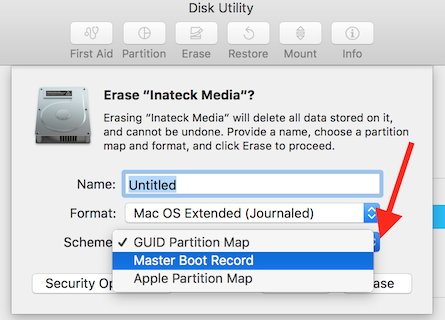
Are you formatting your USB as Master Boot Record in the OSX disk utility?

lostnthesound 0 Stimmen
Aktionen für Kommentare Permalink
0
Avatar

Ah, nice catch. 👍🏻 To the OP: you need to format the drive as Master Boot Record so that the CDJ can boot the drive and load the file contained on the drive.

lostnthesound 0 Stimmen
Aktionen für Kommentare Permalink
0
Avatar

Thanks for the responses guys, so I think you are saying that the USB needs reformatting (enable master boot record) - is this done via the disk utility menu?

Thanks again

PaulM72 0 Stimmen
Aktionen für Kommentare Permalink
0
Avatar

Yes, it’s all done in disk utility—I don’t have my Mac in front of me but I believe that after you select FAT, there’s a drop down box directly below where you can select Master Boot Record. Once it’s formatted, drop the update file into the drive and then you’ll be good to go.

lostnthesound 0 Stimmen
Aktionen für Kommentare Permalink
0
Avatar

Guys, 


Please can someone walk me through this as I can't seem to find anywhere where you can edit the master boot record via disk utility, I've tried erase the USB drive and reading the fw file but it still doesn't work?

Thanks in advance


PaulM72 0 Stimmen
Aktionen für Kommentare Permalink