Have a feature request or suggestion? Post your idea here!

Post

4 Follower Folgen
0
Avatar

Ripping vinyl through DJM 250 MK2 into audacity.

Hi.
Any one know how to rip vinyl throuh the DJM 250 MK2 into audacity?
As the mixer has an internal sound card, it should be easy right?

Thanks in advance.

Oliver Alder

Post ist für Kommentare geschlossen.

13 Kommentare

0
Avatar

Hi, here you go, hope this helps:

1. Plug the mixer into your computer via the USB cable

2. Start up Audacity (important to do this only after plugging in the USB). 

3. At the top of the screen ,in the toolbar, you should see an icon of a microphone, with a dropdown next to it. Switch this to djm250 or whatever looks like the DJM device. 

4. Next to that dropdown there should be another dropdown specifying number of tracks simultaneously recorded... you are either going to want to set that to the full number (6) because the master out goes through channels 5-6, and then delete the excess channels afterwards. Or , if you run the djm250mk2 utility app, you can switch the routing for channel 1 of the mixer from "control vinyl" to "post fader" and just record 2 channels worth.

5. Press the red "record" button

6. Play the record,

7. Press the dark yellow "stop" button

8.. Press the green "playback" button, listen to the recorded track. 

9. Close audacity without saving the soundfile, disregarding steps 1-8 because the phono preamps on this mixer are USELESS for anything other than control vinyl and sound BEYOND TERRIBLE, with worse frequency response than you'd hear in your average 128kbp mp3 (no reallly, I've A/B'd it and the mp3s sound better)

10. Go spend another $60-200 to buy a decent phono->usb preamp, (I'd recommend the NAD PP4), rip vinyl through that instead following similar steps. 
 

Pete Cassin 0 Stimmen
Aktionen für Kommentare Permalink
0
Avatar

Thanks for the reply .
I didn't think the sound quality would be bad. Oh well. How do you rate the quality when recording straight into rekordbox?

I have an Alesis io2 as well, I'll go back to ripping through that then.

Cheers.

Oliver Alder 0 Stimmen
Aktionen für Kommentare Permalink
0
Avatar

I don't think recording into rekordbox changes anything, also the soundcard in the mixer is OK.  It's just the phono preamps in the mixer, so even if you plug in an external soundcard to the output of the mixer to record, it will still sound terrible when recorded.  I'm not sure if this problem is affecting all DJM250's or only some, best bet would be to try to get your hands on a cheap phono preamp and compare the quality when going direct into the mixer versus through that external phono preamp into the line channel.  

Pete Cassin 0 Stimmen
Aktionen für Kommentare Permalink
0
Avatar

Ok. Thanks for the advice.

I've been playing around recording straight into Rekordbox. The quality is good enough for my needs and it records in WAV format.

My only problem now is editing the useless bit from the beginning of the record. I'm using an Audio Technica  AT-95E to rip, so finding the start of the song is problematic. Now when I bring the file recorded from Rekordbox to Audacity or Ableton, I'd have to save it as a different file, rendering the original useless!

I might look into the Behringer UFO202 U-phono USB Audio Interface and rip everything with that.


Oliver Alder 0 Stimmen
Aktionen für Kommentare Permalink
0
Avatar

IF you don't mind the quality of teh mixer, you can follow my steps as listed above to record direct in audacity. It should sound as good as it does in Rekordbox, which for me is absolutely terrible but YMMV (it sounds like the problem is widespread but I'm still not sure if it affects all DJM250mk2s or just some) 

Pete Cassin 0 Stimmen
Aktionen für Kommentare Permalink
0
Avatar

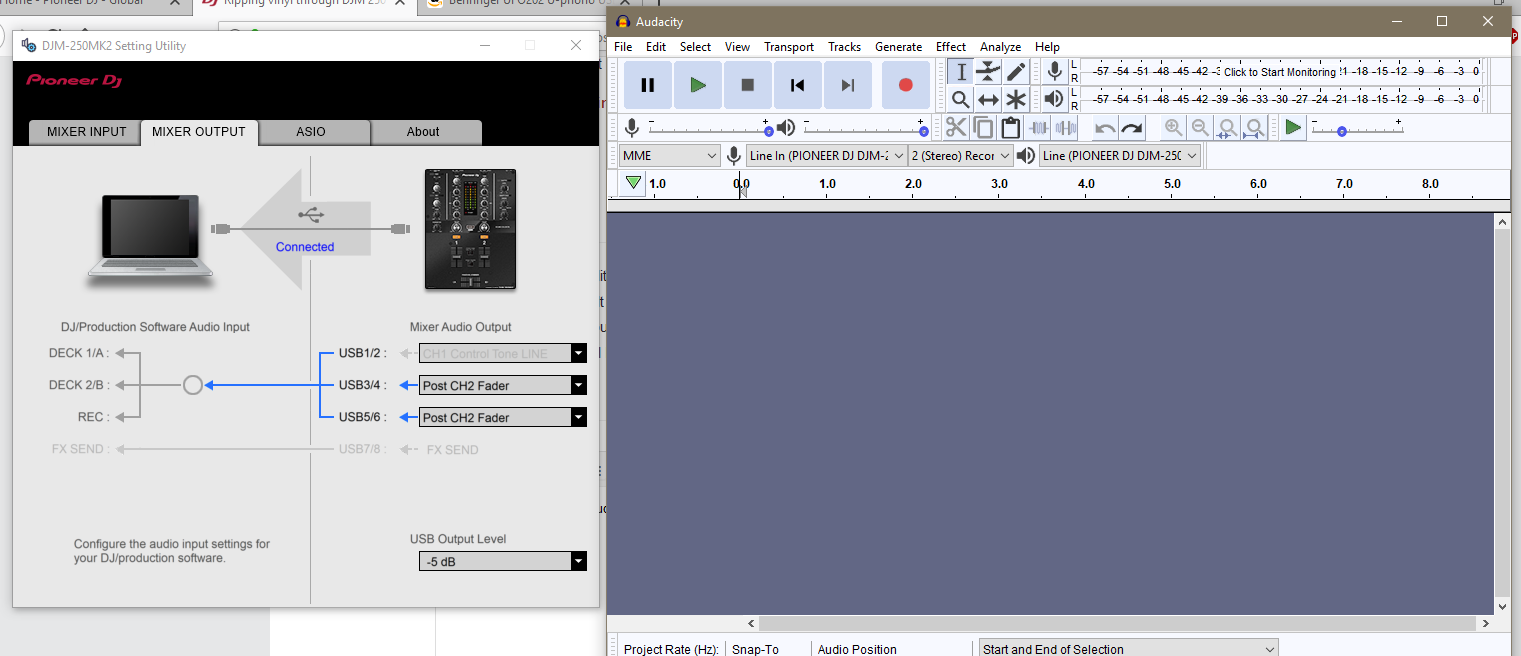
I just tried to record into Audacity with your steps above. I can't get it to work!

This is what I have set it too.

Any help would be much appreciated.


Oliver Alder 0 Stimmen
Aktionen für Kommentare Permalink
0
Avatar

Which channel are you recording the turntable from, left or right?

If you record  from the one plugged in on the right side (Which your mixer output seems to indicate),  click the "2 (Stereo) Record" dropdown and instead select 4 (if that's an option.... or 3/4, haven't seen this exact view since I use a mac / diff audacity version),  then try pressing record, it should work. It will give you 2 extra (empty) channels but you can just delete those by clicking the "x" button on the top left of each one.  


Pete Cassin 0 Stimmen
Aktionen für Kommentare Permalink
0
Avatar

Yes. The right channel.

It seems I only have the option for 1 (mono) record or 2 (stereo) record.

I'm about to throw it out the window!

Oliver Alder 0 Stimmen
Aktionen für Kommentare Permalink
0
Avatar

hmm, that's tricky. I'm using a mac so it's a totally different view for me. Are there any other options other than "Line in (PIONEER DJM-)"  in the dropdown next to the microphone?  

Pete Cassin 0 Stimmen
Aktionen für Kommentare Permalink
0
Avatar

There are a few. I've turned it off now though. I tried pretty much every combination.
I've just ordered the Behringer UFO202. It's fairly cheap but has good reviews. I'll see how it goes with that.

Thanks for the help.

Oliver Alder 0 Stimmen
Aktionen für Kommentare Permalink
0
Avatar

one last thing you can try is, in the input/ouput screen in the utility software, temporarily switch the greyd out channel from "line in" to "post ch1 fader"  That should route the audio in audacity to channels 1/2 in the simplest way possible (assuming you're recording through the left turntable), though you'd have to pick the right device. 


Pete Cassin 0 Stimmen
Aktionen für Kommentare Permalink
0
Avatar

Hi Pete

The phono pre-amps on my DJM 250 MK2 sound terrible also - do you know if the DJM 450 has the same problem / pre-amps?

Many thanks

Ben Walker 0 Stimmen
Aktionen für Kommentare Permalink
0
Avatar

Also in the market for a new mixer that I can use for both vinyl and digital/DVS, how are the preamps on the DJM 450? Compared to the Kontrol Z2?

Errortrax 0 Stimmen
Aktionen für Kommentare Permalink