
What did you record it in for a program? If rekordbox, here you go....https://www.youtube.com/watch?v=7o6ro9cXqbw
Aktionen für Kommentare

After recording a 30 minute mix, the sound was absolutely fine. The problem I have is when I renamed the file, I lost the recording and the information is missing with it. Is there anything I can do to get the file back?
Thanks.
Post ist für Kommentare geschlossen.
What did you record it in for a program? If rekordbox, here you go....https://www.youtube.com/watch?v=7o6ro9cXqbw
I used the DJM-REC app on my phone. It’s worked before but this time it corrupted the file or something.

@Ryan > Sorry, you'll need to provide a bit more information here as it's quite vague as to what you did and in what order...
So far we understand you recorded the mix on the DJM-REC app, but then what? Where did you rename it? Where did it go missing from?
I renamed it within the app. The name I was trying to create was 'Geddun // Minimal Mix 002'. I tried to use 2 backslashes and I went to my recordings page and it only had the 1 backslash. So then I tried to rename it again and it did the same thing only this time the recording came up blank and the artwork is a black box too instead of the automatic 'REC' artwork that is applied first.
Will I lose all of my recordings if I delete the app then re-download it? I don't know if its an option to try but I don't know what else to do.
First and foremost, slashes (back or forward) are typically not supported within filenames as those are reserved for the system to identify folder-level structures, so it's possible that your character choice was the cause of the issue. The file may still be there, although I'm not sure if you've tried connecting it to iTunes to find the file yet.
I'll pass along the comment to our app team that they should reject those characters to avoid this issue in future.
Do the files go to iTunes? I only thought there were 3 upload options.. Dropbox, Soundcloud & Mixcloud.
How do I connect my recordings to iTunes?
If you connect your phone to the computer and open iTunes, it should appear under the files stored within the application.
My iTunes is only showing music (Mac)
@Ryan > The issue with the filenaming is actually covered in one of our FAQs (section 7, FAQ #3), but our team is working to improve the warnings within the app.
As for the file, open iTunes, click the phone icon at the top, then from the left menu in the phone view, click File Sharing. Select the DJM-REC app and you'll see your recordings on the right.
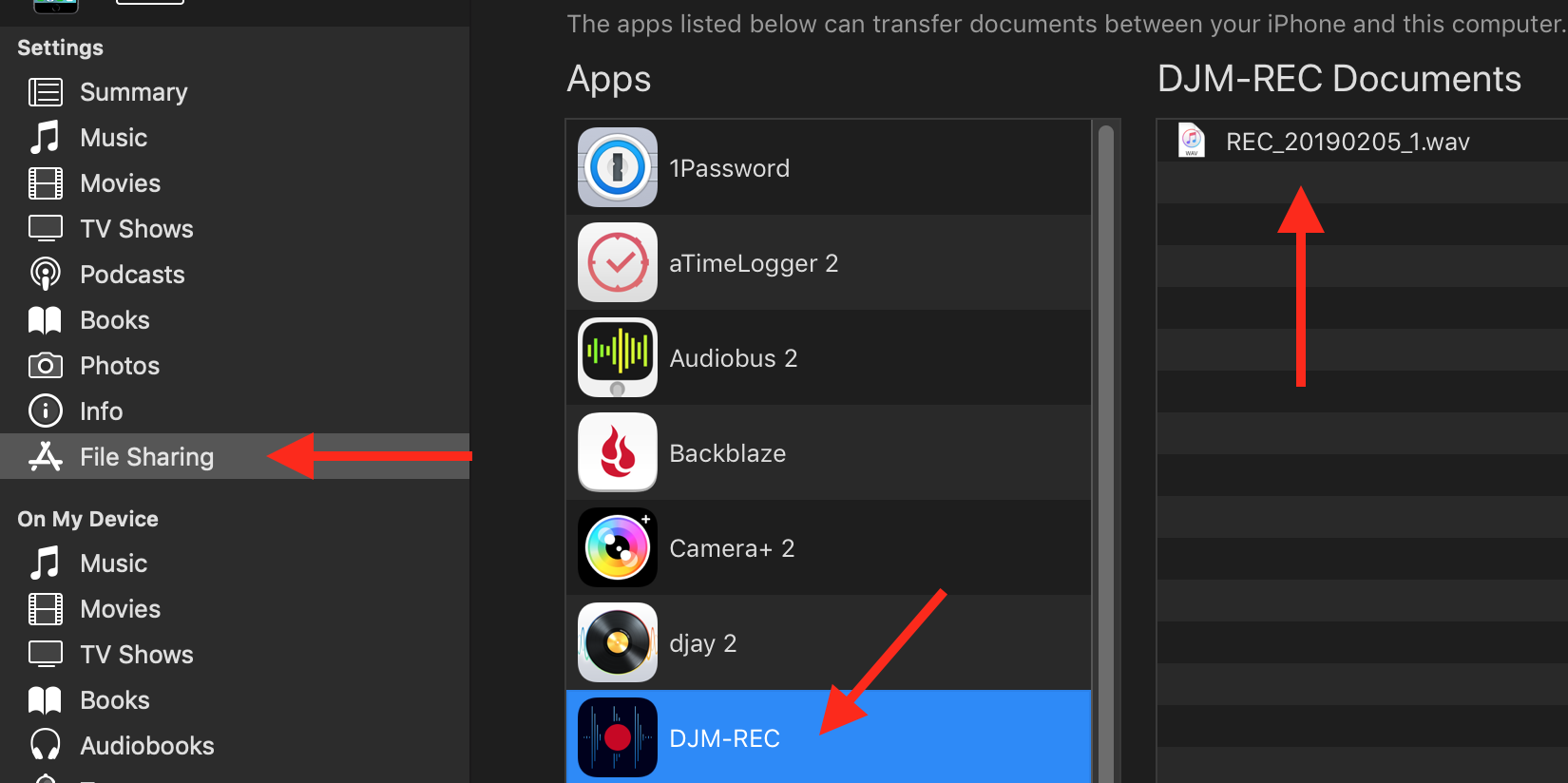
From there you can import the file(s) directly to your computer.
@Ryan > Just for clarification, you said:
"The name I was trying to create was 'Geddun // Minimal Mix 002'. I tried to use 2 backslashes and I went to my recordings page and it only had the 1 backslash."
The slashes you indicate in the filename are forward-slash: //
Was it a forward slash / you attempted to use in the filename or a backslash? \

