Have a feature request or suggestion? Post your idea here!

Post

2 Follower Folgen
0
Avatar

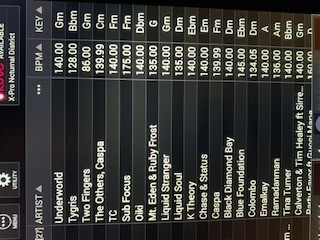
CDJ-Tour1 Not displaying alphanumeric keys, only classic displayed 2020

Hi

I posted this bug / problem / issue back in Feb 2019 when Pioneer introduced Alphanumeric Keys support for the CDJs / DJMs.

https://forums.pioneerdj.com/hc/en-us/community/posts/360041563991-CDJ-Tour1-Not-displaying-alphanumeric-keys-only-classic-displayed

I would like to say I feel very disappointed and let down by Pioneer regarding this issue, as it still hasn't been fix, despite Pioneer having released firmware updates for both the CDJ-Tour1 and DJM-Tour1 in Feb 2020 (a whole year on from me reporting the issue). Furthermore, these are Pioneers flagship models and cost in excess of £15,000 retail for the complete 2 deck setup.

I have updated both the CDJs and DJM and the 14" touchscreens still displays the classic keys, although on the CDJs smaller screen it shows the alphanumerical keys.

If you want I am happy to post a video showing the issue if you don't have the time to recreate the issue.

Please sort this bug out as it's been over a year and nothing has been done to address it.

DJKalz

Kal Boparai

Post ist für Kommentare geschlossen.

5 Kommentare

0
Avatar

I agree this is definitely something the TOUR1 should be able to do on the screens.  I'd really like to see this implemented because I'm still using my laptop to load files (via hotkeys) because browsing via classic key is cumbersome.

What I don't understand is where is classic key information being pulled from?  I've scoured the file tags and I have been unable to find anything besides the numerical key.  I was hoping to overwrite the tag location where it was being pulled from.  I really hope you can fix this for a flagship product.

Ncturnal 0 Stimmen
Aktionen für Kommentare Permalink
0
Avatar

I was pretty annoyed with this and was determined to find a workaround, and I have something that will at least make it usable without having to use my laptop.

Download a program called TagScanner (https://www.xdlab.ru/en/).  This is an awesome application for managing tags and filenames.

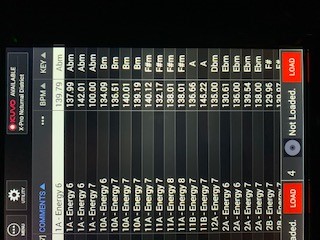
On the TOUR1 browse window there are 3 dots to the right of the column showing artist by default.  The 3 dots will bring up a menu and give you a list of options to select for sorting such as album, artist, bitrate, comments, original artist, etc.  I went Original Artist since I typically blank that one out anyway, and I still wanted to be able to sort by artist.

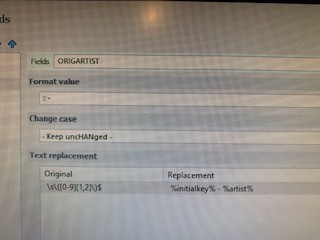
In TagScanner, go to Program Options and Transformations.  Create a new operation with text fields, select ORIGINALARTIST as the field you want to modify, enter the variables to change that field to be the KEY - ARTIST values.

Original:  \s\([0-9]{1,2}\)$
Replacement:  %initialkey% - %artist%

Go back to EDIT in TagScanner, browse to the folder where you want to modify this value on your music files (start with a smaller folder first).  Select all of your files (or the files you want to modify) and go to the GENERATE menu.

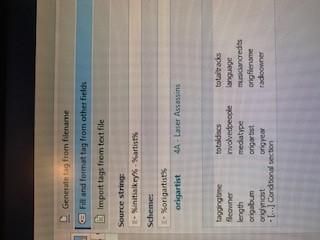
Select Fill and format tag from other fields.
Source string:  %initialkey% - %artist%
Scheme: %origartist%

Select Preview at the bottom right, and if everything looks ok, select Generate.  Using this method, you could replace that field for your entire library in minutes, assuming you have values in the tags for artist and key.

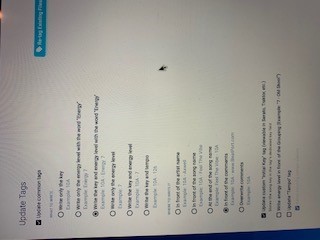
Mixed in Key has multiple options for writing the tag and can put it in front of the artist, song name, or in the comments.  I chose to use the original artist field so I could still sort by song name or artist name, and still have the option to sort by key and still have the artist name.

It's not as nice as native functionality, but at least it's usable.

Ncturnal 0 Stimmen
Aktionen für Kommentare Permalink
0
Avatar

Just to update, Rekordbox 6 does not read the Original Artist tag even though there's still values there in the file.

Ncturnal 0 Stimmen
Aktionen für Kommentare Permalink
1
Avatar

It's all a bit of a sham to be honest. I was also thinking the same thing, the classic keys aren't stored in the mp3 tag so where is the CDJ-tour1 pulling the classic key from?  

Kal Boparai 1 Stimme
Aktionen für Kommentare Permalink
0
Avatar

I have to agree.  I'm pretty disappointed that I can connect my laptop in LinkMode and have the Rekordbox option on the CDJ-2000-NXS2 but that option is not available on the TOUR1 larger screens.  You wouldn't expect it to have less functionality considering the price of those units.  I shouldn't have to craft a workaround that still takes up considerable screen space over just the numeric key column.  Beautiful units, but that part is a pretty big let down.  My work around still has a sorting limitation with it sorting keys by 1, 11, 12, and then 2 - 9.

Ncturnal 0 Stimmen
Aktionen für Kommentare Permalink