Have a feature request or suggestion? Post your idea here!

Post

3 Follower Folgen
0
Avatar

DJM-900 NSX2 No Sound into PC

Ok, I have spent almost 12 hours on this situation for something that should be plug and play.


I have a DJM-900 NSX2 with Three Technics 1200's plugged into it.  I have the most current driver and the most current Firmware.  I am running a Windows 10 pc with a i9900k Intel and 32gb ram.  Everything is up to date.

I Can see the mixer in Windows 10, when i move the dials it correlates with the on screen change.  I have set it up even with a friend that has the exact same setup as mine, his works mine does not.  I have tried Traktor/Serato/Rekordbox.  And even they do not work. I did try the weirdest settings and Get them to work from the pc, into the mixer, and then into the speakers. But no sound is being shown back into the PC.

I currently am having to use an External sound card, (Traktor a8) to get the sound back into the PC From the Mixer.  I even installed an software called "Cool Edit Pro" to see if the PC Was seeing sound at all. It is not, unless I run the Tratkor a8. 

I would like to complain, but what's the point. If any one can help me, for what should be a super simple issue, please let me know, as this "Flag ship" "Industry Standard" model, shouldn't take this long to work inside a pc. My Denon was plug and play at a 1/3 of the cost.

Thanks so much!! Let me know, any screen shots, or model numbers lmk.

BIlly veit

Offizieller Kommentar

Avatar

As I explained to you in the ticket, the Windows audio driver is not capable of handling ASIO audio from the mixer. Please follow the instructions as provided to use Voicemeeter Banana and the virtual audio cable to link the mixer to the OBS software.

Pulse
Aktionen für Kommentare Permalink

Post ist für Kommentare geschlossen.

9 Kommentare

0
Avatar

Cool Edit Pro doesn't support the DJM's ASIO driver.

What, specifically, is it you're trying to do? Keeling in mind that the mixer is an audio first device, meaning mapping the controls to functions within software will also affect any audio passing through that channel on the hardware.

Pulse 0 Stimmen
Aktionen für Kommentare Permalink
0
Avatar

My friend, has his setup with Cool Edit and a DJM750 and it works perfectly for Vinyl, Streaming with obs, or just recording. Also it works great with him using Traktor as well.

AS the OP State, I Want sound into my pc from the mixer. For both playing vinyl and recording any audio from the mixer into the pc.   Or Using Traktor/Rekord box/Serato from pc, to mixer, and from mixer back into pc for recording/streaming/etc. 

I.E. Showing sound from Mixer to PC with vinyl or with a program.

I have read many posts on here, and some people can get it to work no problems, others are returning or selling mixers and going with other brands, as this should not be that hard, ASIO or not. IT is fixable by Pioneer to utilize this equipment with a PC interface. 

You state "meaning mapping the controls to functions within software will also affect any audio passing through that channel on the hardware."  Yet, a mixer is designed to show sound, if it has a USB and two sound cards, why do i need an external sound car to allow my PC To see sound from it? That just makes no since, marketing wise.  Thank you for your reply, Hopefully more ideas will float to the surface.


BIlly veit 0 Stimmen
Aktionen für Kommentare Permalink
0
Avatar

Given that Cool Edit was purchased by Adobe in 2003, I'd recommend you consider upgrading to newer software. Adobe Audition (as Cool Edit became) is one option, but at $20/mo for that, I'd point you to Audacity which is a free alternative.

Unfortunately Audacity doesn't provide ASIO support out of the box either, but you can roll your own version to include it

If you're using software to mix (eg. Traktor or rekordbox), you don't need to map the controls for the mixer and should be using it in external mixer mode. This is because the mixer itself is ... mixing the audio. If you map it so the hardware is controlling the software mixer internally, you're doing double-duty (this is what I meant above by "audio first").

Both of these programs would also allow you to configure the audio to record internally without the need for separate software.

You don't need an external sound card, I never said that.

Pulse 0 Stimmen
Aktionen für Kommentare Permalink
0
Avatar

Ok, I am not sure where were got off on the wrong foot, nor where my words are not coming through. 

 I am am primarily playing vinyl. I plug in the pioneer into my pc, and my pc via windows does not show sound coming from the mixer. Do you understand this?

 "You don't need an external sound card, I never said that."  I never said you did. I said I had to do this to make my PC Show sound from the mixer, if I was playing vinyl only as my PC Will not show any sound into windows from the USB from the DJM to the PC. 

Do you copy, over? 

This still doesn't answer the other questions, Why does all of the above work for people with the exact same spec machines, and mixer, but not mine, is this a bad mixer from the factory? Why doesn't windows show any sound coming in? Nor traktor, nor Rekord box, nor Serato.  Only sound inside the program to the mixer, but not back to the pc. If I play vinyl and DVS on Serato/traktor then the program would have to see sound back from the mixer? Do you copy? 


Thanks again, I can't believe I am the only person that is having this problem. Which further proves my point that this mixer is not working properly out of the box, even though it was Brand new when i opened it. 


BIlly veit 0 Stimmen
Aktionen für Kommentare Permalink
0
Avatar

Try this:

  1. Open the start menu, go to the Pioneer > DJM-### Setting Utility
  2. Click the MIXER OUTPUT tab and change USB7/8 to MIX(REC OUT)
  3. Change the USB Output Level to -10dB
  4. In your recording software, select the DJM-### ASIO as your device and select USB7/8 as your source.
Pulse 0 Stimmen
Aktionen für Kommentare Permalink
0
Avatar

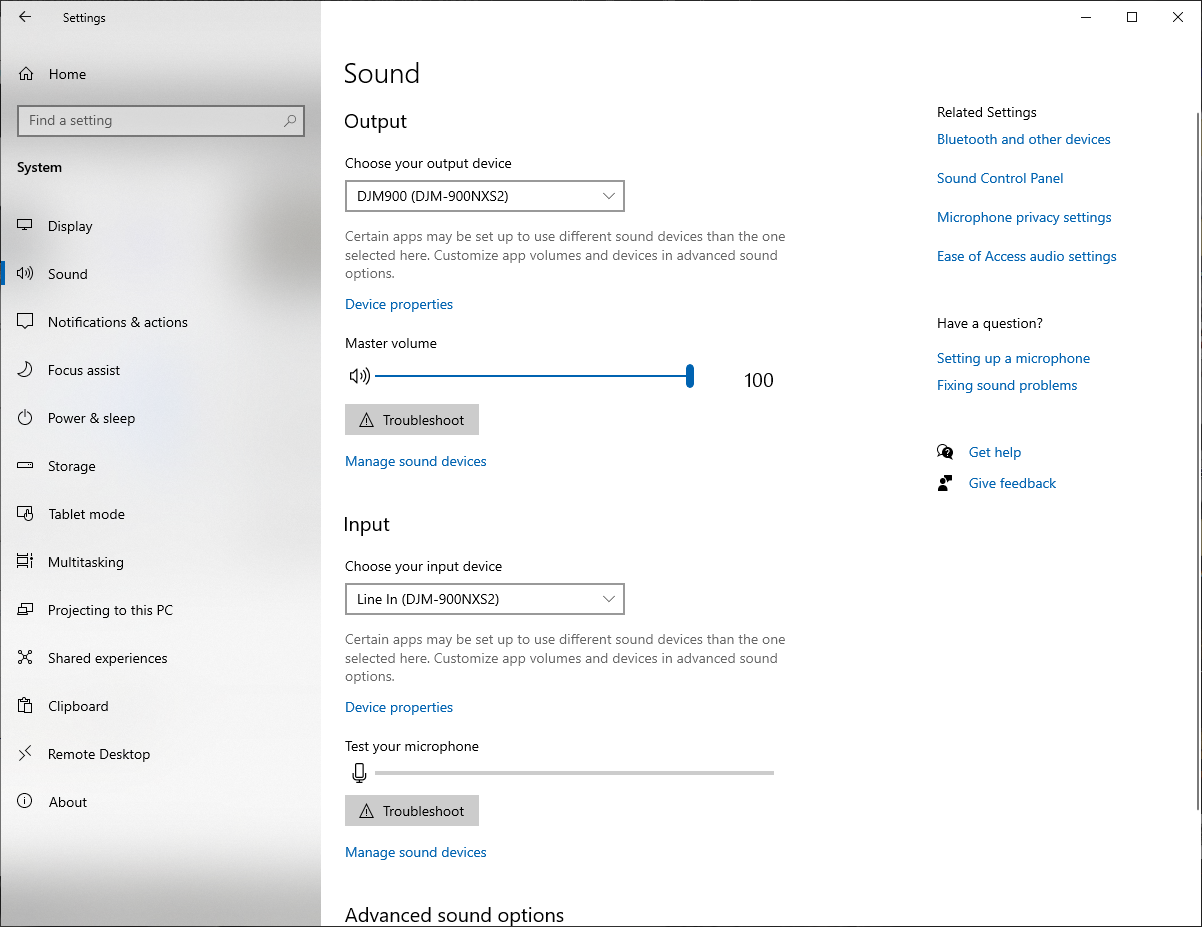
I am trying to upload a picture of Sound "playback" to show you while I play a real record, there is no sound coming through into my pc, from the USB From the 900. It shows all the settings are correct. so I am not sure what else to do 


BIlly veit 0 Stimmen
Aktionen für Kommentare Permalink