
Are you monitoring the booth output? It's possible you have the mic-to-booth disabled in the preferences.
Aktionen für Kommentare

Hello,
I just got a brand new DJM-S9 and fresh out of the box the microphone input isn't working. I have swapped out 2 different XLR with different 1/4" and still nothing. I have ensured that MIC is selected on the back of the mixer. This mic was working today in my Rane 57.
The only way I can get a peep from the MIC is if I turn the mic volume and echo all the way up. Doing this, I can hear a faint echo of what was spoken.
I've scoured the internet for similar issues but have been unsuccessful in finding a solution.
Any input would be great.
-Renzo
Post ist für Kommentare geschlossen.
Are you monitoring the booth output? It's possible you have the mic-to-booth disabled in the preferences.
Hello thank you for your reply, So I found the preferences on the S9 and the mic-to-both is enabled. I turned it off an on to see if it triggers anything to work but still no luck. Again when i turn the echo all the way up, I can hear a faint echo of what was said.
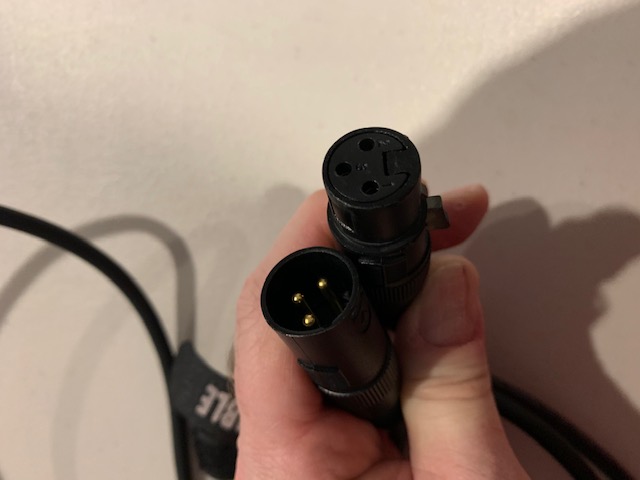
Are you connecting the mic with an XLR cable or a TRS or TS connector? Can you please provide a photo of it? Thanks.
Hello,
I have been trying XLR and TRS. Both have been successful is using the MIC on my Rane 57, just yesterday.
I have also updated the firmware and the software and hardware are still not recognizing the mic.
Below are the pictures of the cables I have been using.
Thank you,
-Trent



I too am having issues. DJM S9 is a month old. New Shure mic fresh out there box, I have to have the mic level turned up all the way to hear anything and the talk over appears to do nothing.
Siavash,
I determined the mixer was bad. I tried everything and it still didn't work. I ended up sending it to Pioneer authorized repair shop in Los Angeles because the shop I purchased it from had never responded to my emails about a return.
I hope you can exchange your mixer.
-Renzo

