
The link you have provided is broken. Could you please send us a working product/manual link?
On behalf of Pioneer DJ,
AtlaBase Ltd
Aktionen für Kommentare

Hey!
I was wondering if you had added this fixture? https://www.gear4music.com/us/en/PA-DJ-and-Lighting/Cosmos-Multi-FX-Stage-Light-Pack-by-Gear4music/26S5
if not can you guys add it?
Info:
Post ist für Kommentare geschlossen.
The link you have provided is broken. Could you please send us a working product/manual link?
On behalf of Pioneer DJ,
AtlaBase Ltd
Hey!
Sorry about that! does this one work for you?
https://www.gear4music.com/PA-DJ-and-Lighting/Cosmos-Multi-FX-Stage-Light-Pack-by-Gear4music/26S5
//Mathias
Your fixture request already exists in the rekordbox fixture library. Please find the latest list of the library fixtures here (under Fixture library lists).
Manufacturer: Gear4Music
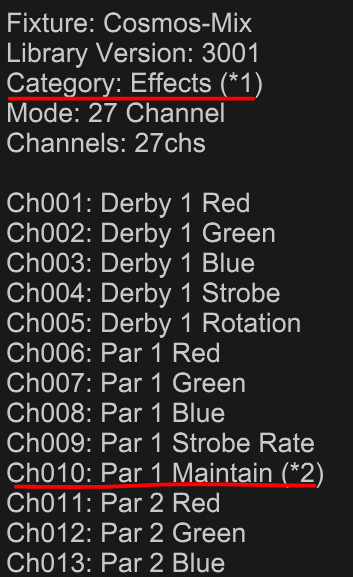
Fixture: Cosmos-Mix
On behalf of Pioneer DJ,
AtlaBase Ltd
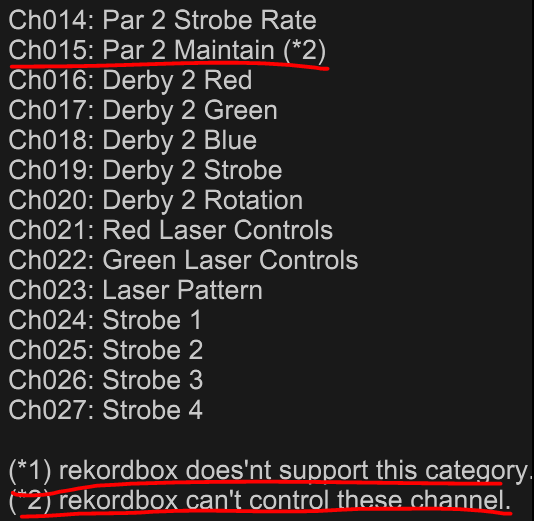
So i have added fixture Cosmos-Mix as you have suggested here and i have chosen the 27th channel setup and confirmed that the lights turn on... the issue is i have to choose an asignment for the lights. either effect. strobe etc.. and when i try to create an own scene i cant get the induvidual lights on this fixture to program... i get 27th different options to edit in the scene editor but if i turn everything red to test and save. nothing happends... i can only get maybe 50% of the pre programed scenes to work aswell.. any tips?

Hello Mathias,
Unfortunately, many of the features of your fixture cannot be controlled by rekordbox lighting. The Effects fixtures are not supported and some of the features like Maintain cannot be controlled.
Thanks,
Pioneer DJ Support

