Have a feature request or suggestion? Post your idea here!

Post

2 Follower Folgen
0
Avatar

XDJ XZ Soundcard Audio

Is there a way to use the XZ soundcard for audio from the Laptop (Finder,Youtube etc) into Channel 3 or 4?
With the XZ connected to the laptop via USB.
 
I have selected XDJ XZ as the soundcard in my Mac sound options but no output on the XZ.
Usually with the DJM900NXS or NX2 mixers the audio comes through on channel 1 .
 
But when the XZ is connected via USB on performance mode with RB the audio from the laptop (Finder,Youtube) comes through on Channel 2.
lediscjockey Beantwortet

Offizieller Kommentar

Avatar

Unfortunately not without additional software to manage that since those applications are not designed to function with audio interfaces featuring more than 2 channels, so they default to 1/2. Sorry!

Pulse
Aktionen für Kommentare Permalink

Post ist für Kommentare geschlossen.

6 Kommentare

0
Avatar

I actually want the laptop audio on channel 3.

What additional software would be required?

My setup would be

Channels 1 & 2 USB Standalone.

XZ connected to the mac via USB.

channel 3 of 4 just for playing something off youtube if needed or last minute requests using finder on the mac. Not RB.

Basically just use Channel 3 or 4 for outputting audio from the laptop.


lediscjockey 0 Stimmen
Aktionen für Kommentare Permalink
0
Avatar

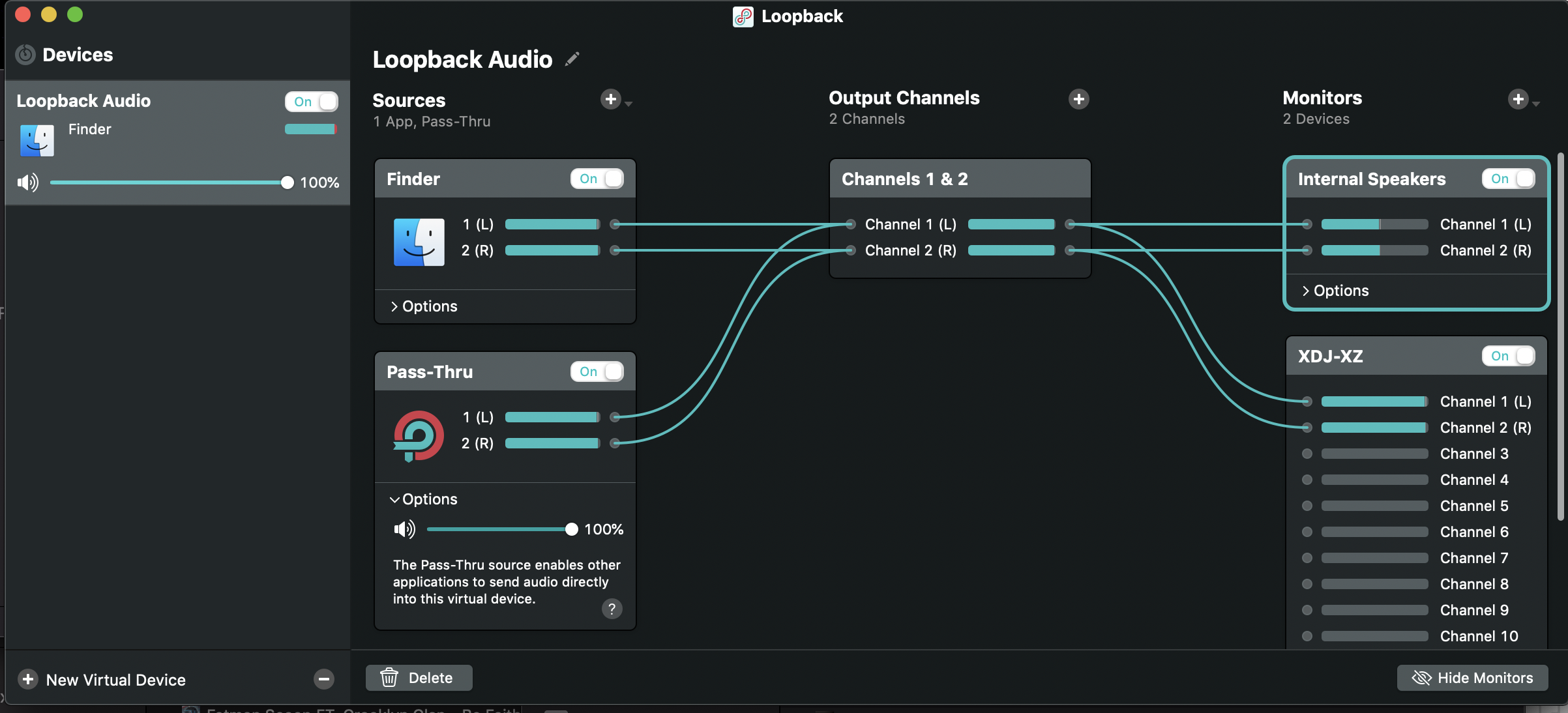
My recommendation would be something like Loopback or SoundSiphon; either one will allow you to direct specific sources (either hardware or software) to any other software or hardware device and on specific outputs.

Pulse 0 Stimmen
Aktionen für Kommentare Permalink
0
Avatar

I already have Loopback 2.I have just tried it with that but have no audio on the XZ. Both Channels 3 & 4 are selected to USB on the XZ.

Mac sound options is Loopback Audio.

The audio levels are coming in Loopback but nothing on the XZ.

I dont think I can attach a screenshot.

lediscjockey 0 Stimmen
Aktionen für Kommentare Permalink
0
Avatar

I think i have figured it out.

I had to route the outputs to channels 5-6 on Loopback to get audio on channel 3 on the XZ.

According to Loopback there are 12 channels for the XZ.

What channels in Loopback correspond to the actual channels on the XZ?

lediscjockey 0 Stimmen
Aktionen für Kommentare Permalink
0
Avatar

That's correct:

1&2 = CH1
3&4 = CH2
5&6 = CH3
7&8 = CH4
9&10 = MASTER
11&12 = FX (not really usable)

Pulse 0 Stimmen
Aktionen für Kommentare Permalink