Have a feature request or suggestion? Post your idea here!

Post

2 Follower Folgen
0
Avatar

DDJ-SX3 microphone

Hey guys,

I accepted that my SX3 will always send microphone input(s) to master out, and that I will never ever be able to do something with it.
But last week my microphone stopped working.

This week I was trying. And look at that. Like a proper sound card, the second microphone input was *only* available on input channels 7 & 8, and not in the monitor out channels 9 & 10.

Somehow the direct routing to the output has been disabled. And I have no idea how.

I want to know how, so I can make sure that microphone input first goes to the OS for processing before making it to the master out (if at all... the SX3 together with a coil/dynamic microphone is perfect for online meetings ;-) ).

To be clear: I've hacked support into linux for the SX3, I've watched countless packets going over USB to make it work.
But I've never ever seen an option to stop microphone input to be directly routed to master out. This is so ****ing awesome. This would take the SX3 to the next level.

If someone just could explain to me how this happened :-(.

I even went as far to not output any audio to master out, but directly through another channel to the PA, so I could have the monitor channel purely for microphone input.
But this...

What did I do to make this work? I am afraid to power off and on my sx3 :-(.


Ard van Breemen

Post ist für Kommentare geschlossen.

4 Kommentare

0
Avatar

Hi Guys,

So I've noticed: it is possible to make microphone port 3 route solely as deck 4 input, *NOT* routing it to main!

This means you can add full effects to microphone input at the expense of about 10 ms delay between input and CPU processed main output.

It took me more than 2 years to discover this, because my cat jumped up on my SX3 and suddenly my microphone was dead.

I have to retest it. Because once it is in this mode, the SX3 will keep that mode until it is power cycled.

It is a combination of serato initilization codes and some key presses. If the deck is not in serato mode, I think it will not work.

The fun thing is: since this actually works now, I can have google meetings with the PA blasting at full, but nobody noticing because I use a dynamic microphone.

This is lovely, finally some really nice audio routing from this superb piece of equipment. Just too bad for those special effects that I don't seem to have any use for ;-).

Anyway, I am going to test this some more in the weekend...


Ard van Breemen 0 Stimmen
Aktionen für Kommentare Permalink
0
Avatar

Hey Ard, sorry this post was missed last year!

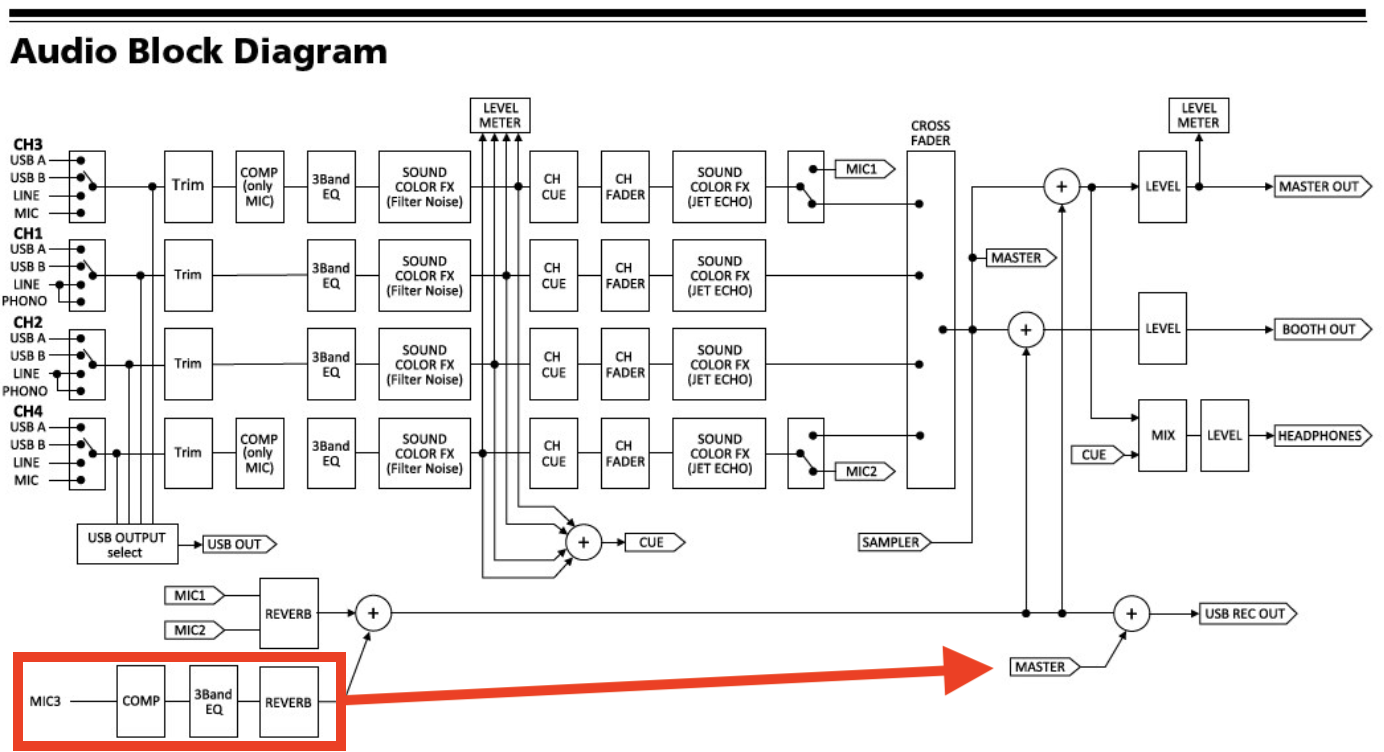
Did you mean Mic1 or Mic2? Because Mic3 goes direct to the master:

Pulse 0 Stimmen
Aktionen für Kommentare Permalink
0
Avatar

Ah, I meant mic 2 in this diagram.

For the last 2 years, mic 2 always went straight to master out.

But I now discovered I can get it to pass trim, 3band eq, sound fx filter and noise, channel fader, and then straight to usb pcm in channel 7 & 8.

It does not pass sound fx jet nor echo, and it is not going to master out analog, nor the headphone analog, nor the usb monitor channel (pcm in channel 9 & 10), nor  PCM in channels 1...6 .

But for that to happen I have to do a special incantation on the SX3. I hope it was described and known somewhere, but the documentation of the SX3 is rather scarce.

Even on the virtual DJ site it is described that this is impossible with the SX3, yet, I have held several meetings in this mode where I use the SX3 as a working DJ controller, but with the microphone in routed to my web browser and the audio out of my web browser to the headset out on the SX3.

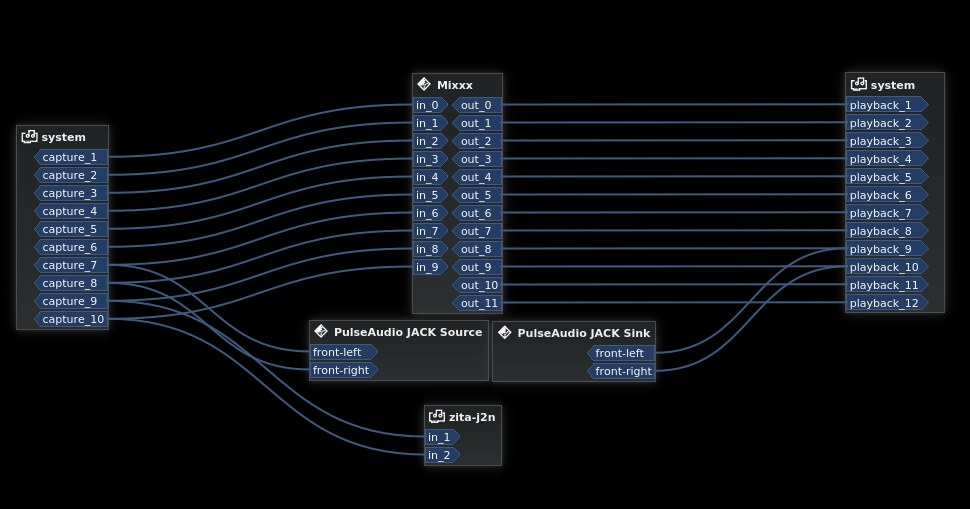
In this picture you can see the SX3 PCM in on the left side (called system), SX3 PCM out on the right (again called system), in the middle the software I use for DJ'ing, beneath that the bridge from realtime audio (jack) to desktop audio (pulse). And beneath that the realtime network audio sink that goes to my PA. Which I could have routed straight from the mixxx software, but draining it from the master out reclocks it since I use my DJ laptop also as a desktop, and google chrome is a good way the remove all cpu time needed for realtime audio.

Anyway, as proof:

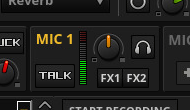
That's the VU meter for PCM in 7 & 8 when I tap the mic. It hasn't done that in over 2 years. As soon as I switched the slide to MIC input, it was always a straight pass through.

I mean: normally you get the LINE-IN's on PCM channels 1...8, but as soon as you slide it to line-in, the PCM channels are dead, and the audio is routed straight through the deck. And if you slide it further to MIC-in, the PCM channels were dead and the audio was still routed to master.

Anyway, the magic incantation is I think:

1) switch the controller to serato mode by either starting serato, or by any other DJ software like MIXXX that sends serato enablement code to the controller

2) press the A button on the SX3 while sliding the input to MIC-in.

I will have to verify this some more. But up until a month ago when my cat jumped on the SX3, I really was thinking about using a seperate audio card for audio out so I could use the master-in to record the microphone. And then the cat happened.

Ard van Breemen 0 Stimmen
Aktionen für Kommentare Permalink
0
Avatar

So I could get it to work again at least once after my proevious post.

But now I am just trying to figure out what the magic incantation is exactly.

Mic2 input is now useless again (i.e. goes straight to main and not to PCM in).

Ard van Breemen 0 Stimmen
Aktionen für Kommentare Permalink