
Hey Zachary,
How did you "move" the library?
Aktionen für Kommentare

Just moved my library from Rekordbox 5 on a Windows machine to Rekordbox 6 on a Mac. Successfully transferred the files and got them matched up with the restored library but all of my beatgrids, cues, album covers and waveforms are missing. I've been scouring the forums for how to fix this and haven't come across anything other than "the next Rekordbox update will fix this", which would have been multiple updates ago.
I used the "import library from version 5" option and then added new analysis data on everything but no luck.
Please help!
Post ist für Kommentare geschlossen.
Hey Zachary,
How did you "move" the library?
I backed up my Rekordbox 5 library, moved my audio files to the new computer, imported the library to Rekordbox 6 on the new computer, and located all the missing files from the new directory. As stated, all of my music, meta data, and tags moved over just fine. But still missing waveforms, album art, beatgrids, and all cues.
In addition, any time I attempt to export to a USB, I get an export error. This is really frustrating, especially after following all of the online guides for migration.

I have a similar problem with 6.5.0 on macOS 11.2.
40 of my 1600 tracks are missing the beatgrid, and I cannot analyze them again, the "analyze status" is stuck at 95%.
The files are not missing, there is no noticeable difference from the other tracks that are fine.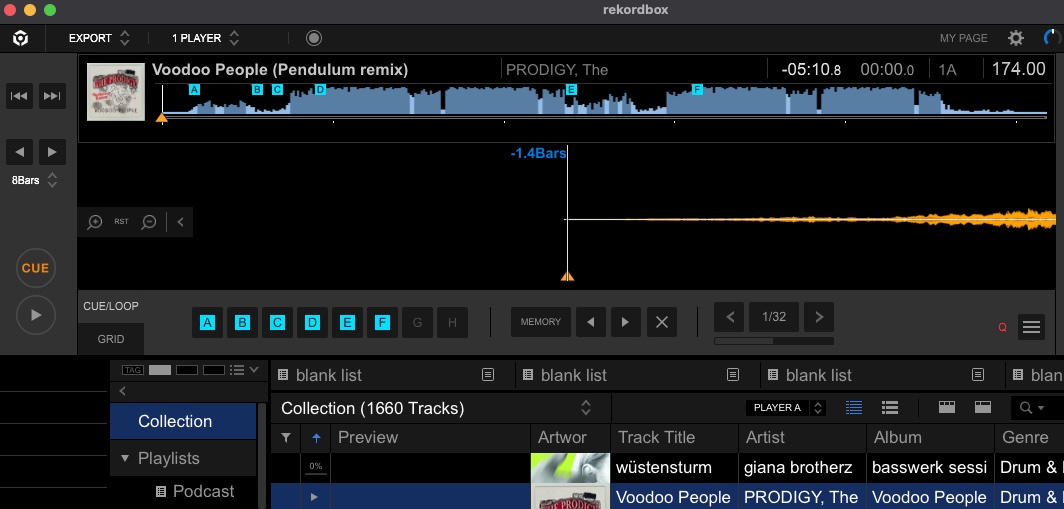
@Zachary > Did you allow rekordbox access to the removable drives / devices in the System Preferences > Security & Privacy > Privacy ?
@Kold > Did you also move the location of any files? To a new computer / user profile? It would be better if you create a new topic so we're not overlapping conversation please.
Hi, yes, removable drives are accessible by Rekordbox. I've now reverted Rekordbox to version 5 on my new machine and I've been able to recover my cues, but not my beatgrids and waveforms. How should I proceed from here?
@Zachary > Did you use the File > Library > Backup Library then Restore Library process? Moving between OS's that should still work to update the file paths and relocate everything, but if you've done a different process it would explain why some things are missing.
Yes, I followed the instructions for migrating to the T. What's next?

Hi, I have a same issue, bought a new Macbook, migrated to RB6.5, able tu relocate all files using auto relocate, added new analysis data, Preview Beatgrid and artwork missing. Is there a solution yet?
@Hoangle512 > It all depends how you migrated. Please start a new topic and provide as much detail as you can as to the process you took then we can troubleshoot. Thanks.
How about this topic? I haven't received a reply in a week. Still no resolution.
@Shoyei > Do you still have access to the old computer?
Yes I do.
@Shoyei > On that computer, create a backup by going to File > Library > Backup Library and save the resulting file. If you choose to backup the music as well you can do that, just remember to transfer the folder located beside the backup zip file.
Once you transfer the files over to your new computer, open rekordbox and go to File > Library > Restore Library, point it to the zip file. If you had also backed-up the music, it will ask you about the restoration of that as well.
As stated previously, that's exactly what I did. And it hasn't worked. Unfortunately, now the master database is on the USB stick, so both computers are now synced to it. I don't have a clean delineation between the old database to the new anymore. I do still have the XML file of the old database though.

