Official comment

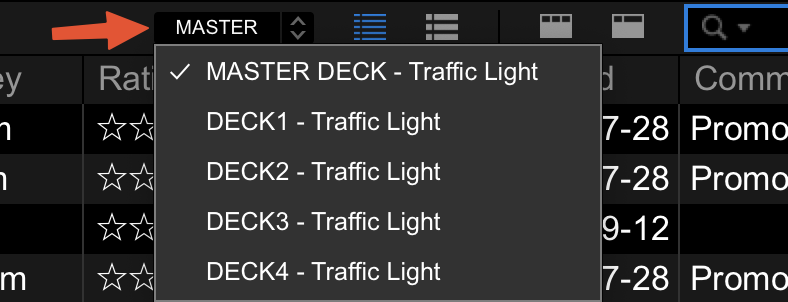
Do you have a target deck selected in the traffic light drop-down, and is it blue?


Comment actions

Hello
I use RekordBox and have noticed that the traffic light system does not display anymore. I have selected 2 deck horizontal in performance mode as well as trying 2 deck horizontal in export mode. I have tried re-analysing all my tracks too. Has anyone had the same issue?
Do you have a target deck selected in the traffic light drop-down, and is it blue?
Post is closed for comments.
Hi Pulse. Thanks for getting back to me so quick. I select deck one as the master, but MASTER DECK - Traffic light is not blue. I have also tried DECK 1. I have also selected deck two as the master, and it is the same as with deck one. None of the options are blue. I have also made sure that Key is selected as a column option.
No, I mean is the button (where the arrow is pointing) blue? That indicates it's enabled.
Oh right....it is not blue.
Click the word MASTER (not the drop-down), it will turn blue, and that should then show the traffic light in the collection.
I have just clicked on master and it has turned blue. What I was doing before was clicking on master to open the drop down menu (and not enabling it)
Thank you so much pulse!
Awesome - glad it's working! :)