Have a feature request or suggestion? Post your idea here!

Post

5 followers Follow
0
Avatar

Multiple problems with DDJ RB. Help!!

Having bought this the other day, I seem to be having a few teething problems.
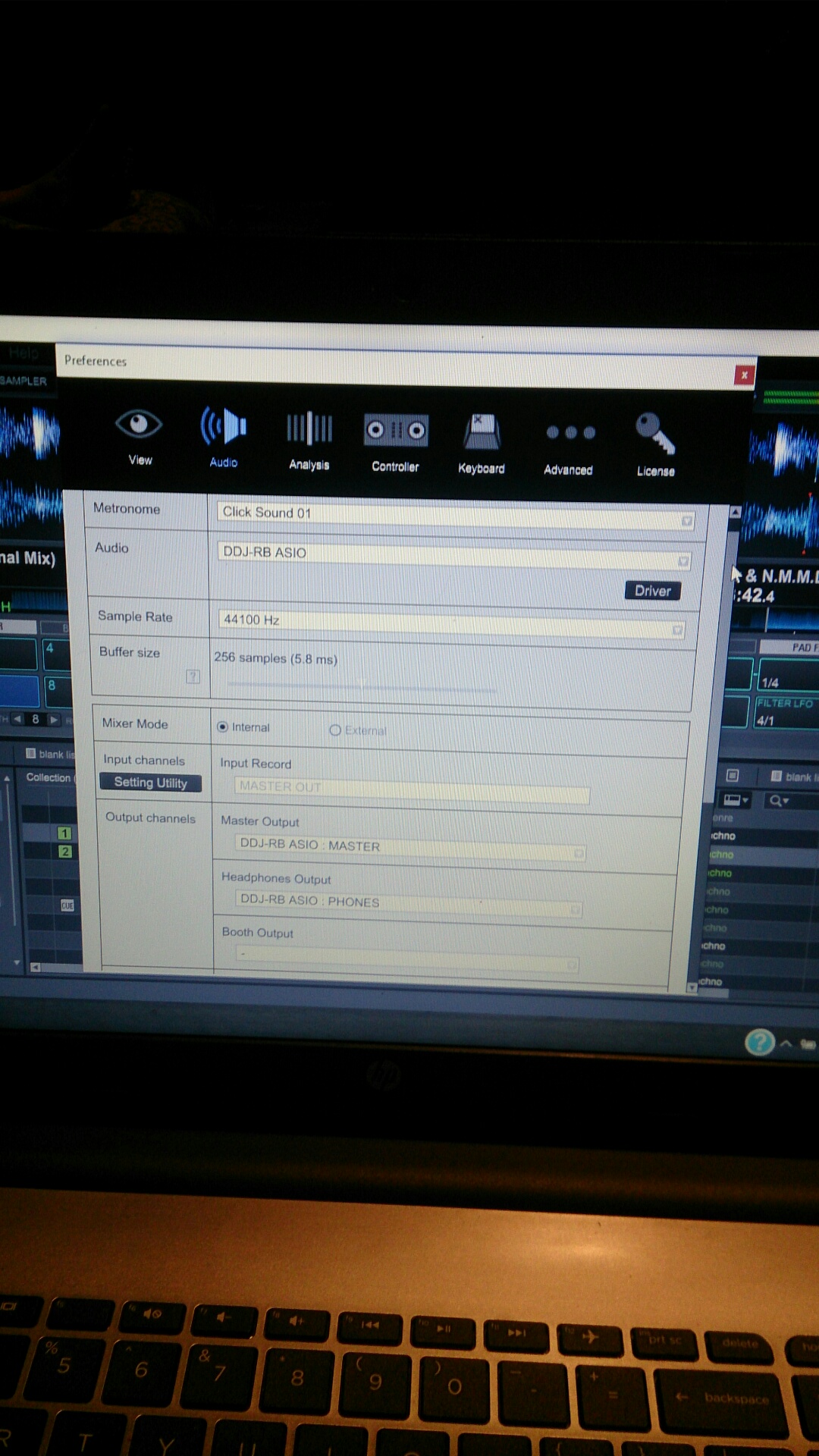
Firstly I cannot seem to run my external laptop speaker as the master and cue through my headphones.

Audio - DDJ RB Asia
Master output - ddj RB asio: master
H/ phones output - ddj RB asio: phones

Secondly, now I can't even get it to load a track!!

It was working fine yesterday when connected to my surround sound system, but not via the laptop and speaker. Now, it's basically decided not to load up at all. I uninstalled the driver amd reinstalled it but no avail.

Anyone be able to help with this? Getting rather frustrated as you could imagine

Thanks in advance

Robert Henderson Answered

Official comment

Avatar

If you have Windows fully updated, rekordbox at 4.2.5 and the current drivers for your device, you should be able to use the PC Output function; click the little speaker icon up beside the master volume knob in the rekordbox window and when it's blue, it will output the master audio from the RB master out as well as your computer's default audio device.

Pulse
Comment actions Permalink

Post is closed for comments.

11 comments

0
Avatar

Have now got it playing but pulling out usb and putting back in again.........and it's just stalled on me again.......deep breaths haha

Robert Henderson 0 votes
Comment actions Permalink
0
Avatar

Same here, just bought this pile of junk, it won't do a thing, it doesn't load. 

Marina 0 votes
Comment actions Permalink
0
Avatar

I managed to get mine working with this set up and just buying some logitech speakers with a separate amplifier (just laptop speakers and sub).
The only problem I am having with it now is after about maybe 20 minutes of playing, RB seems to stutter and just stop. Pain in the arse. Hope this helps.


Robert Henderson 0 votes
Comment actions Permalink
0
Avatar

You're both experiencing issues with Windows settings not with the Pioneer DJ hardware.  Once your settings are configured properly, everything will work just fine.  If the DDJ-RB was junk, we wouldn't sell so many.

Mark Gallo 0 votes
Comment actions Permalink
0
Avatar

Why does everyone from Pioneer DJ assume that everyone has windows? I don't. I have a 10.9.5 MacBook Pro with twice the minimum requirements to run the software. 

I see no info re. Apple Mac here. Why?

Marina 0 votes
Comment actions Permalink
0
Avatar

Selling is the easy bit, it's the post-sales service that's the proof of the pudding. I keep on reading tons of issues on the forums from other unsatisfied costumers, I wish I'd read them before buying.

Still, should you include a clear and thorough explanation on the manual re. how to get the controller going, together with a list of possible communication issues between the controller and software BOTH for Windows AND Mac, you'd probably have an easier ride on this web trying to fend off unhappy users who it seems end up sorting out the problems by themselves rather than by you. 

What kind of support it is trying to get rid of questioning clients by blaming the software and telling them to configure it properly? You don't even bother including any info whatsoever on how to configure it on BOTH Windows AND Mac.

Some support, hey?!

Marina 0 votes
Comment actions Permalink
0
Avatar

@Marina > You posted a "me too" and your post was lost between Robert's posts. In future, please start your own topic and we'll be happy to provide you with dedicated, personalized, support. @Mark doesn't have a Windows computer and is unable to provide step-by-step instructions on configuring the outputs properly... but that information is already available in several places - not just the manual, but several videos on our site, and in multiple posts readily available with a search of these forums.

The only information you have provided is "Same here, just bought this pile of junk, it won't do a thing, it doesn't load." How is anyone supposed to provide ANY kind of support when you don't even tell us what's happening, never mind the operating system you're running?

So to your issue -- have you installed the correct drivers? Please note that there are different drivers for OS X Yosemite / Mavericks from macOS Sierra / OS X El Capitan.

If you're not sure, run the uninstaller that comes within the download package, then reboot the computer, run the installer (all of this with the RB DISCONNECTED), then reboot again. Next, connect the RB, launch rekordbox and see how she goes.

If you still need help at this point, a reply with more information about just what's not working would be advantageous for us in providing targeted assistance.

Pulse 0 votes
Comment actions Permalink
0
Avatar

I'm not too bothered to much in regards to the sound output now, although I will check that out, thanks for replying. As I said it's the stuttering after 15 20 mins is the problem now. 
Look, I still really like the item, hopefully the next update will help as I already have the most updated version of RB.

Robert Henderson 0 votes
Comment actions Permalink
0
Avatar

Im having problems to. I dont know what the problem is. The controller  doenst respond My IOS version is 10.9.5 . I think its Mavericks. The driver should work on this one right?

G 0 votes
Comment actions Permalink