Have a feature request or suggestion? Post your idea here!

Post

3 followers Follow
0
Avatar

Rekordbox Video / DJM-900 Nexus

Hi Guys,

This may be a strange question that I have been searching for answer and cannot find a resolution. My set up on the DJM is  Channel 2 & 3 using CDJ-2000Nexus.

Is there a way I can Map the Channel faders 2 & 3 to the Video Crossfader on the Software. As it stands now, I can mix videos, but the Video Crossfader remains in the center so the Video is NOT a full output until I manually drag it with the cursor.

Your inputs are greatly appreciated.

Thank You

SergioD

Dj Sergio D Answered

Official comment

Avatar

You know if you click the AV SYNC button to the right of the video crossfader it will follow the action of the audio crossfader. If you don't want it to fade the audio, simply unassign the audio channels from the crossfader of the audio mixer.

Pulse
Comment actions Permalink

Post is closed for comments.

11 comments

0
Avatar

Hi Pulse,

Thank you for getting back to me. I have tried that prior and it does not function. I thnk the issue I may be having is the Midi Mapping of the channel faders of the DJM to the Video cross fader on the software. or am I  missing something.


Dj Sergio D 0 votes
Comment actions Permalink
0
Avatar

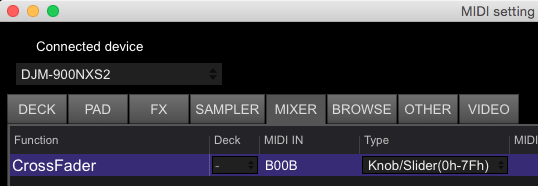
You don't map the video crossfader (there is no option), just map the audio crossfader:


Pulse 0 votes
Comment actions Permalink
0
Avatar

Hi Pulse,

yes that works, I don't like to use the Crossfader to mix Videos, I want to use the Volume faders as in the others VDJ softwares as Serato, Virtual dj. so I guess the option I am looking for is Mapping the Channel Faders to the Video Fader on the Software. They should put that option in.

Any thoughts

Dj Sergio D 0 votes
Comment actions Permalink
0
Avatar

You can do that, but recognize that the audio is also tied to the channel faders.

Pulse 0 votes
Comment actions Permalink
0
Avatar

How would I map that if I don't have the option. Unless I am missing something here.

Thanks

Dj Sergio D 0 votes
Comment actions Permalink
0
Avatar

Sorry - I meant you can use the channel faders to control the video -- but the audio is also going through those faders, so any changes to the video would also affect the audio.

Can you explain what it is you're trying to achieve and maybe I can provide an alternative solution?

Pulse 0 votes
Comment actions Permalink
0
Avatar

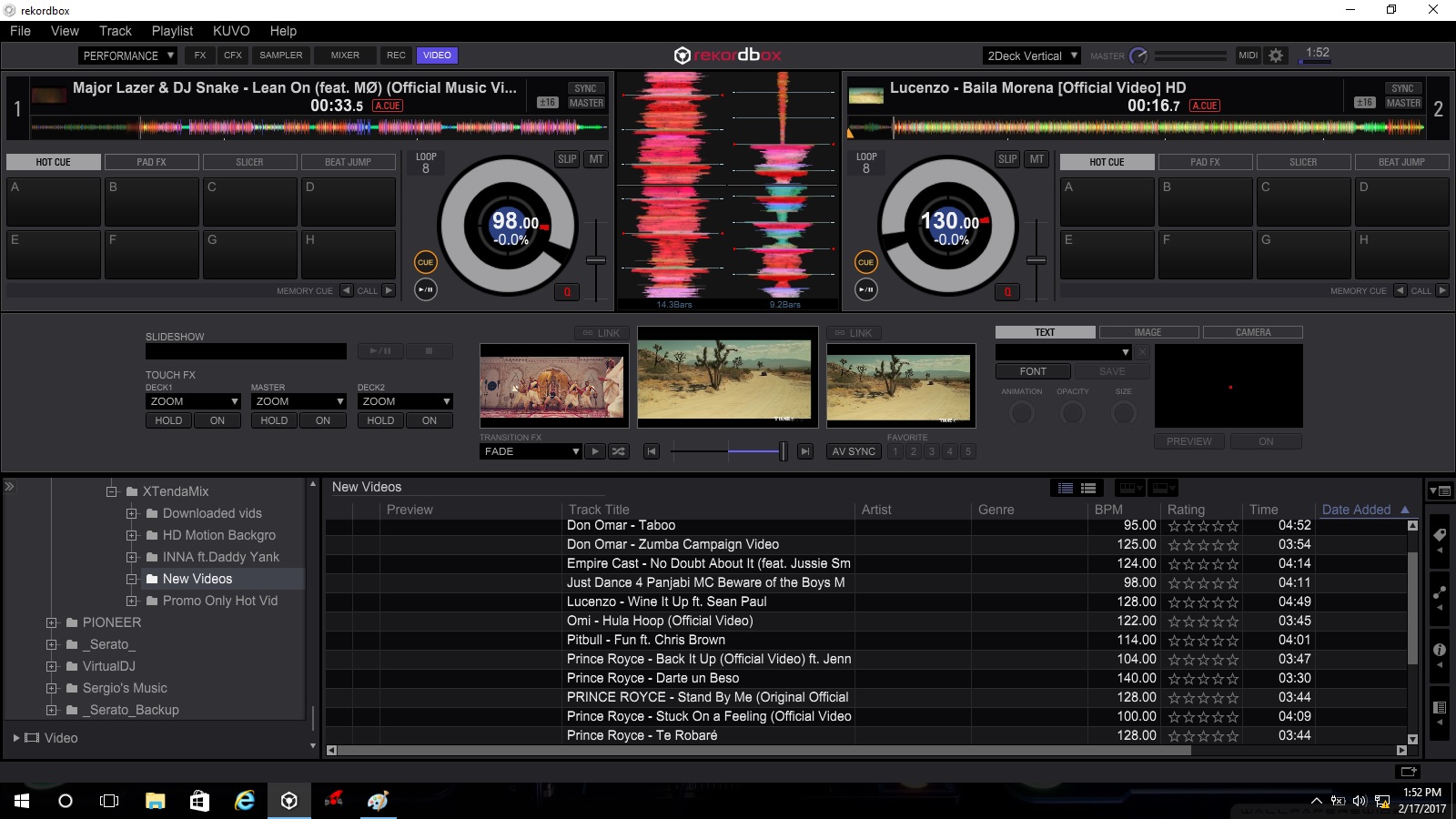
No worries, I have attached 2 Screen shots for your review.

Image 1.1

On Deck #2 the Channel Fader is all the way up and the Video Cross fader remains in the center. The Video Output is not as it should you can see the difference between the Video on the Deck and the Main Monitor Output.
Image 1.2

You can see that I manually moved the slider with the cursor to the extreme right and you can see that the Video actually has the same output to what is playing.

That is why I am asking if it is possible to Map the Video crossfader on the software to the Channel fader of the mixer.

I hope this help and makes this more clear.

Thank You

Sergio D

Dj Sergio D 0 votes
Comment actions Permalink
0
Avatar

You understand that you have the video transition mode set to "FADE," correct? That is what sets the video output level based on the crossfader position. If you don't want it to fade out at the middle, consider using the "ADDITIVE" transition and put the video crossfader in the middle, that way the video level is only controlled by the channel fader.

Pulse 0 votes
Comment actions Permalink
0
Avatar

I don't know if this helps, but here's what I like to do: 

I make sure that the AV Sync is off, and I I work with just the audio (sometimes the cross fader, sometime the line faders), and then I use the auto transition buttons to fade the video separately.  I find that the auto transition is really smooth, and I like that it's done independently from the audio.  Also, reaching for and hitting one button, instead of a separate cross fader saves me time and allows me to focus on what I'm doing with the audio (using effects, filter, etc to transition from one song to the next). 

Michaelpaulmagic 0 votes
Comment actions Permalink
0
Avatar

Hi Guys,

Thank you for your inputs. Pulse you last reply SOLVED my issue, I thought it was something I was missing. I did not understand the "Additive" effect in the manual clearly. Now everything is working just as I want it using the volume faders. 

but I am not going further than 4.2.5 everything after give my issues when playing Videos. I will open a NEW thread on the 4.3.0 Beta 2

Thanks Again

Sergio D

Dj Sergio D 0 votes
Comment actions Permalink