Official comment
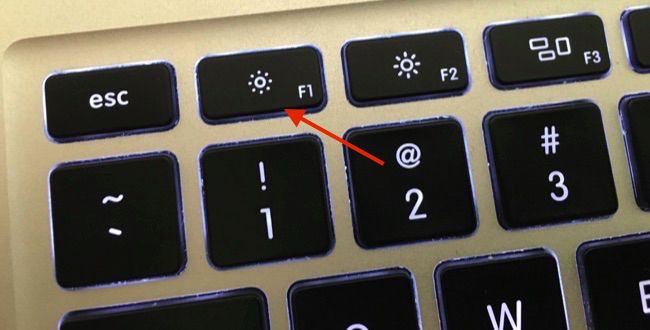
There's a key on the keyboard that can already do this:

Just press it a bunch of times, then not only can you not see the BPM, but the ability to visually beatmatch by waveform is also removed!
MAGIC!
;)
Not sure where to post this, so figured here might be the best place.
I put in a request a while ago to hide these, it seemed some people were interested, but as it hasn't happened yet, I found a little solution (OSX only).
It's pretty simple - basically, just make a *transparent* blank image which is the exact dimensions of your screen, then block over area which has the bits of screen you want to hide (so in my case, I just drew some circles over the display area).
Save the image somewhere, then use GeekTool (https://www.tynsoe.org/v2/geektool/) to set a screen overlay which is "Always on top" - and voila :)
Everyone's screen is different of course (and this also only works if you don't always hide and display different tabs in RB, otherwise it will move around) - but I attach what I use and what it looks like, in case it might help someone else :)
Overlay File

Final Result

There's a key on the keyboard that can already do this:

Just press it a bunch of times, then not only can you not see the BPM, but the ability to visually beatmatch by waveform is also removed!
MAGIC!
;)
Post is closed for comments.
Why would you do this?
I personally like it off as it makes me too complacent.
And right now I'm teaching my gf to mix and want to do it properly! No sync or just using the screen to match up.
Lol @Pulse - I know you are really against anything old school (you do love your sync button :p) - but for some of us, this is part of the fun of things :)
Being able to mix by ear is a very important skill and shouldn't be overlooked.
A lot of the parties out here in Taiwan still use CDJ-1000's - there is no sync, so everything really does need to be done manually. Keeping up with those skills at home is therefore very important!
I don't use sync and can beat match by ear, but I still have the display on as I have no idea how far I am moving the pitch without it.
This just seems like a complete waste of time and effort. Having BPM and pitch number on screen isn't a problem, as you get that on CDJs.
Of course it's not for everyone, but when I teach people I like to go back to the basics.
If they can keep looking at the BPM display, they will (me included, it's right in front of me). As for the display on CDJ's - most people I know will cover that up when starting out, for the same reason.
If I want to know the speed of the overall output, it's shown there in the sampler section.

Very funny Pioneer Dj ... your comment is rather unneccesary in my opinion.
Will there or is there an actuall possibility to hide the BPM in rekordbox dj?
Sorry, no - while it is on the request list, it has not been added to rekordbox.
Thank you for the information!
Would be a cool feature though ;-)