Official comment

The idea is it shouldn't happen. I'll pass this along.
Comment actions

RB 3.5 - Track Sometimes AutoPlays On Load (again)
Using RB 4.3, when a track is loaded, it will annoyingly start autoplaying if the track is loaded into a deck that was previously playing but the track had already ended. This causes a huge embarrasing problem if the fader is still up.
I experienced this issue with much earlier version of RB, and it seems to have resurfaced again in 4.3. Perhaps I am missing a simple setting, but I have compared the settings with my (luckily) still installed 4.2.5 version and I cannot see a difference in the settings.
As I pointed out before, I believe this to be a bug because if the deck is still playing, then the deck shouldn't let me load a track into a playing deck. If the deck is not playing, then the new track should not start autoplaying. RB seems to have a logic error in the programming for this reason.
Interestingly, in 4.3 Export Mode, a track dragged and dropped into the play area will start autoplaying if the track is already playing. I actually prefer this in Export Mode, since in this mode you are editing grids and cue points and nobody is listening and it makes the workflow slightly quicker. In 4.2.5, a track dragged and dropped into the play area will not autoplay, it will just load. I am not sure if this is related to the other problem.
Any ideas??
The idea is it shouldn't happen. I'll pass this along.
Post is closed for comments.

@Rob McKerlie I am having that problem as well. Hope to see this fixed soon. Thanks for passing along Pulse.

I'm experiencing the same issue.. [I have the latest rekordbox software 20/06/2018] with or without my controller connected. OS Win10 / Dell 2-in-1 PC i5 / 8GB RAM / 256SSD
I load (drag n drop) a track, and it starts to autoplay (either deck)..
I've gone trough the menu setup, and can't find an "Auto Play - On/ Off" button, so I have no idea why this is happening.
I see this issue dates back to 2016 at least.. and can't find anything related to if it has been fixed or not.
@Marnus VT > Are you still using rekordbox 3.5 as the OP?
I'm on ver. 5.2.3 rev.14414-13745-13746 x64
In future, please don't "necropost" (posting to an old topic) even if you believe the subject is the same.
Yes, it has been fixed:
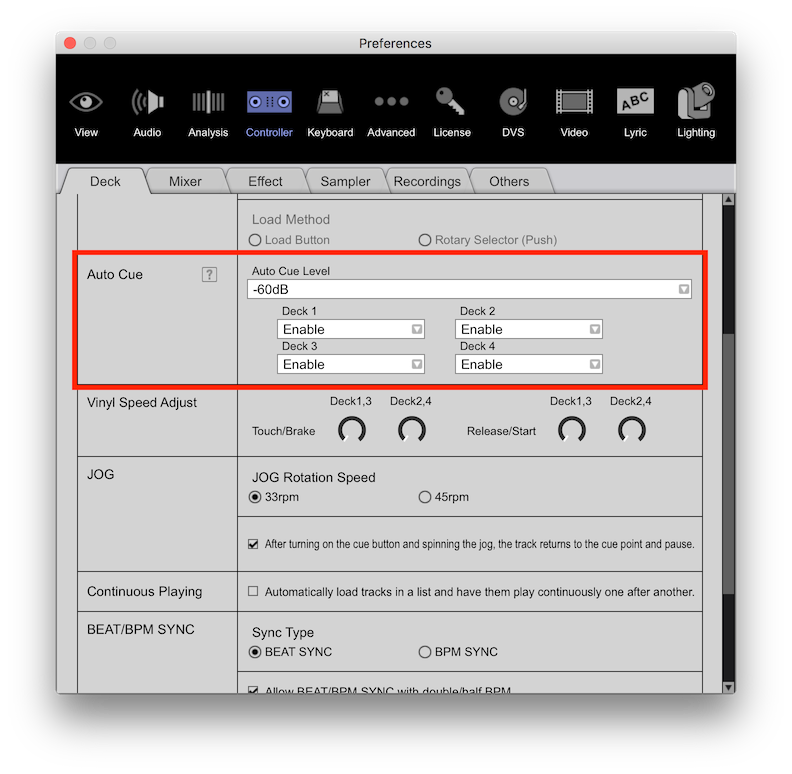 That setting is accessible without a controller.

