Official comment

Thanks all for your input - I've asked our rekordbox team to investigate this issue and will get back to you if I need any additional information for their troubleshooting.
Comment actions

Since I updated Rekordbox, when i listen thru my Mtrack plus (Maudio) it plays the tracks at double the speed. Also there is a hum whenever I play on my speakers thru the Maudio.
When I play thru the computer audiocard it play at regular speed with no hum
Thanks all for your input - I've asked our rekordbox team to investigate this issue and will get back to you if I need any additional information for their troubleshooting.
Post is closed for comments.
Have you verified that the samplerate of your Mtrack is configured properly? Sounds like it may be double what rekordbox is expecting it to be at.
Hi thanks for the help :D
The M Audio is set up at 44,100Hz just like Rekordbox. Still double the speed
Is the bit depth at 16bits?
Does it work properly if you change the audio device to something else?
Yes when I change the Rekordbox output to Built In Output (my computer basically) then it works fine.
When I use the M Audio with Ableton or another DAW it works fine. It also play at the correct speed on Serato DJ.
There is no where to change the bit depth of the M Audio on my mac.
Ok i reinstalled the Install_rekordbox_425 from January and now I am listening to tracks thru my MAudio and they are playing at the correct speed. Something is wrong with the new Rekordbox_4_3_1.pkg update when it connects to Mtrack Plus M Audio device.
I'll have to see what the engineers say about this - 3rd party products aren't officially supported, but as you're not using rekordbox dj (performance mode), it should still output properly. Did it work with 4.3.0?

Hi, I am having the same issue too. I've just updated to the latest version of RB, and when I record my vinyl from my Pioneer PLX-500 turntable (using a MacBook Pro), the time is doubling the speed on the screen but playing back half-speed from the recording. Rekordbox was working absolutely fine before I updated the software...Please help, as I don't won't to revert back to Audacity!
In the meantime, I will try using my Windows 10 laptop, which hasn't yet been updated to the latest version, to see if it's a newly encountered problem on my Mac...

Hi,
I'm having the same issue, since updated to the latest record box, every track in my collection plays really fast, as if the sample rate has been affected.. I'm not using any sound cards only the built in card on my macbook. Only use record box to organise my music for DJ sets..
Hope someone can help?
Regards,
Trevor

Hi there
I’m having the same issue. I updated to Rekordbox 4.3.1 over the weekend and now when I record vinyl from my Pioneer PLX-500 turntable, it shows the correct BPM but the track plays at half speed, with the track time twice as long as it should be.
My turntable is playing at the correct speed and the sample rate appears to be right.
I'm guessing this is an issue with the new version of Rekordbox with others having the same issue? Hope this can be solved quickly. Is there a way of reverting to 4.3.0 as that worked fine!
Many thanks

Normal speed with Mac built in Speakers or Pioneer DDJ-SR as Sound Card.
Double speed via other external USB Soundcard.
Rekordbox 4.3.1 (4.3.0 worked fine) not Performance Mode
Hi all, thanks for your patience. As I had originally suspected, it looks like the issue is with the sample rate. Our engineers would like you ask the following questions / to try these steps:
1. Did you enable PC MASTER OUT at the top of rekordbox?
If you enabled PC MASTER OUT, please answer the questions below.
2-1. What controller do you use with rekordbox?
2-2. Will you please change the sample rate from Preferences > Audio > Sample rate?
An alternative option is downgrading to 4.3.0, which you can obtain here:
https://www.dropbox.com/sh/7o1aq4evtors0ry/AAD_VK7UeGBuJa1xynWi_VMaa?dl=0
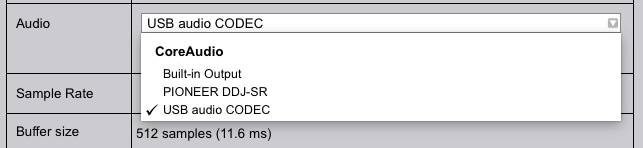
I couldn't find PC Master Out - maybe because I am not using Performance Mode at the moment?
I use Pioneer DDJ-SR.
RB doesn't double play speed with either built-in Output nor through DDJ-SR.
It doubles the output speed on the external USB audio Codec (where my external speakers are attached). It makes just a slight difference, if I choose 44100 Hz or 48000Hz. Both sounds too speedy.
Thanks for the patience all -- this issue will be addressed in the next update.

hey there, I found a work-around, using soundflowerbed:
install soundflowerbed (https://github.com/mLupine/SoundflowerBed)
select soundflowerbed in Rekordbox as an audio driver
select desired output in soundflowerbed (see pic)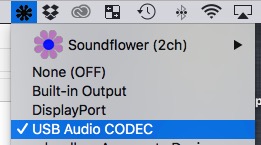
@Erwin > The real fix is in the next update of the software; all Soundflower is doing is changing the audio device path. It's not necessary when the updated version of rekordbox is used.
@Pulse and what should I do in the meantime 'till the update is available? cancel all my gigs?
@Erwin > The two options that have been posted numerous times over the forums are to either downgrade to 4.3.0, or install the 4.4.0 beta 2.

Can you use traktor control vinyl with rekordbox dvs, I have it set up but they are playing at the wrong speed, im using a djm 750mk2, and windows 10 64bit
I would suggest trying rekordbox vinyl, or even Serato noisemap, which are both compatible - I'm not 100% sure of Traktor timecode's compatibility.

mine is still playing at double speed with latest updates ???
@lewis > Please start a new topic and provide a bit more detail as to the setup (hardware / software) and info as to when it occurs.


