
@Chris > Do you have keyboard shortcuts assigned to Play/Pause or Cue for any of the keys you may have pressed?
Comment actions

so it started on friday night when i had a track playing and then i began searching for the next track in the serach bar, and it paused the track that was playing. all that i was doing was seraching for a track hitting certain letters. this happened 2 times Friday night.
skip to saturday night i experience the same thing again! a track would be playing and i would go to start searching for my next track and it pauses as i was starrting to search did it to me 2 times on saturday.
any ideas, i can't continue to have this happen.
Post is closed for comments.
@Chris > Do you have keyboard shortcuts assigned to Play/Pause or Cue for any of the keys you may have pressed?
not that i am aware of - i have been using this for a while and haven't had this problem - i know that something else that happend is that it went to library view too which through me off a couple times cause i wasn't expecting that either. i haven't dug into the program to set anything up hotkey wise, is there something different that has been implemented in the latest version i wonder. i was kind of thinking some kind of hot key issue but i had never set any up. also i was using a ddj-sr when all this was happening. don't know if that matters.
found the hotkeys layout - is there anyway to get the hotkeys off? i think the problem i have was having is becuase the place that i'm at has alot of bass and is moving my cursor around and when i was searching it's making the hotkeys active instead of being in the search bar.
@Chris > Yes, simply edit each one - click the shortcut key, then click Remove.
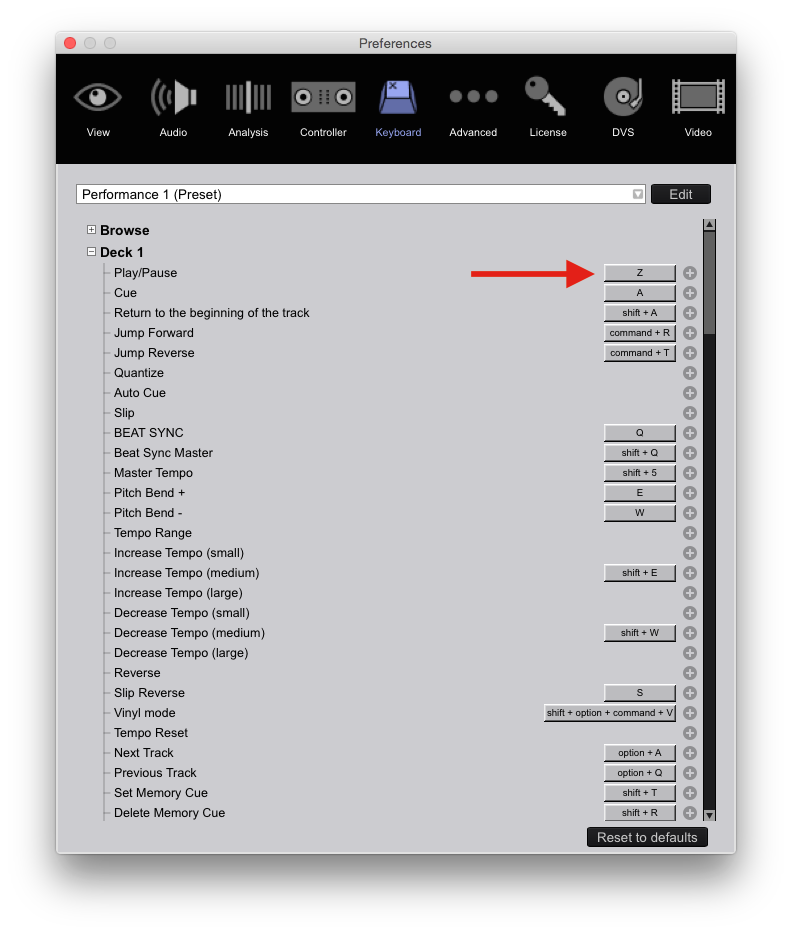

Pulse has your answer
Personally I removed EVERY keyboard command
All I have is
Cmd F = search collection
Cmd P = add selected to shortcut 1 ( this is my play crate)
Cmd R = add selected to shortcut 2 ( this is my request crate)
Otherwise my sx2 controls everything I need
@Chris > Did that solve your problem?

