Have a feature request or suggestion? Post your idea here!

Post

2 followers Follow
0
Avatar

[SOLVED] DDJ-SR works fine on other macs, but not on mine (even after fresh Yosemite install)

  • I recently bought a DDJ-SR.
  • I took it home and plugged it into my mac (running El Capitan 10.11.6).
  • After plugging it into Serato (1.9.9), my macbook just couldn't read it.
  • I downloaded Serato 1.8.2 (tagged as a fix) - Hooray! The thing connected.
  • The output from it however, was very very quiet (had to turn speakers on FULL to get any sound out of it, and there was nothing coming from cues via headphones.
  • Plugged the SR into 2 of my friends' macbooks (Mavericks & Yosemite) and 1 PC (Windows 8) - the controller worked flawlessly.
  • Figured it was my OSX so did a CLEAN wipe and fresh install of OSX Yosemite 10.10.5.
  • Installed Serato latest (1.9.9), it connected! However... exactly the same problem as before. Extremely low output, and nothing coming from cue.
  • Installed Rekordbox. Same Problem.
  • I'm pulling my hair out trying to think of solutions to this. All cables tested and working fine. Is it just some conflict with my specific Macbook?


Any help much appreciated!


Hardware: DDJ-SR & MacBook Pro 2.3GHz Quad-core Intel i7

Kane

Post is closed for comments.

6 comments

0
Avatar

Extra Info

  • Knobs all set high and correct, cue button on etc.
  • Mac is late 2013 model
Kane 0 votes
Comment actions Permalink
0
Avatar

Could be an issue with the power output on that USB port - have you tried the other port or using a powered-USB hub?

Pulse 0 votes
Comment actions Permalink
0
Avatar

I have tried the other USB port, same issue.

Not tried a powered USB hub. I guess that's the next test. Any specific ones you'd recommend?

Kane 0 votes
Comment actions Permalink
0
Avatar

It's working! Problem Solved.

 I purchased a "Insignia 7-Port USB 3.0 Hub" and got it working through that.

Note: This didn't initially work - I had to plug it into the 2.1A USB port that came with the hub - other standard ports didn't work
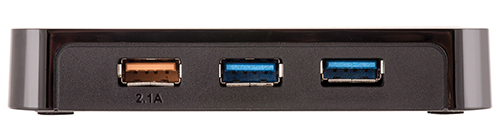
So it seems that certain Macbooks can't output enough USB power to run the DDJ-SR - that sucks! I guess that's why they put a DC in on the SR2.


Thanks for your help!


Kane 0 votes
Comment actions Permalink
0
Avatar

Some USB3 ports also cause problems with these devices, but glad to hear you got it working!

Pulse 0 votes
Comment actions Permalink