Have a feature request or suggestion? Post your idea here!

Post

2 followers Follow
0
Avatar

No Signal in Logic from DDJ-RB

So I've just purchased an DDJ-RB, with the purpose of recording audio directly in Logic. Im not getting any audio signal in Logic for some reason.

Everything is updated with the latest drivers, and I've hooked the DDJ to a USB-hub where my Focusrite i6 Interface is also hooked to. I do hear the audio from the DDJ through the headphones that are connected to the Interface. Meaning the signal is going right I guess, Logic just doesn't pick it up.

Ive tried different Core Audio settings, even made an aggregate device with the DDJ and i6 together, also I tried al kinds of different input channels.

Probably something really simple, but I'm more a musician then a computer geek :) Any help would be appreciated!

Sven Cruson

Official comment

Avatar

Okay, in that case, your output from rekordbox is incorrect - you're sending the audio to the 6i6, not the aggregate, so when Logic accesses the aggregate, even though it contains the 6i6, it's not getting what it needs... plus an output from one software to a hardware device doesn't mean that the other software can access that input; it needs to monitor an output.

I've replicated what you need to do here with Ableton Live and a DJM-S9; follow along...

You'll first need to close rekordbox and Logic, then grab and install Jack Audio Router.

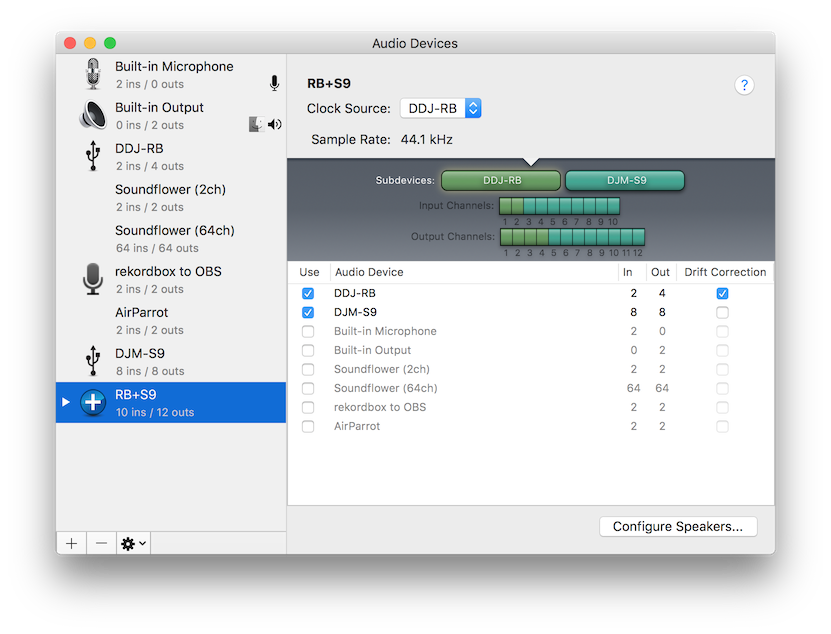
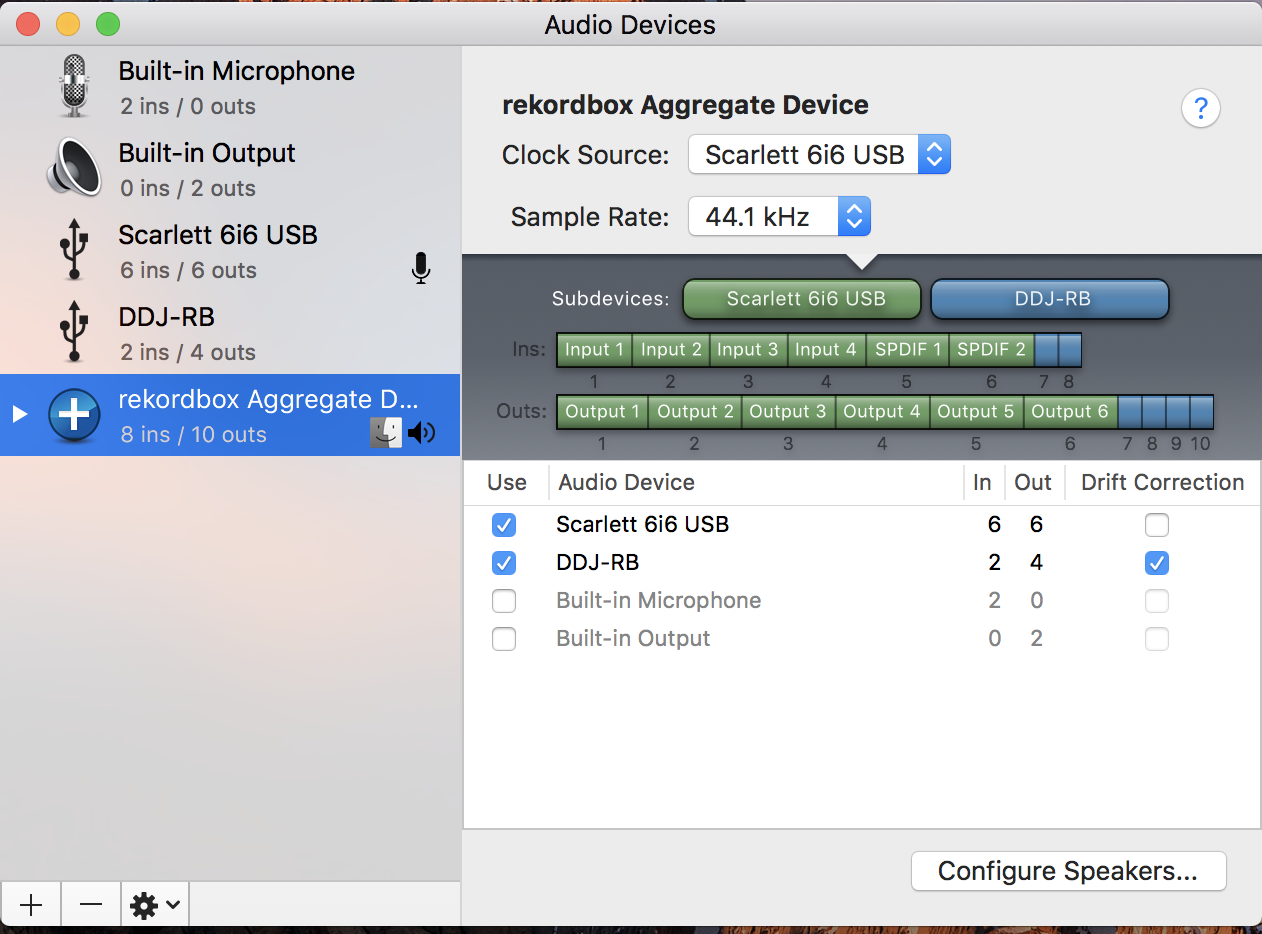
Create an aggregate for the 6i6 and RB, but don't have the word "DDJ-RB" anywhere in the aggregate name.
Next, open JackPilot and set your preferences, selecting the aggregate as your devices:
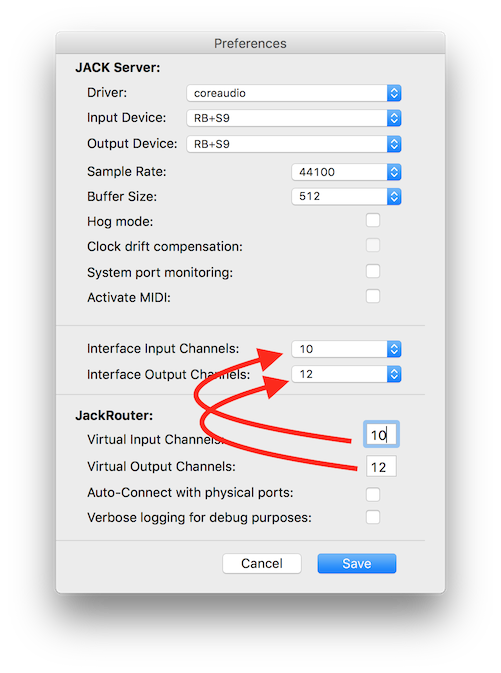
Make sure the number of virtual ports matches the physical ports, and un-check System port monitoring and Auto-Connect with physical ports. Click save, then click the Start button on JackPilot.

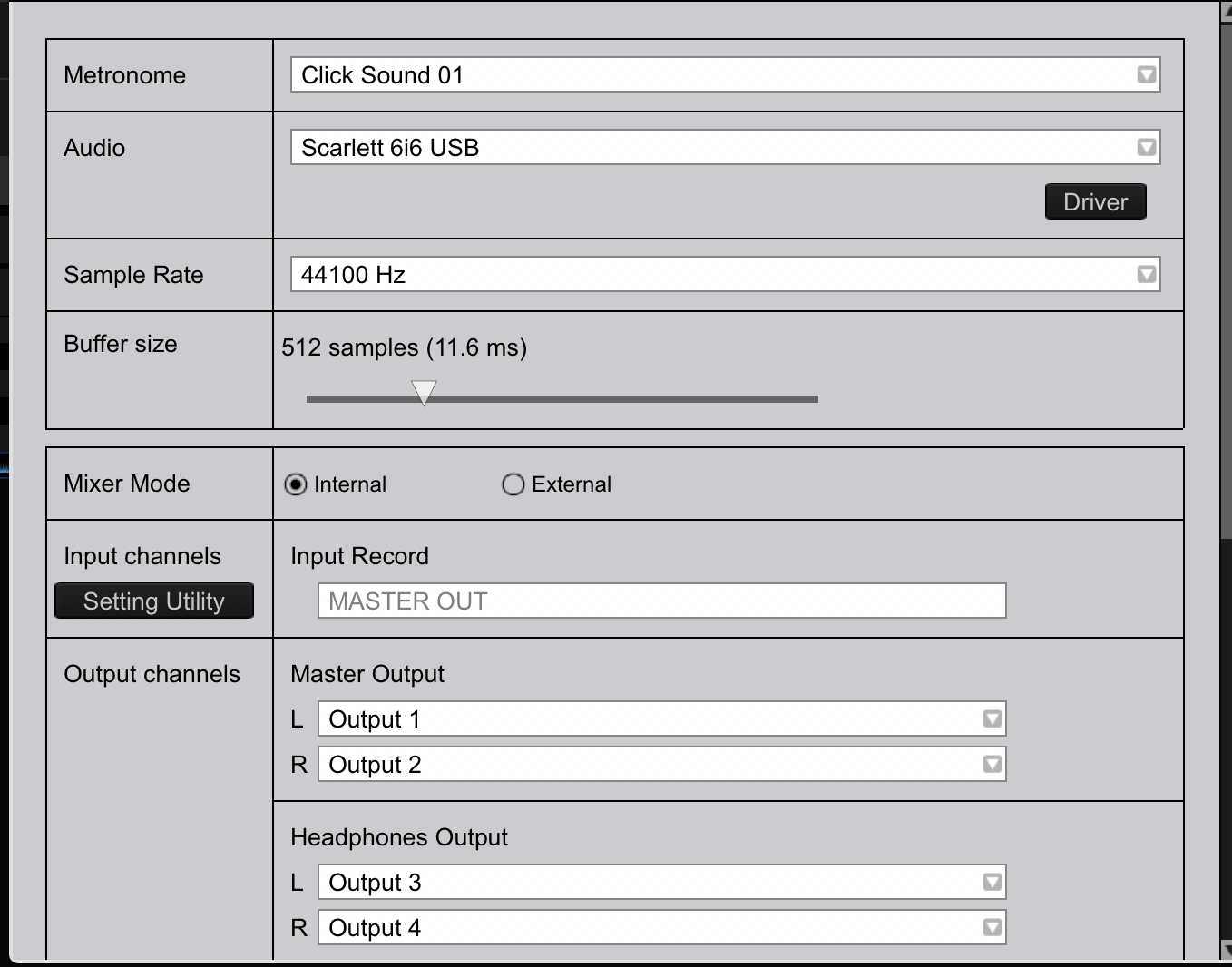
Open rekordbox, and select JackRouter as your audio device, making sure the mixer mode is internal, and  configuring the outputs as follows:

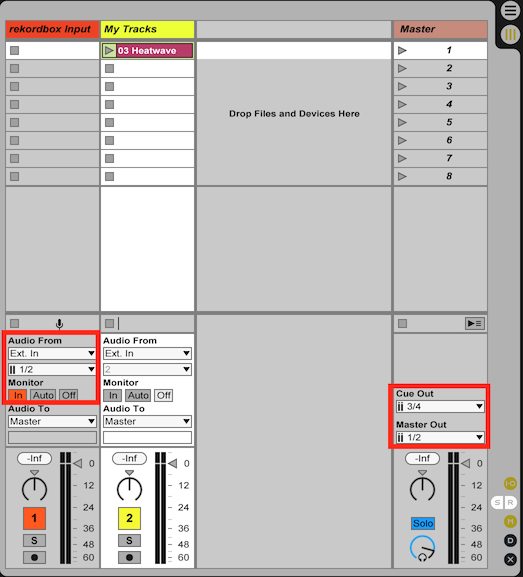
Close the preferences, and open Logic, set your audio devices to JackRouter as well. Your output routing should simply match whatever you have going on with your 6i6, your input routing should take inputs 1/2 to a channel for recording what's coming from rekordbox. Here, in Live, you can see I've configured it that way:
Go back to the JackPilot app, click the Routing button.

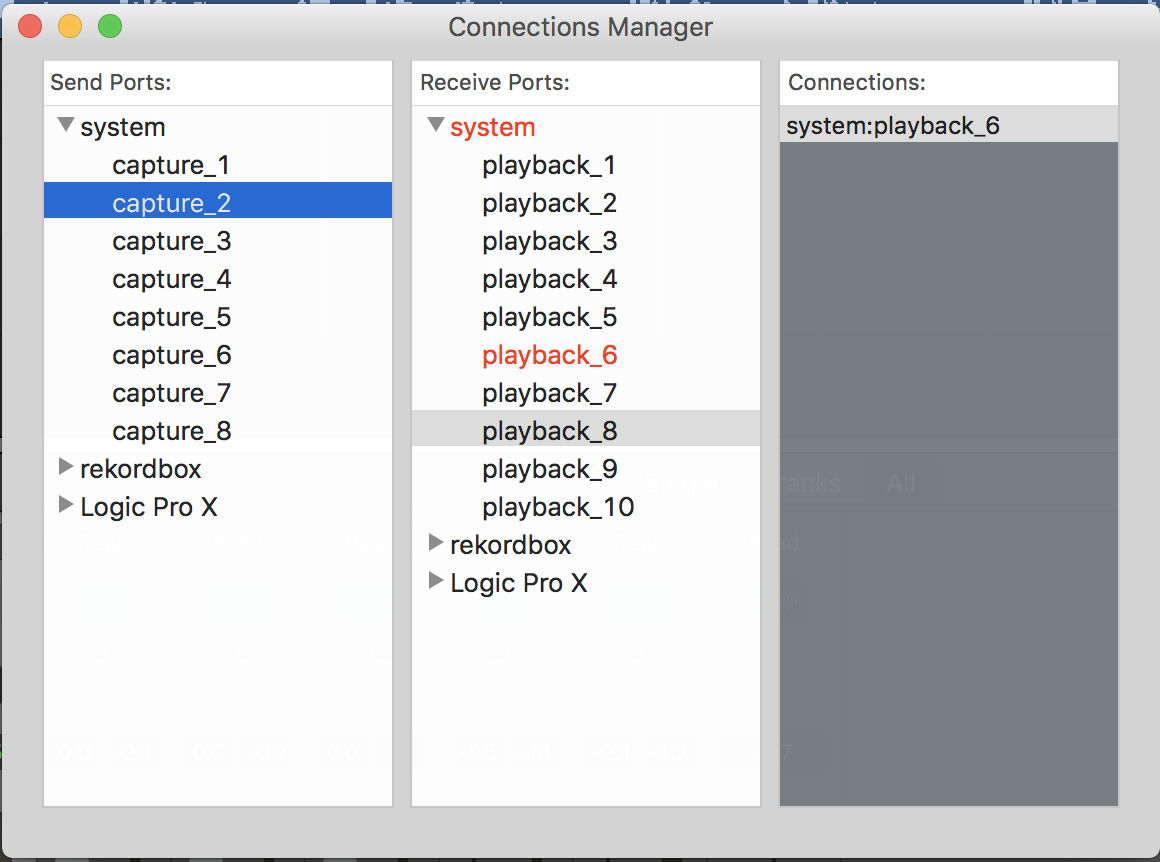
Toggle the triangles beside rekordbox in both the Send Ports pane, and the Logic in the Receive Ports pane of the Connection Manager window. To patch the audio between the correct ins and outs, you'll first select the item you want to patch, then double-click on the item you're patching it to. Start by selecting the rekordbox out1 and then double-click Logic in1. You'll see it turn red, and rekordbox:out1 will appear in the Connections pane (this sends the rekordbox master output to your Logic JackRouter 2 input channel). Repeat that process for the following:

  • rekordbox out2 > Logic in2 (this sends the rekordbox master output to your Logic JackRouter 2 input channel)
  • rekordbox out3 > system playback_3 (this is the DDJ-RB headphone L)
  • rekordbox out4 > system playback_4 (this is the DDJ-RB headphone R)
  • Live out1 > system playback_5 (this is the 6i6 output 1)
  • Live out2 > system playback_6 (this is the 6i6 output 2)
  • Live out3 > system playback_7 (this is the 6i6 output 3)
  • Live out4 > system playback_8 (this is the 6i6 output 4)

That should be enough to output from the 6i6 to your speakers, the headphone output on the RB should also still work for monitoring there without it going to the recording.

Let me know if you have any other questions, 
Pulse
Comment actions Permalink

Post is closed for comments.

18 comments

0
Avatar

@Sven > Chances are it's simply a configuration issue - can you post screenshots of your audio device page and your Logic audio settings?

And please tell me what you're trying to accomplish in terms of the audio path.

Pulse 0 votes
Comment actions Permalink
0
Avatar


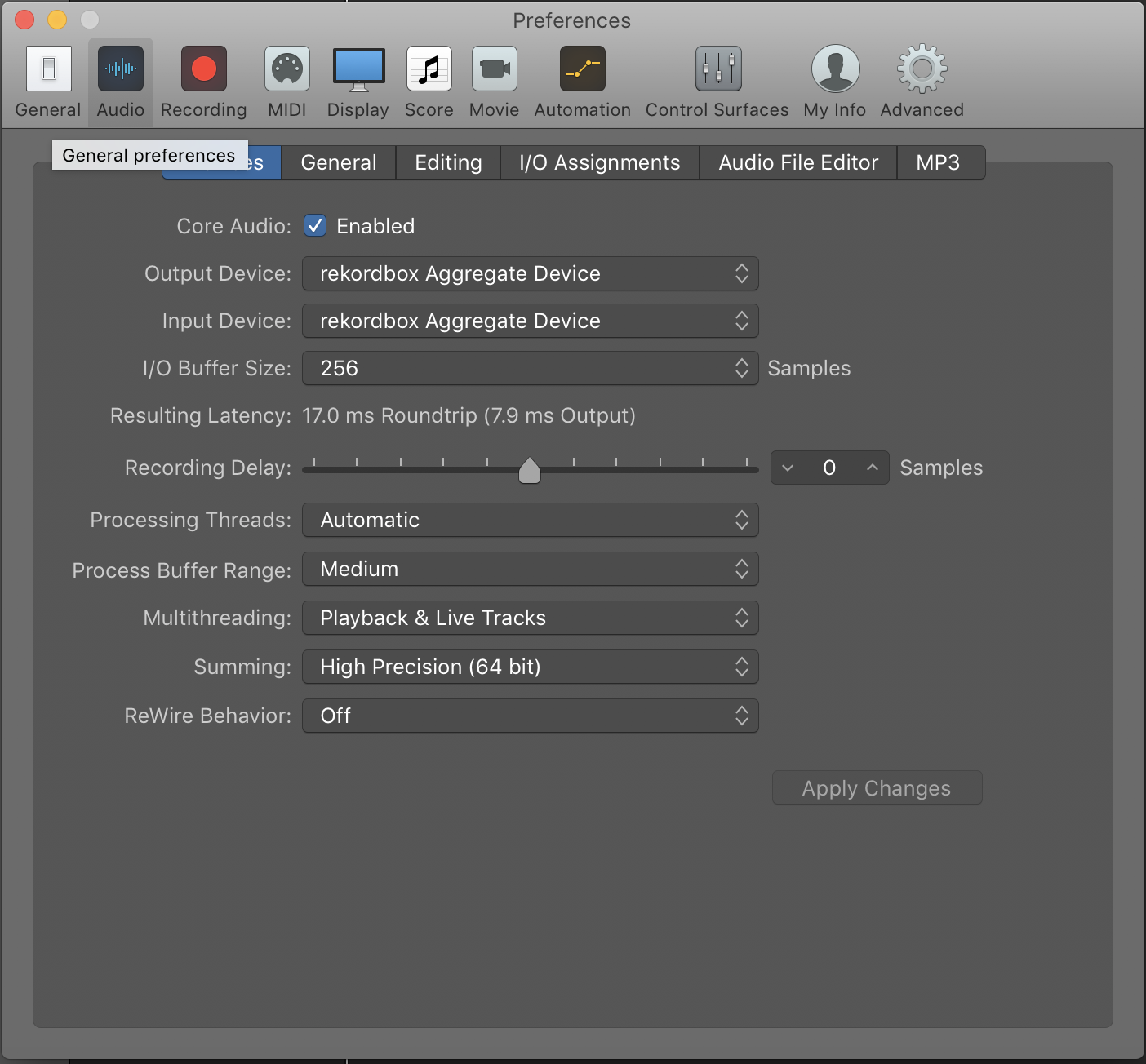
Here are the settings in Rekordbox, Logic, and Core Audio. What I'm trying to accomplish is recording the output from my DDJ directly onto an Audio track in Logic. More specific I want to play a track in Logic and record scratching over it from my DDJ. Thanks for your fast reply!

Sven Cruson 0 votes
Comment actions Permalink
0
Avatar

First off, thanks for your elaborate explanation. I thought this would've been a little more 'Plug&Play', and id never be able to figure this out myself.

Made some progress following the steps, in that I do now get an audio signal from my DDJ in Logic. However, I can't hear the audio anywhere with these settings, not from Rekordbox and not from Logic.

I followed the steps minutely, until this step:

As you can see a can't find the 'live out' setting you're referring to so I assumed this is Abletons version and Logic would be 'Capture'. However following the steps made me loose all audio over my headphones (I do not have speakers on this setup, just headphones connected to my 6i6).

One thing I saw was that I can not select any input in the Logic I/O assignments tab in preferences, but I have no clue if that is even relevant.

Any idea what might be the problem? 

Sven Cruson 0 votes
Comment actions Permalink
0
Avatar

Yeah, this method isn't "plug and play" like using Audio Hijack or Loopback, but those are also $49 and $99 respectively.

Sorry, that's my fault - I wasn't sure what it would be named, so I put "Live" per my settings. My "Live Out" would be whatever is hiding under your Logic Pro X - there should be some outputs beneath the Send Ports; those are what you want to link to the system playback ports.

Those I/O assignments in Logic should be available ... I can't say I'm terribly familiar with the program (only having dabbled a couple of times), but if you maybe post a screenshot of that page I might have a suggestion?

Pulse 0 votes
Comment actions Permalink
0
Avatar

So if i understand correct a program like Audiohijack should do what i want with not much difficulty? 49$ to get everything going is a small amount in the big picture so i might consider that.

Tried to fiddle with the send ports but to no avail. Ill try to post a screenshot tomorrow, but im afraid theres not much to see setting wise on those tabs.

Sven Cruson 0 votes
Comment actions Permalink
0
Avatar

I'm confident you should be able to do this with JACK, but it's just a fiddly setup at first. You have no idea how much hair I've pulled out trying to determine the best way to route audio for DVS and broadcasting when the audio has to come into the mixer, to the software, back to the mixer, then back to another software application! I've learned a lot and figured out the best use for these tools. :D

One thing to consider is downloading the trial version of Audiohijack - it's free and runs all functions for a limited amount of time. At least that would see if it's doing what you need it to!

Pulse 0 votes
Comment actions Permalink
0
Avatar

Is there a function on the Logic mixing board itself to assign the I/Os? Live does that directly on each channel as opposed to the settings.

Pulse 0 votes
Comment actions Permalink
0
Avatar

Tnx ill try the trial version for sure!

Yes, logic has I/O's on the mixing board, and ive tried every possible setting :(

I hear you on the hair pulling, im almost bald. I love making music, but computers and me are a bad combination....

Sven Cruson 0 votes
Comment actions Permalink
0
Avatar

Really, the only combination you should need to try is for inputs 1/2 - if you've assigned the rekordbox out 1 & 2 to Logic in 1 & 2, those should route the master output audio to the 1/2 inputs of Logic.

I've just located a 30 day trial of Logic X Pro, so I'll give it a whirl and see if I can't get it figured out!

Pulse 0 votes
Comment actions Permalink
0
Avatar

Tnx, cant wait to hear your findings.

Now something happened that started some hairpulling btw. I know turn out to only have 2 system capture options and 4 playback (live out) options instead of 8 and 10 i had before? I cant remember doing anything stupid, but i guess i did.

Sorry for being a total nitwit....

Sven Cruson 0 votes
Comment actions Permalink
0
Avatar

lol - no worries. The number of connections available within the JackPilot Router depend on what you have configured within the software. Did you set the JackRouter config virtual I/Os to match the hardware (which should be the aggregate device total I/O for the RB and 6i6).

Pulse 0 votes
Comment actions Permalink
0
Avatar

Downloaded trial versions of both Audiohijack and Loopback. Audiohijack no luck but Loopback seems to do the trick after some fiddling!

I'll try some more with Jack, but im afraid ill have to fork out 99$ for Loopback, oh well....music has always been an expensive hobby. Thanks for your help so far!

Sven Cruson 0 votes
Comment actions Permalink
0
Avatar

What did you try configuring for Audiohijack? Sometimes just knowing the intricacies of how the program works helps to get things running smoothly! I know both of those tools are incredibly powerful and useful, and well worth the money.

Pulse 0 votes
Comment actions Permalink
0
Avatar

The thing with Audiohaijack was that i routed the sound fine into logic, but when i recorded the sound it recorded all sound in logic, not just the one track from Rekordbox. There was no way of chanelling this correctly if im correct. Audiojack seems more like something to capture audio then something with lots of options like Loopback. Technically i could do it by playing the reference track from itunes or whatever and then recording just the audio from Rekordbox in Logic, but i prefer to have everything going on in Logic. Hope that makes sense.

Sven Cruson 0 votes
Comment actions Permalink
0
Avatar

Was Logic set to record only that incoming track or everything going to the master?

Pulse 0 votes
Comment actions Permalink