
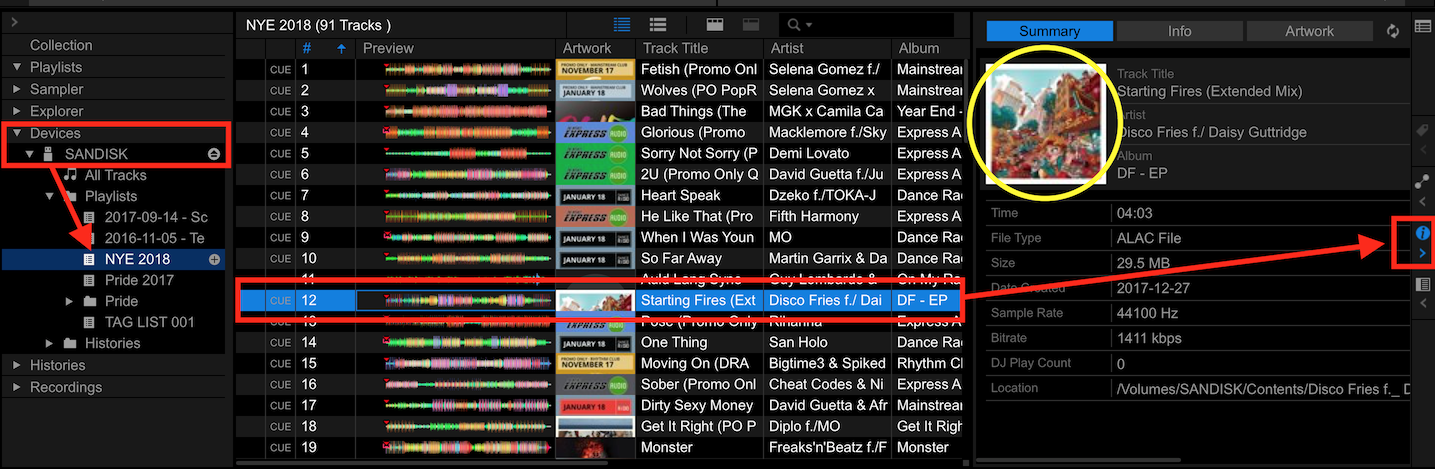
Do the tracks show the album artwork here...
Click the export drive, select the playlist, pick a song, open the info panel:


Comment actions

Hi all,
I just spent some time on the laptop putting images on my tracks on RB. I just dragged and dropped about 300 images onto a Happy Hardcore playlist I have. I then exported the playlist to a USB stick and plugged into my XDJ1000mk2 however, the images are not appearing on my XDJ screens. What did I do wrong?
thanks
Matt
Post is closed for comments.
Do the tracks show the album artwork here...
Click the export drive, select the playlist, pick a song, open the info panel:
Hi,
thanks for the response.
No, the images are not displaying there but they are in my Playlist in Rekordbox. How can I get them to display within the playlist on the USB stick?
Matt
What do you show on this page of the preferences?
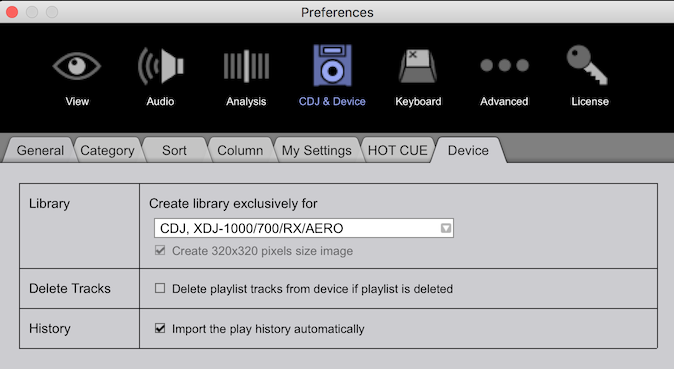
Were you exporting from EXPORT mode or PERFORMANCE mode?
Hi.
the dropdown menu under device was blank so I have changed it to what I see above,
I exported in Export mode.
I will try again now after changing the dropdown under the device tab. Thanks for the help BTW
Matt
Blank? That's odd! It usually defaults to the CDJ etc. option as shown above. Give that a try - re-export everything (you may need to remove the playlist and songs from the drive first, but I'm not entirely sure), and see how she goes.
yeah still nothing?!?!? I will delete the playlist and try again.
Thanks


