
Hello?
Comment actions
It doesnt respond. When rekordbox is opened, and I plug in the controller. The pad lights go on, and then they go off, and it doesnt respond.
My IOS is Version 10.9.5
Ive installed the following files:
Install_rekordbox_4_3_0.pkg
DDJ-RB_M_1.0.0.dmg
DDJ-RB_v103_MAC.dmg
Post is closed for comments.
Hello?
Also it doesnt show in the MIDI setup. Even after I rescan MIDI. And after a few minutes the buttons start to light up in what seems to be a random sequence.
I now its showing USB MIDI Device. I dont know what I did because it was unresponsive.
Ive opended rekordbox and im making progress. Now when I press a button I hear a sound. Like its trying to tell me something...

It's one of the frequently asked questions.
Try to reload Audio MIDI settings follow by next steps.
(1)Connect DDJ-RB to your computer and turned it power on.
(2)Open [Applications] folder, [Utilities] folder and [Audio MIDI Setup.app].
(3)Open [Audio Devices] window. Confirm that [Audio MIDI Setup] is displayed on Menu bar.
Click [Window] and choose [Show MIDI Studio] or [Show MIDI Window]. (The displayed name depends on OS version.)
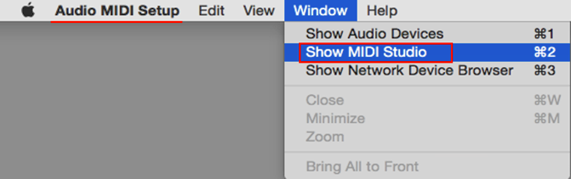
(4)[MIDI Studio] window opens up, click [DDJ-RB] icon. The icon turns to blue color, click [Remove Device].
"DDJ-RB" icon disappears and comes back again.
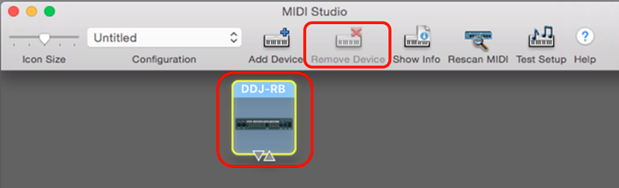 (5)Close [Audio MIDI Setup] and turn DDJ-RB power off.
(6)Turn DDJ-RB power on and run DJ Application.
hmm ok. Happy your speaking so confidently. It givse me hope. Going to try it out. Ive allready did it but going to do it again with a fresh mind. Wil let you know thnks
Why is it not clled ddj rb like in your example?
Why doest my laptop regocnize this device? is there somebody from pioneer here?
Im wokring this thing for two days now come on guys wtf is this man±!
I cant even remove the device from the settings when its in. So this whole frequently asked questions makes no sence
???
Also it says turn ddj rb power on, like there is a power button somewhere. There isnt a power button so how can i turn it on? smh
Its working! I just pushed in the cable really hard. And now i have differnt problems with cracking sound. pfff I miss my djm 800 and the cdj's i want to cry

I see this issue resolved itself, but if anyone have similar issue it can be due to Rekordbox is in wrong mode, make sure to select "Performance" mode, or any other mode that your dj-controller supports. Mine was in "Export" mode and rekordbox did not respond to my device at all and my device did not sense rekordbox. Switched to performance mode and boom done. :)


