Have a feature request or suggestion? Post your idea here!

Post

2 followers Follow
0
Avatar

Issue with Itunes folder structure

Hello,
I have Rekordbox 5.0 and Itunes 12.6.0.100 on MacOS Sierra 10.12.5.
Everything was working perfectly for me till the day I have decided to change my playlists and folders to be less than 1000 tracks for CDJ use.

So I have added a lot of playlist & folders that have smart and regular playlists inside them.

Unfortunately now RKB can't display all the playlists inside some folders, so I've got a half-working bridge that was working perfectly a few hours before I did this split.

Yes I do have a itunes.xml file to share, no I won't publish it on a public place.
Thank you

Note : it does still works flawlessly with SDJ, SSL, Cross, Traktor, VDJ. So the issue is somewhere over here I guess.

Spark972 Answered

Post is closed for comments.

6 comments

0
Avatar

If you quit iTunes, and leave it closed for a minute or two, then open rekordbox and refresh the iTunes portion of the tree, does it show all the playlists?

If not, is there any logic as to which are missing? For example, 3 levels deep works, but 4 levels are absent, etc. 

Pulse 0 votes
Comment actions Permalink
0
Avatar

I never leave both open at the same time, tried refresh, also export to a new xml the itunes library, tried to load it into RKB, still no love.

If there is a logic, I didn't found out which one it is.
I've done a very basic structure with only 1 level of depth to avoid such issues.

My structure is :
Playlist folder 1 ------ playlist 01
Playlist folder 1 ------ playlist 02
Playlist folder 1 ------ smart playlist 01
Playlist folder 1 ------ playlist 03
Playlist folder 1 ------ smart playlist 02
.
.
.
Playlist folder 30 ------ playlist 01
Playlist folder 30 ------ smart playlist 01
Playlist folder 30 ------ smart playlist 02

and I have something around 30 playlist folders.
I may have 1 folder that is 2 levels depth but that's it.

The missing playlists seems to be mostly smart ones, but not 100% shure, I'll need to check when back at home.

Spark972 0 votes
Comment actions Permalink
0
Avatar

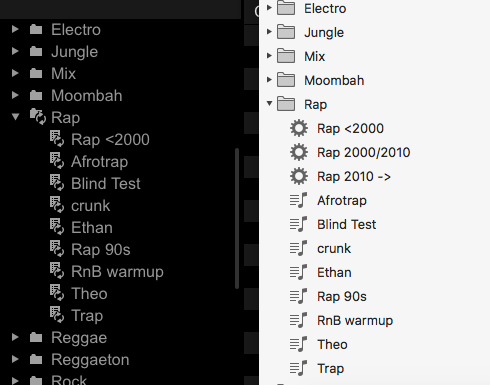
Here is an extract : the Rap folder

2 smart playlists are missing there...

Spark972 0 votes
Comment actions Permalink
0
Avatar

I'll convert this over to a ticket and include you on it - look for an email, or click here to connect to the ticket. Our engineers may require some additional information or for you to upload your XML file there.

Pulse 0 votes
Comment actions Permalink
0
Avatar

Unchecking 'Synchronise iTunes playlists' from the Sync Manager fixed the issue.
Now solved !

Spark972 0 votes
Comment actions Permalink