
Hi
I have the same problem. Nothing happens. Just says Firmware update is complete but it doesn't move off 0%.
Thanks
Comment actions

Hi guys,
Ive recently downloaded the latest rekordbox software which advised me to update to the latest firmware 2.21 otherwise sliders would not work in performance mode.
I have downloaded the software (unzipped UPD file) onto a brand new flash drive but when I insert this into the XDJ RX USB port 1 when prompted to do so nothing happens.
When I downloaded the previous software I had red lines run across the screen.
Please can you advise if I am doing something wrong!
Thanks
Post is closed for comments.
Hi
I have the same problem. Nothing happens. Just says Firmware update is complete but it doesn't move off 0%.
Thanks

Hi , i have the same problems with DDJRZ...there is no sound output coming out of the controller and the link between the PC (windows 10) and the controller seems to be working.
When i go to update the latest version of the firmware, the 'updating your DDJ-RZ firmeware' box gets stuck at 0% update.
Please help, really frustrating!

@Danny / Kevin > Are you sure you've extracted the zip and placed the update file on the root of the drive?
@E Grau > Are you connected to the USB A port on the RZ? It won't work on the B port.
Hi Pulse, when I download the file it is named xdj rx.upd. I therefore assume this is the UPD file as there is no option to unzip it or one I am aware of? I am using it on a Mac and the file image is a black square with green coloured letters ‘exec’ - can this be unzipped? If so how? I think my situation may be slightly different to Kevin’s as when I insert my flash drive, it continues to display ‘insert flash drive’ and nothing happens. I’ve tried it on two flash drives now and get the same problem. Am I doing something wrong? Danny
Hi there, I am connected through the USB Port A, yes. is there another way I can register my issue with you guys to have it tracked through to resolution or is communicating via this post the best way?
Hi
My issue is slightly different alright. I've unzipped the file XDJRX.UPD to three different flash drives. When I insert the flash drive to USB1 I get 2 progress bars, Main and Sub. And also a message saying "Firmware update is complete. Turn the power off/on before using". However the progress bars are both at 0%
Thanks,
Kevin
Kevin, maybe I’m being stupid but how do you unzip the file? I am of the view that when I download from the pioneer website it already com s as a UPD file. I have no option to unzip? Your help would be appreciated if possible.
I have updated, and was able to unzipped the former firmware update but I cannot seem to do it this time around with the new version
Hey Danny, When i download from the website its a zip file and i use a rar file opener to unzip it. Then i copy to a flash drive. Im using windows so maybe with the mac it may be different.
@Danny > If you used Safari to download it, that may be the problem as it automatically unpacks the zip file. Grab the update with a different browser, it certainly should come down as a zip.
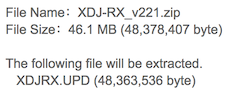
Also ensure that your USB drive is formatted to FAT32 with MBR (master boot record). If you don't have MBR, it will be detected by the XDJ, but it won't be able to load the firmware.
Thanks Pulse il give this a go and let you know how I get on. Perhaps the bit about the usb Drive being formatted to a FAT32with MBR is Kevin’s problem? How can this be checked?
It's only a Mac issue, Windows doesn't use GUID boot partitions; if it says "complete" and doesn't do anything, it may be worth checking that the version installed isn't already the latest.
Hi Pulse, I downloaded the file via a windows computer and that has now worked! Thanks for your help!
Awesome - yeah, for some reason Safari's automatic unzipping does something to the update file that makes it unreadable.
Finally got it sorted. Tried a 4th USB drive and its worked.
Thanks for the help guys.

Hey - is the Download Update for XDJ Rx no longer available? I bought my mixer about two years ago and I cannot find the appropriate link on the website. My mixer has some glitches that will hopefully be solved this way. Please help
Hey - is the Download Update for XDJ Rx no longer available? I bought my mixer about two years ago and I cannot find the appropriate link on the website. My mixer has some glitches that will hopefully be solved this way. Please help
For some reason it doesn't show up on the global page, but if you go to another region, it's there:
https://www.pioneerdj.com/en-gb/support/software/xdj-rx/#firmware-update

