Have a feature request or suggestion? Post your idea here!

Post

2 followers Follow
0
Avatar

Dropbox Storage Location of Cloud Synced files?

Hi there, 

I have my entire library synced to Dropbox utilising a separate SSD on my laptop and Dropox basically just syncs that device to the cloud and works well.  I wanted to try the Rekordbox Cloud so enabled the trial playlist and added some tracks, connecting Recordbox with my Dropbox account.  All worked well with the couple of tracks I used and was able to access the tracks on my mobile, add a cue point and see those changes reflected on the laptop so all good.

What I'm curious to know is where in Dropbox, is Rekordbox storing the tracks it syncs with Dropbox?  When I logged into Dropbox, I was expecting to see a Folder that Rekordbox perhaps would create would have created in the Dropbox UI in the browser but nothing.....  Where are the files then, is it in a separate partition that I can't see somewhere?  Is Rekordbox Cloud Sync, leveraging my storage in Dropbox but not exposing the files in the UI?  

Thanks

DJ Mista G Answered

Official comment

Avatar

If your music is already in Dropbox, rekordbox doesn't move them when you add them to the cloud sync. It's only if they started as an outside source and then require that they're moved / copied to Dropbox that you will see a rekordbox folder with a Contents folder within containing the songs.

Pulse
Comment actions Permalink

Post is closed for comments.

6 comments

0
Avatar

How does it know the file is already in Dropbox? This is a filepath example

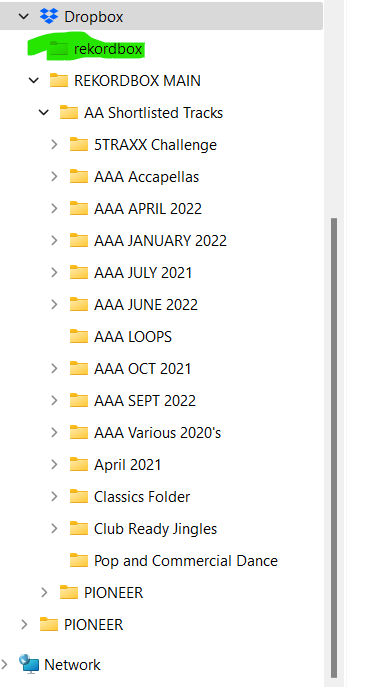
"D:\Dropbox\REKORDBOX MAIN\AA Shortlisted Tracks\AAA SEPT 2022\Tech House\Andruss-Jump_Around__EP_-Original_Mix-36055885.mp3"

DJ Mista G 0 votes
Comment actions Permalink
0
Avatar

I have notice that another folder has been created on the D Drive called 'rekordbox' but there's no files in it and this folder isn't in Dropbox in the browser....  

DJ Mista G 0 votes
Comment actions Permalink
0
Avatar

If the file is in Dropbox, rekordbox knows that.

The empty rekordbox folder doesn't need to have any content.

Pulse 0 votes
Comment actions Permalink
0
Avatar

Is the empty folder doing anything?  I assume Rekordbox put if there when I created the cloud link...  If my tracks were not already in dropbox, would RB then have used the empty folder to store the tracks...?  I guess I should leave it right?  I'm probably going to upgrade and start using it.  I just need the creative plan I guess?  One question, one I subscribe, it won't recreate the playlists as cloud version, it will just use whats already there and sync those...

DJ Mista G 0 votes
Comment actions Permalink
0
Avatar

The empty folder was likely created as a placeholder in case you imported any songs which were outside the Dropbox scope already, and selected "upload to cloud." I'd just leave the folder, no harm.

You can use your current Dropbox with the Creative plan (limited, of course, by the capacity of your Dropbox plan), and the cloud sync simply makes the library available to other devices -- Dropbox still maintains the music. So in order to then use those songs on another device, the library will sync, and any songs you want will have to be available through Dropbox on that device.

Pulse 0 votes
Comment actions Permalink