Have a feature request or suggestion? Post your idea here!

Post

2 followers Follow
0
Avatar

[SOLVED] REKORDBOX 3.2 Crashing all the time Even when I deleted all and Install it again.

Rekordbox KEEPS CRASHING (ALL THE TIME) I did everything that was suggested in the blogs and at** Pioneer DJ support.** Including deleting the application (Rekordbox) and all the directory... EVERYTHING and Install again. After install it crashes even more. What Can I do? I left TRAKTOR for good thinking I would never have Crashing issues with Rekordbox and guess what? Worst.

I have an Early 2011 MAC BOOK PRO with OS X Yosemite 10.10.2 running.

JuanCarlos Sanchez

Post is closed for comments.

11 comments

0
Avatar

@JanCarlos > Did you read this thread before posting?

You may also want to try this:

Some Mac users may have problems with the OpenGL rendering of the waveform - to fix it, plase try the following

  1. From the “Go” menu in the Finder of Mac, select "Go to Folder...". 
  2. In the popup window, please type in “~/Library/Application Support/Pioneer/rekordbox” to open the folder and find “rekordbox3.settings”. 
  3. Control-click or right-click “rekordbox3.settings” then select “Open with” -> “Other...” and use TextEdit to open the file. 
  4. Find the following line in the settings file. 
    <VALUE name="DisableOpenGL" val="0"/> 
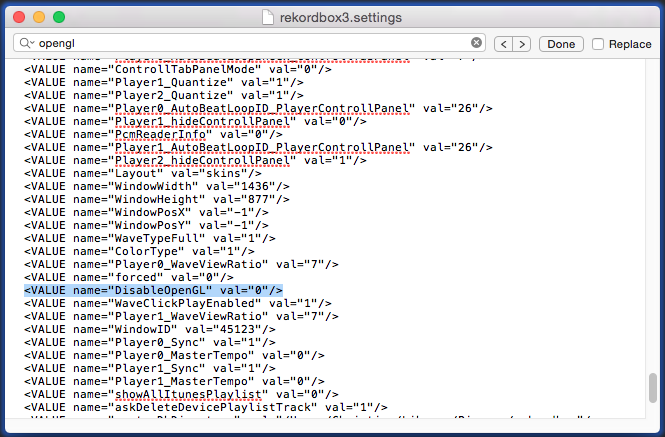
Screen_Shot_2015-02-15_at_8.52.27_PM.png

  1. Then, change the value from “0” to “1” as shown below. 
    <VALUE name="DisableOpenGL" val="1"/> 
    Please note: Be sure to copy the text "1" including the quotation mark " " in for example, 
     <VALUE name="nexusServerIsActivated" val="1"/> in the TextEdit and paste them instead of directly typing the value 1.

Because of the "smart quotes" function of Mac, when a user changes the text 0 to 1, the double quotation text is changed so that the value can be read as 0 instead of 1 even after changing the value.  Please COPY AND PASTE from above into your settings file.

Close the file and restart rekordbox. 

If this doesn't work, please let us know and we'd be happy to help.

Pulse 0 votes
Comment actions Permalink
0
Avatar

Thanks for the reply. I did follow those steps. in fact, when I try to change the VALUE it was with NO NUMBER LIKE THIS..

<VALUE name="DisableOpenGL" val=""/> I Change it to 1 (with copy and paste) re-open the app but the wave form while playing was acting slow.. not steady so I decided to close the app and change the value back from 1 to zero (0) and still crashes. any other suggestions?

JuanCarlos Sanchez 0 votes
Comment actions Permalink
0
Avatar

See the line in blue in the image above -- did you have that line in your settings file?

Pulse 0 votes
Comment actions Permalink
0
Avatar

So it just looks like:

<VALUE name="DisableOpenGL" val=""/> 

??

If that's the case, copy and paste this entire line in the place of that line:

<VALUE name="DisableOpenGL" val="1"/> 

Pulse 0 votes
Comment actions Permalink
0
Avatar

Yes. Like that...

Story Short. I had rekorbox already but was crashing all the time. I deleted everything, The App and every single folder. 

Installed the app again, ran it but kept on crashing. went  to the settings files to change the Vaule and was 

<VALUE name="DisableOpenGL" val=""/>  WITH NO NUMBER I change it to "1". I open the app again but

could not take the way the wave file was looking (glittery) so went back to settings files and change the VALUE back to "0" open the app again and the wave was looking normal again but still crashing

JuanCarlos Sanchez 0 votes
Comment actions Permalink
0
Avatar

The engineers are working to resolve the issue, in the meantime, if you want to use the program without it crashing, you need to set it back to 1 and deal with the "glittery" waveform.

Pulse 0 votes
Comment actions Permalink
0
Avatar

rekordbox 3.2.1 has been released with a menu option to disable the graphics acceleration; please give it a test to see if the fixes included have resolved the problems directly. Any issues with "glittery" waveform may be present, if they are, we can look forward to future updates addressing those concerns as well.

Pulse 0 votes
Comment actions Permalink