Have a feature request or suggestion? Post your idea here!

Post

2 followers Follow
0
Avatar

Rekordbox Memory {Points disappear)

Regularly when I open rekordbox it seems that the previously defined Memory Points are lost again. I get to re-define these every single time. And it's at random, so not the same tracks. Also, I did not change album or artist names in Itunes (in case you're wondering). Anybody else experience this problem?

Roberto LR

Post is closed for comments.

8 comments

0
Avatar

Which version of rekordbox are you running?

By the fact you mention iTunes, I expect you're also using the iTunes sync?

Have you tried loading a blank database to see if the errors continue with a new data file?

Pulse 0 votes
Comment actions Permalink
0
Avatar

Hi,


I'm using the latest version (as my Rekordbox Update manager always checks at start) and yes, I'm using iTunes sync.

I don't dare using blank databases in fear of having to re-analyse and re-set my memory cue for my entire 5.000+ collection.


Now we're on the subject, could Rekordbox not use a bit more intelligence when linking with iTunes? Now it 'disconnects' with the track every time I correct an album, artis or filename. Some sort of approximate name algorithm in combination with the waveform should save your customers a lot of headaches.

Roberto LR 0 votes
Comment actions Permalink
0
Avatar

@Roberto > The problem you're experiencing when changing information within iTunes is you're allowing iTunes to manage your files - which you SHOULD NOT do when using other applications as they rely on a file path which then changes when iTunes renames / moves the files according to the metadata. The first step you should make is to properly manage and maintain your collection and not allow iTunes to do it for you.

You can create a blank database for rekordbox without losing the original one and any accompanying data. Simply rename the old one and then fire up rekordbox - when it detects no default database name, it creates a new, blank, file. If things work there then it's clear the problem is within your existing database. If it doesn't, then the problem is isolated and you can then delete the dummy database and revert your original database to operation.

Pulse 0 votes
Comment actions Permalink
0
Avatar

Hi,

I'm so glad I finally found a post that is kinda about the issues I'm experiencing. I run the latest versions of iTunes and Rekordbox. I bought the newest NXS2-set a few weeks ago and switched from Virtual DJ to Rekordbox.


It took me weeks to manually transfer all my cue-points from Virtual DJ to Rekordbox. I organized my iTunes in such a way that the comments reflect the Camelot-notations and when I was done I was very happy. If I updated a playlist in iTunes and I re-started Rekordbox I could see the updated playlists in Rekordbox as well. It even notices the amount of stars I give a track. That is nice because this way I can use my iPod classic to listen to tracks, rate them in the train, connect to iTunes and voila....Rekordbox changes the ratings I gave the tracks.

BUT, here it comes.....I noticed that if I make adjustments to certain variables of a track in iTunes it deletes all the work I did on the track in Rekordbox. Beatgrid, hot cues and memory points are gone..... This really freaks me out and I don't really know what to do. I'm starting to become afraid of changing stuff in iTunes.


For example....an hour ago I made a new playlist in iTunes. It consists out of tracks that come from other iTunes playlists. I didn't change any of the names of the tracks. I just changed the 'album artist' in iTunes to the playlist the tracks came from. Ok.....so I open Rekordbox and I see that 5 tracks have been 'erased' in a way that I described above. It seems as if Rekordbox look at these 5 tracks as new tracks. This is weird to me because I didn't do anything different to those 5 tracks besides give them an 'album-artist-name'. But I did that to the other 45 tracks as well and they're fine. Yet Rekordbox did erase all the information on those 5 tracks.... I'm a bit lost....


In the respons to Roberto above I read this: "The problem you're experiencing when changing information within iTunes is you're allowing iTunes to manage your files - which you SHOULD NOT do when using other applications as they rely on a file path which then changes when iTunes renames / moves the files according to the metadata. The first step you should make is to properly manage and maintain your collection and not allow iTunes to do it for you." 

How do I do this??? Because I thought that if I left the names of the tracks alone my Rekordbox would be save. I really rely on iTunes and I don't really want to start over from scratch. The way I work now is the following:

- I buy a track on beatport for example

- Open it in Itunes and drag it to certain playlists

- I analyze the key and write down the notation in the 'comments-field' in iTunes.

- I open Rekordbox and set (hot)cues and memory points.

- I connect USB, click on the usb, and then it automatically puts the new track on my usb. (If I put the track in a playlist that was already synched because of my settings in the sync manager)


So you see the order. It feels kinda fragile at this point....that's what it feels like. It kinda scares me to open Rekordbox after I made some minor changes in iTunes. Especially if I don't know WHAT changes cause Rekordbox to 'forget' everything I did to the track.


Please help me....this is costing me so much time and it takes away the fun of DJ'ing in a way. I need to be able to rely on these programs. I spent almost 7000 euro's on the NXS-2 set. It's more than I ever spent on anything. But if I keep finding out during a gig that Rekordbox deleted memoypoints and hot cues......well....it's just really frustrating and stressful. 


Thank you so much in advance for the help! 


One Eyed Jack 0 votes
Comment actions Permalink
0
Avatar

Hi 1EJ,

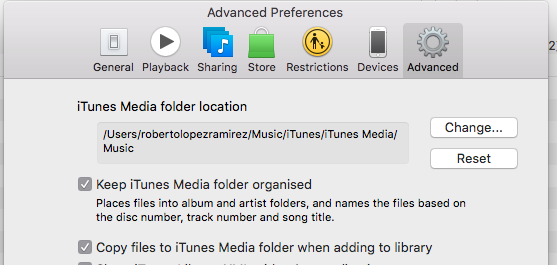
I think that iTunes actually uses Album Artist to automatically organise your mp3 files. Songs are saved on your harddrive (iTunes Media folder) in the subfolder Album Artist/Album Title.

So if you change the field, the path to the mp3 file will be changed/renamed with the consequence that Rekordbox can no longer find it.

You can change the Auto Organise setting in iTunes > Preferences > Advanced. See screenshot attached. Or you can decide not to change Album Artist (or Artist or Album Title) anymore.

Roberto LR 0 votes
Comment actions Permalink
0
Avatar

Hi Roberto,

Thank you so much for your respons. I'll make sure to uncheck the first box. Then I'll only have the third one checked. 

I really appreciate you responding. 

Kind regards from the Netherlands.


One Eyed Jack 0 votes
Comment actions Permalink
0
Avatar

Next time I'll respond in Dutch.


Succes verder!  ;-)

Roberto LR 0 votes
Comment actions Permalink