Have a feature request or suggestion? Post your idea here!

Post

5 followers Follow
0
Avatar

XDJ-RX analysis disappeared

Hi,


Yesterday I was recording a mix with my (new) XDJ-RX firmware 1.80, all my music has been analysed well with Rekordbox 4.0.5 and exported to USB.

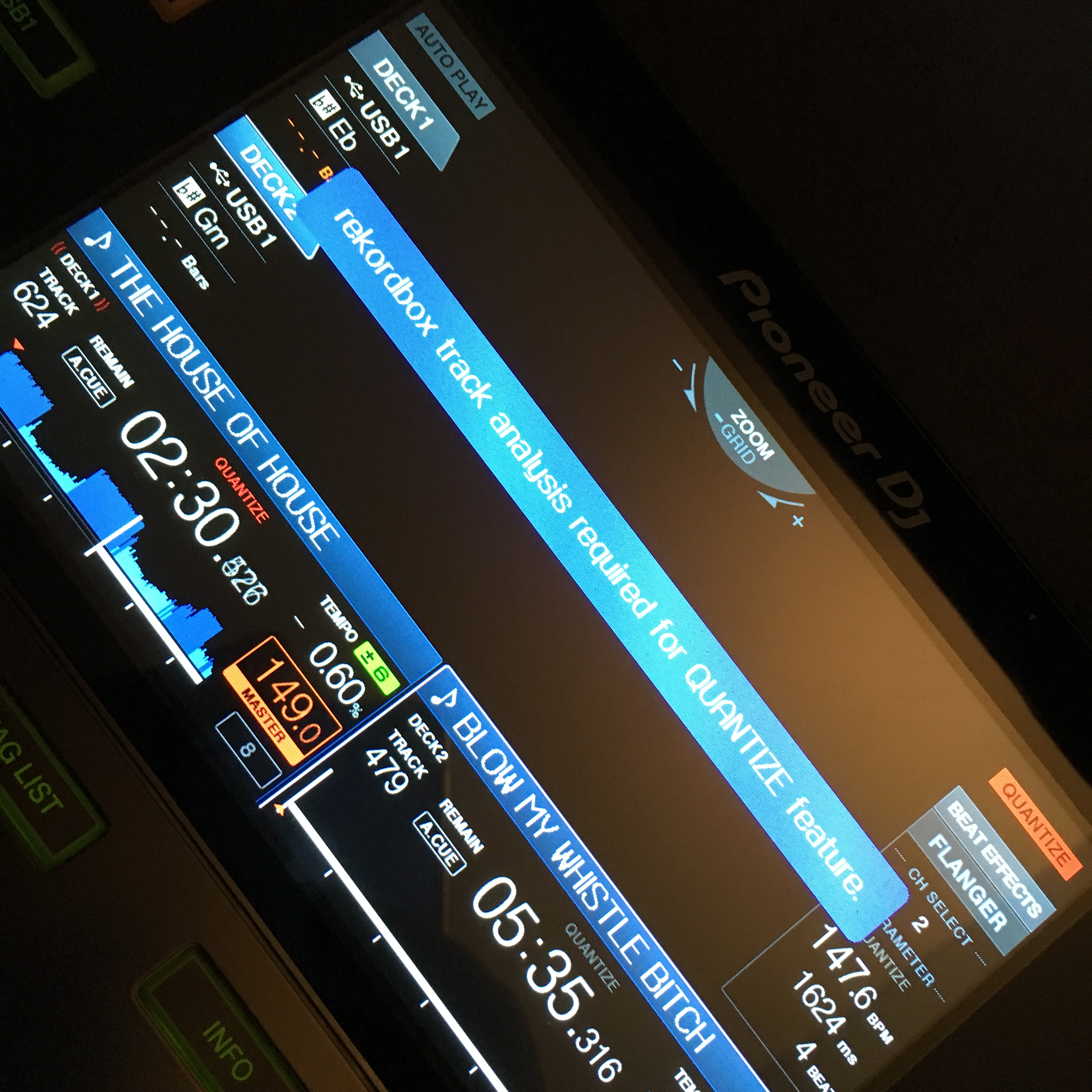
After playing an hour, I got a message when I loaded a track "rekordbox track analysis required for quantize feature".  No waveform appeared.  Turning off quantize function also resulted in non-displaying the wave form.  Tried to load another track, same problem.  More... ALL tracks I was loading had the same problem.  Shut down the XDJ-RX and reload same tracks from USB -> problem fixed.

Luckily this was at home!  Anyone had the same problem?

ceepee-in-the-mix

Official comment

Avatar

Unfortunately I will have to mark the support issue as closed due to inactivity and no response. Should you require assistance in the future, please post a new topic and link back to this one for reference.

Pulse
Comment actions Permalink

Post is closed for comments.

26 comments

0
Avatar

@Christophe > What is the make / model of USB drive you were using?

Pulse 0 votes
Comment actions Permalink
0
Avatar

a brand new TDK type TF10 USB 2.0 stick 32GB ... formatted FAT32 and filled for 14GB with 1850 music tracks, spread in about 20 playlists

ceepee-in-the-mix 0 votes
Comment actions Permalink
0
Avatar

@Christophe > Do you have a different USB drive you could try? It sounds to me like a possible read/write error on the drive, but just to be sure, another device might help diagnose the problem.

I went looking for information on that particular model of drive and it seems TDK (Imation) no longer makes them, and any information I found on 3rd party sites didn't make it seem like it's a high-performance drive. It could very well be that the drive itself, or the memory chipset manager, has a conflict with the XDJ-RX. I've seen many SanDisk drives with similar issues.

Pulse 0 votes
Comment actions Permalink
0
Avatar

Ok I'll try. Replaced it yesterday with another stick, same type, but formatted HPS+ ... will see if it's the same problem.  Else I'll try another one ;-) Keep u posted. Thanks!

ceepee-in-the-mix 0 votes
Comment actions Permalink
0
Avatar

Hi all, I just get Xdj RX and I have the same problem now.. All of my music was analyzed and workd fine but somehow during play XDJ rx is loosing analyzed information.. And it happend allready few times since yesterday. I am using Sandisk Extreme 3.0

Jan Krzyzanowski 0 votes
Comment actions Permalink
0
Avatar


This is what's happening. Getting this error. All future loaded tracks won't load a waveform anymore. Shutdown XDJ-RX, Reboot = problem fixed on the same tracks.

ceepee-in-the-mix 0 votes
Comment actions Permalink
0
Avatar

@Christophe > If you could please try a different TYPE of stick. Using the same make/model but formatting differently doesn't help if the problem is with the chipset or memory controller.

@Jan > What is the capacity of that drive and what firmware version are you using on the RX?

Pulse 0 votes
Comment actions Permalink
0
Avatar

I already tried totally different stick @Pulse. 3rd different stick, 3rd time same problems :-(

ceepee-in-the-mix 0 votes
Comment actions Permalink
0
Avatar

Does it happen with random tracks or consistently with the same tracks?

Pulse 0 votes
Comment actions Permalink
0
Avatar

It 'suddenly' happens (as from then on, on every track) -- reboot -- try same playlist -- no problems occur .... until ... 'suddenly' ... 'somewhere' else :-(

ceepee-in-the-mix 0 votes
Comment actions Permalink
0
Avatar

You said that you tried two TDK drives, what is the make/model of the 3rd drive you tested? While there are many different brands, the internals are made by only a handful of factories.

Pulse 0 votes
Comment actions Permalink
0
Avatar

It's an Imation. Exact type not known (I'm not at home right now).

ceepee-in-the-mix 0 votes
Comment actions Permalink
0
Avatar

Is there a list of fully supported USB sticks?


ceepee-in-the-mix 0 votes
Comment actions Permalink
0
Avatar

@Pulse I was using 1.6 but I've updated today xdj rx to 1.8, formated usb stick and loaded music again. So far ok, but I had a chance to play only for an hour. I dont really want to change usb stick because it is really fast, and I have been using it in Cdj 2000 Nexus without any issues. 

Jan Krzyzanowski 0 votes
Comment actions Permalink
0
Avatar

@Jan > Thanks, keep us posted - some of these issues are a bit harder to nail down than others!

Pulse 0 votes
Comment actions Permalink
0
Avatar

SDCZ80-032G-G46 Sandisk Cruzer Extreme 32GB - USB 3.0 max reading speed 245 MB/s max writing speed 100 MB/s ... Good choice Pulse?


ceepee-in-the-mix 0 votes
Comment actions Permalink
0
Avatar

hi ii   the same problem in my xdj rx.......  

how to do  ..


Navratri Dandiya 0 votes
Comment actions Permalink
0
Avatar
I got a message when I loaded a track "rekordbox track analysis required for quantize feature".  No waveform appeared. 

please help me how to do

Navratri Dandiya 0 votes
Comment actions Permalink
0
Avatar

Hi all, 5 days ago I bought Xdj RX and I have the big problem now. Of course all of my music was analyzed by latest rekordbox and worked fine but during play on XDJ rx after a short time (~1 hour) is loosing analyzed information (no waveform).

And it happened already few times since yesterday. I am using brand new Kingston 3.0 8 gB. Please help me...

Interestingly shut down the XDJ-RX and reload USB -> problem fixed --> unfortunately only for few minutes. 
Please solve this problem.

Sorry for my english.

remik737@gmail.com

Remigiusz Włodarczak 0 votes
Comment actions Permalink
0
Avatar

Hi All, 

just want to let you know that I had no more problems with my usb stick since I updated xd rx to 2.0 firmvare, format stick to fat32 partition (full format) and loaded music again from rekordbox . I am using Sandisk extreme 3.0 32gb. Hope this will help

Jan Krzyzanowski 0 votes
Comment actions Permalink
0
Avatar

@Christophe > The engineers have asked if you could create a disk image from that drive and send it for inspection -- if you are on a Mac, you can do so using the Disk Utility in the Applications > Utilities folder.

Pulse 0 votes
Comment actions Permalink