Have a feature request or suggestion? Post your idea here!

Post

7 followers Follow
0
Avatar

CDJ2000 Nexus Emergency Loop 0060 Error

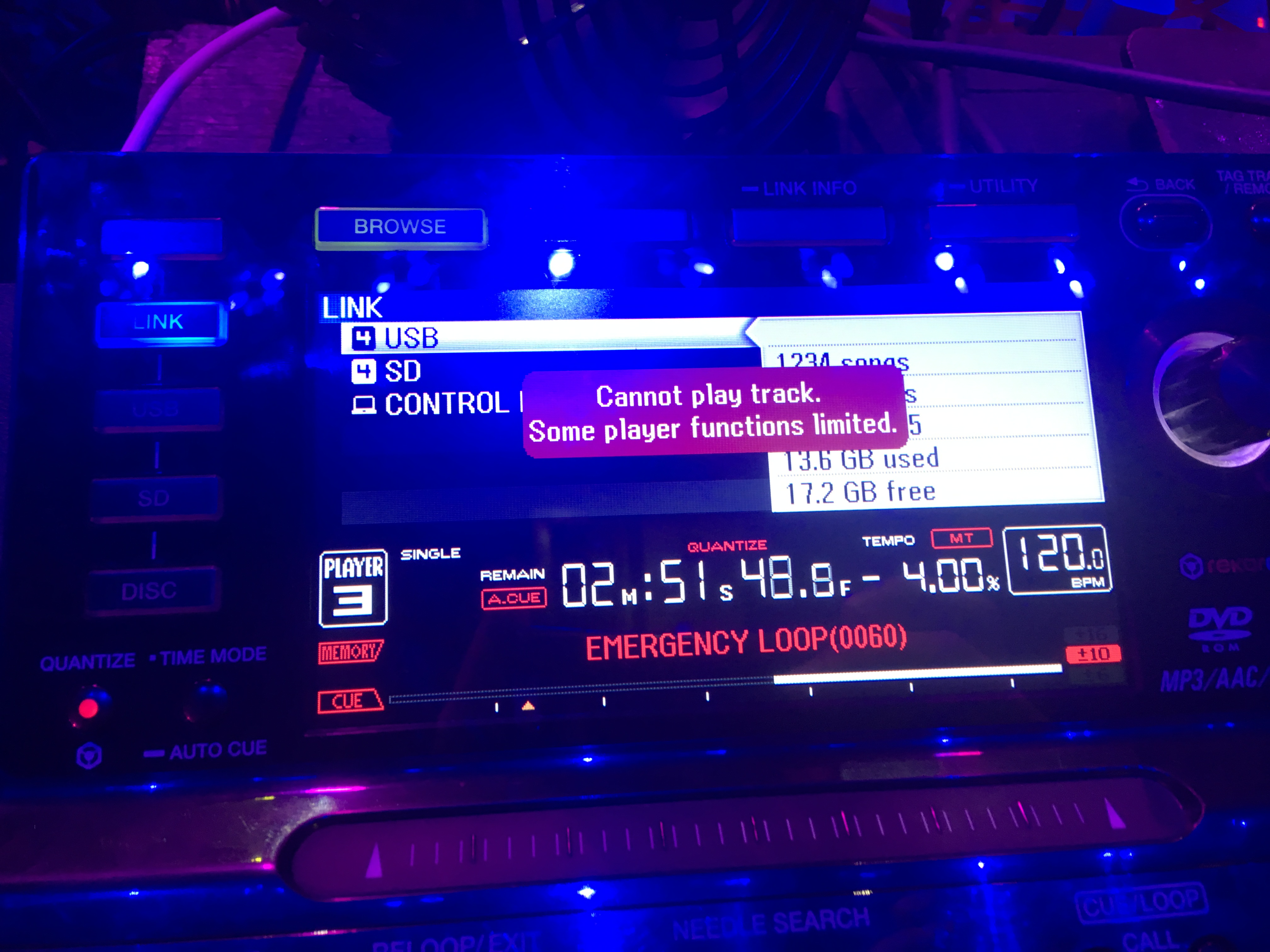
Last week I was DJing at a club, and there were 4 CDJ2000 Nexuses linked. During my set, one of the CDJs went into an emergency loop (Cannot play track, some functions limited), and went into emergency loop (0060). I've seen this happen from a bad link cable / port, or a hub, but this time the file source was the USB stick plugged directly into the deck. The firmware was only 1.10 or something like that, but would that be the cause of the issue?

Anton Tumas

Post is closed for comments.

20 comments

0
Avatar

The 0060 error is seldom seen; please try updating the firmware on ALL players (current version for CDJ-2000NXS is 1.25), and try again with the same track from the same source in the same player.

What was the make/model of the USB drive used at the time?

Pulse 0 votes
Comment actions Permalink
0
Avatar

The USB drive used was PNY Turbo 256GB USB 3.0 Flash Drive. It has never generated this error with this configuration. Why would the firmware 1.10 cause an issue with 0060 error?

Anton Tumas 0 votes
Comment actions Permalink
0
Avatar

Hello Anton,

As the first step for sorting out your issue, please download and install the latest firmware 1.25 from here.

If you still have any issues, please post it here.

Thank you very much for your kind cooperation.

Best regards,

CRM, Pioneer DJ

Keiko 0 votes
Comment actions Permalink
0
Avatar

Guys, what's the verdict for what actually caused this issue? Is it outdated firmware? Just want to avoid this from happening again in the future.

Anton Tumas 0 votes
Comment actions Permalink
0
Avatar

Hi Anton,

Yes, we have fixed some Loop error issues in an earlier version of the firmware.

In each update some issues reported was fixed so please update to the latest version to avoid such old issues.

If it does not solve the issue, please get back to here.

Thanks,

CRM, Pioneer DJ

Keiko 0 votes
Comment actions Permalink
0
Avatar

Hi


I have the same problem with one of my cdj-2000 nexus , when i play from any usb or hard drive suddenly it s going to emergency loop and my usb light turning of ,i have to take the usb out and put it again , i check the the usb connection the usb fits in it perfectly i almost update the player to latest firmware which is 1.30 buy have this issue can you help with this problem .

wait for your kind reply

thanks

parsasaffarzadeh 0 votes
Comment actions Permalink
0
Avatar

Hello. I faced the same problem on two players cdj 2000 .. firmware 1.41. Is there a solution to this problem? 

Use just usb, without link 


IGOR CHERNELLE 0 votes
Comment actions Permalink
0
Avatar

@IGOR > Several questions...

1) Which version of rekordbox did you use to export that song?

2) What is the make/model of the USB drive on which that track is loaded?

3) What is the file format / type / bitrate / sample rate of that song, and which encoder was used to create it?

4) Does it happen every time you load / play that song?

Pulse 0 votes
Comment actions Permalink
0
Avatar

Hey there, I have the same problem with firmware 1.41.

Version Rekordbox: 4.5.0

Gets error when loading a WAV file.

USB Model: CORSAIR Survivor 3.0

Yes it happens sometimes when the track is loaded.


Mike B 0 votes
Comment actions Permalink
0
Avatar

@Mike > Corsair Survivor USB drives are known to be problematic; in fact, we've found most of them won't even read in XDJ units when the same database will read just fine with CDJs.

Please try using a different USB drive and see if these issues persist.

Pulse 0 votes
Comment actions Permalink
0
Avatar

I had the same problem with a Kingston USB, so i don't think the CORSAIR USB is the problem, i didn´t know CORSAIR USBs had problems on XDJ, because CORSAIR USBs are what the biggest name djs use on their gigs, on CDJs.

In this article are people saying that have the same problem with a different usb, and different firmware on CDJ, so i don´t know what is causing the problem here.


I formatted the CORSAIR USB on my Mac in MS-DOS, and exported everything from 0 with Rekordbox 5.0, and re-analysed old tracks that had waveform analysis from older rekordbox versions, i hope i don´t have the problem again, only time will tell, please give us feedback on this issue.

Mike B 0 votes
Comment actions Permalink
0
Avatar

With Corsair, only the Survivor series seems to be an issue; the GTX drive (which is one of my top picks) is amazing and has never had a problem.

It could well be there is another source of the problem, but it would certainly help to have the additional information, specifically regarding the track itself:

What is the file format / type / bitrate / sample rate of that song, and which encoder was used to create it?

Just saying "WAV" is only one tiny portion of that detail. Thanks!

Pulse 0 votes
Comment actions Permalink
0
Avatar

Its strange because i see most top world djs use the Survivor versions, and they use them at the moment.

About the file format, i think this happen to me with a mp3 320kbps file using a Kingston USB.


About the WAV file i mentioned here are the details:

Type: WAV

Sample Rate: 44100

Bitrate: 16

It was exported from Ableton

Mike B 0 votes
Comment actions Permalink
0
Avatar

Yeah, again, we don't recommend the Survivor series - while they may work with most CDJs, the fact they don't work with XDJs is reason enough for us to suggest users avoid them.

Do you have any metadata tagged on those WAV files?

Pulse 0 votes
Comment actions Permalink
0
Avatar

@walmendez > You haven't provided any other information ...

What hardware are you using?

What version of firmware is installed?

What source are you playing from (USB drive / SD card / linked player / linked rekordbox)?

What is the filetype / bit depth / sample rate of the song you're playing?

Pulse 0 votes
Comment actions Permalink
0
Avatar

Was this issue ever resolved because we are currently experiencing this

Tim Gregg 0 votes
Comment actions Permalink