Have a feature request or suggestion? Post your idea here!

Post

4 followers Follow
0
Avatar

Rekordbox/XDJ1000 - Activate loops later in track

Is there a way to pre-activate a loop that will be upcoming or activate a loop once you arrive at it?

Here's what I mean - say you have a track with a loop saved in rekordbox (as either Hot Cue Loop or a Memory Loop) halfway through the track that you know you would like to activate once you get there. You want to play the first 64 bars of the track as normal and then turn the loop on once you arrive at that point in the track without stopping playback or jumping back to the start of the loop.

In Traktor you can just activate the loop once playback reaches the loop band but the only ways I have tried to activate it on the XDJ1000 either involve the Call Memory point or Hot Cue Loops which jump to the start of the loop (ruining the beat-matching) and the Reloop button doesn't activate it at all unless it was the last loop played. If I try to activate the loop and then rewind/needle drop back to where I want to start the track the loop just traps me within it.

Any help would be great; there must be a way to do it either on the rekordbox preferences or the XDJ itself without having to input the loop on the fly but, being the Pioneer n00b, that I am I just haven't figured it out yet!

Jack Barnett Answered

Official comment

Avatar

@Jack > Yes, you can!

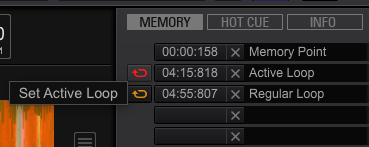
With your track loaded, create a loop, store the memory point, click the orange loop button to make it red. The red loop is the active one - I've labeled mine so you can see them:

This can be done in either EXPORT or PERFORMANCE modes.

Pulse
Comment actions Permalink

Post is closed for comments.

4 comments

0
Avatar

Setup a cue point (not a hot cue, just a cue point) in Rekordbox. You can then define that point to automatically loop once the track reaches that part of the song. Make sure your XDJ is updated to the latest firmware and you're using the latest Rekordbox. In older Firmware, there was a nasty bug that would cause the autoloop to shrink to 1/32 once the song got to that point, essentially creating a very nasty noise.

lostnthesound 0 votes
Comment actions Permalink
0
Avatar

I have the same question as above for XDJ RX2:


Is there a way to pre-activate a loop that will be upcoming or activate a loop once you arrive at it?


I usually set all my hot cue loops from RX2 itself, directly on USB.

How do I do the above without syncing back to Rekordback on my computer and then editing/setting new memory loops?

Anuraag Gupta 0 votes
Comment actions Permalink
0
Avatar

If you create a HOT LOOP on your RX2, that will have a loop stored to a hot cue, but it won't be recalled automatically, you would have to press that hot cue (hot loop) pad for it to play. Even if you stored it as a loop to a memory point, it won't activate the loop unless that memory point is called, but that isn't an instantaneous recall, and you wouldn't want to do that while playing the song live.

The only way to CREATE an active loop is through rekordbox.

You can toggle an existing memory loop to become an active one.

Pulse 0 votes
Comment actions Permalink