
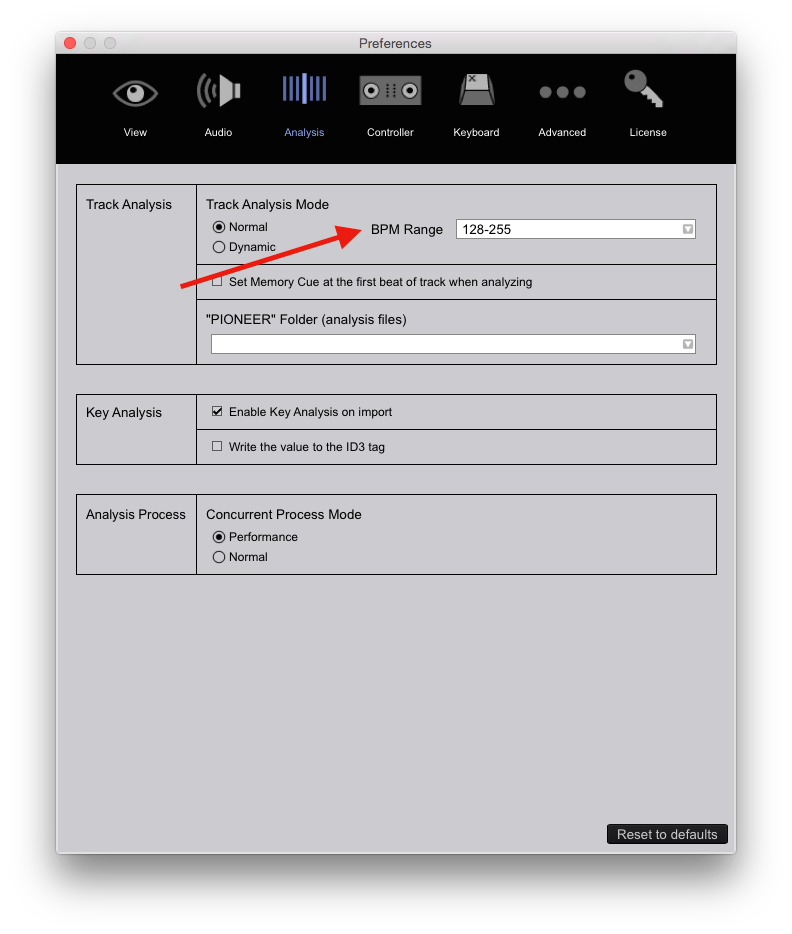
@Brandon > Are you selecting the proper BPM range before analyzing?


Comment actions

Hey,
ive added my music, edited & analyzed it.
my BPM values had to be doubled up, which I did in the grid section.
when I saved and locked track, it was fine, sitting in the 170BPM range.
i exited out the program, came back later, and some how they had all halved in value, to the 85BPM range.
i went in and added it AGAIN, manually, went away again......and it did it to me again..... Everything halved ??????
Post is closed for comments.
@Brandon > Are you selecting the proper BPM range before analyzing?

Hi Mark,
I had recently an interesting discussion with Roel, see the request #4614, and discovered that the bpm range selection does not force rb to use the range specified by the user. Basically rb takes the bpm range as a suggestion buf if it thinks that the bpm is outside the range specified by the user, it will ignore the user setting.
As I described in #4614, I have an old disco track at 85 bpm but rb has unilaterally decided that the track is at 170 bpm no matter which BPM range I select :D
I don't consider it a bug or a wrong behavior, it might be okay for some users and might be annoying for others, however it should be explained in the user manual.
Cheers,
J
Hi Brandon,
in my case rb goes the other way, 170 instead of 85, but after locking my track the bpm does not change again. You might want to file a support request because this might be a bug: after locking the track beatgrid and bpm should never ever change. By the way I'm on version 4.0.5 on OS X 10.10.
Kind regards,
J
Thanks for the response
so half my music is house and the other is drum & bass
do I switch between ranges when analyzing
Thanks J
will look into it
@Julia > Thanks for sharing those details on the BPM range and for assisting your fellow forum-user. It's always nice to people helping each other out :) However; I must ask that, in the future, you refrain from recommending other users file support requests before we exhaust all troubleshooting options. This can put an unnecessary burden on the support team. If the forums users and moderators are unable to assist in solving an issue, a support ticket will be created. We appreciate your contributions. Thank you for understanding :)
@Brandon > Yes. I recommend analyzing all of your house tracks separately from your D&B, selecting the appropriate BPM range for each. But BEFORE doing this please take the following steps:
Thank you Mark
will give it a go
Legend....worked like a dream !
problem solved
thanks Mark
much appreciated
Looks like all you needed was a reboot :)