Official comment

Correction, my good sir!
The PARAMETER 1 buttons (below the loop section) jump between memory points! :D
Comment actions

Totally newbie question I'm afraid, but neither the manual or a YouTube trawl has revealed the answer.
In RekordBox I can define Hot Cue points easily:

When the DDJ is conencted, the cue points light up the respective performance pad buttons just fine...
But, how do I access saved memory loops on the DDJ?
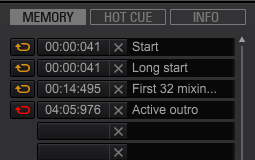
Sometimes I want to start a track in a loop (for an easy mix in), but cannot figure out how to access those slots. I'm sure this is proper obvious but after 10 years with my CDJ1000's I'm still adjusting...!
Correction, my good sir!
The PARAMETER 1 buttons (below the loop section) jump between memory points! :D
Post is closed for comments.

they are only accessible from the laptop, there are no buttons on the SZ to jump to memory slots
Not the answer I was hoping for obviously, but thanks for clarifying. Yes, I see now in Rekordbox I can switch from PAD MODE 1 to MEMORY, which displays them in Performance Mode.
I can easily to copy them into Hot Cues anyway so its not a big deal.
Thanks very much :-)
maybe you can remap some buttons you don't use on the controller to use them for memory points
thats good to know Pulse, there was another thread a few weeks back that you had mentioned there was none so i was going by that, sorry to misinform you TheEvilDoctor
It might have been an update or simply something I had missed before - but I tested it and the PARAMETER 1 < and > buttons certainly do call the memory points!
Super - thanks for your follow-up, much appreciated :-)