
@ preferences --> CDJ & Device. tab: Device.
Is the "Library" set to "XDJ-R1" (NOT CDJ, XDJ-1000/700/RX/AERO)?
Then if you export to USB, then it should work.
Comment actions

I just got an XDJ R1 and have been trying to use rekordbox unsuccessfully.
My problem is that after i analyze and export a playlist to a usb drive and launch remote box, remote box only finds my files inside a "contents" folder, so i cant search by artist or track or bpm, only through folders which makes it really annoying.
Any ideas? I'm using a mac and a 64gb usb drive from sandisk which i believe is formatted as FAT32 and is partitioned.
Post is closed for comments.
@ preferences --> CDJ & Device. tab: Device.
Is the "Library" set to "XDJ-R1" (NOT CDJ, XDJ-1000/700/RX/AERO)?
Then if you export to USB, then it should work.

Tal, did J.P.'s suggestion work for you?

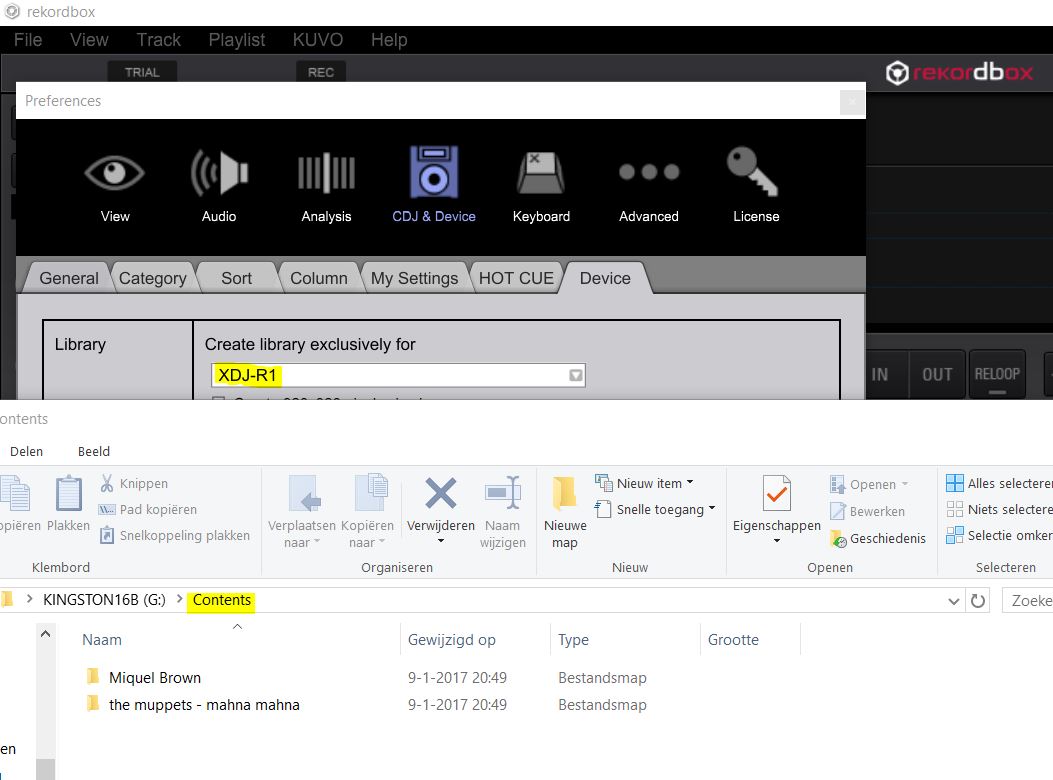
- See image above -
After refreshing Windows 10 and installing RB 4.2.5 (latest) all tracks are exported to the CONTENTS folder. XDJ R1 can not handle this; no playlists available...
Device Settings; XDJ R1 exclusively
USB 16GB FAT32 (reformatted)
Before refreshing and installing RB 4.2.5 this was not the case, same USB stick.
My gig was totally screwed because of this. Please advise PioneerDJ!


