
Have a feature request or suggestion? Post your idea here!

Post

3 followers Follow
0
Avatar

Genre How I can change the data base of genre

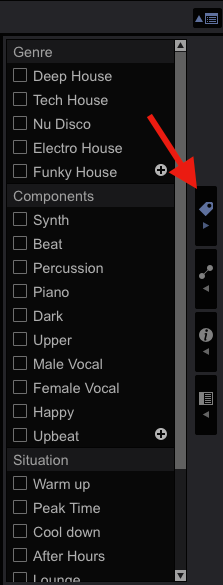
Hello I tried to change my genre (see picture in the right hand) and nothing change in my genre left side ?

Can we edit genre ?

Best regards

dom 
 

Pisino Answered

Official comment

Avatar

@Dom > The picture you attached shows the Category Filter.  Those genres on the left side are simply a list compiled of all the genres that your tracks are tagged with.  

For example...
Let's say your entire library only has 10 tracks in it.  If 5 of those tracks are tagged with the HOUSE genre, 2 of them are tagged with ELECTRO, and 3 of them are tagged with TECHNO, the category filter would show you 3 genres.  House, Electro and Techno.

I hope this helps.


@JP > Actually, what you're referring to is the Track Filter.  The My Tag configuration window is not show in his picture.  
Mark Gallo
Comment actions Permalink

Post is closed for comments.

3 comments

0
Avatar

The first 3 colums are the "Category Filter"

With "Track Filter" you can choose what you see @ "My Tag"


You can choose that above the text "Album" @ your picture.


I hope this helps...


J.P. Ownman 0 votes
Comment actions Permalink
0
Avatar

@Mark: Correct!

I hope that explains a lot.


I refer @ the button you can see the My Tag filter what you see as "4th" My tag configuration window @ the picture.


If you want to change the "main" genre, change it in your "Collection". If you want add a sub-genre, simply do that in "My tag configuration window"


Then you see the difference.

J.P. Ownman 0 votes
Comment actions Permalink