Have a feature request or suggestion? Post your idea here!

Post

4 followers Follow
0
Avatar

MONO config with DDJ-SX and rekordbox DJ Performance

Hi,

I have a DDJ-SX and I've just moved from Serato DJ to rekordbox DJ Performance, which in my opionion is better. I have a single active speaker that I connect to my console XLR left output and I need to set up the output as MONO; in Serato I just used to check the Mono option in the mixer settings.

When I use rekordbox DJ in Export mode, in the audio settings I can set up separately the left and right channel of the master mix and assign both of them to the left XLR output. However, when I go to Performance mode, I'm not able to assign the global master output only to the left channel. In the list in the Audio settings now I have only a generic Master item (not the two separate Master L and Master R) and in the drop-down list I can only select a generic Master output of the console (not the two separate channels L and R).

Please help me, this is a very important and fundamental issue for me, I don't want to go back to Serato because of that.

Hentoneuf Answered

Official comment

Avatar

Unfortunately the easiest solution would be to have a mono function included in mixer / audio preferences, but as that is a feature still waiting to be implemented, the work-around is to use ASIO4ALL which will allow you to assign two outputs from the software to one output on the hardware. The problem here becomes if you were planning on using each of the master outputs as mono feeds to something, your second output would have no signal.

Here's a screen-shot using the RR: 

Let us know if you need further assistance with this issue.

Pulse
Comment actions Permalink

Post is closed for comments.

12 comments

0
Avatar

Simply go into Preferences and click the Audio icon.  Under the output channels send both the L and R channels to whichever single output you plan on using.  For example, the DDJ-RX in the image below is outputting both channels to the LEFT master output.


Mark Gallo 0 votes
Comment actions Permalink
0
Avatar

Hi Mark, thank you very much for your answer.
As I said in the first post, the problem is that in the section 'Output channels - Master Output' in performance mode I have a unique item, not the two separate L and R items like the screen you posted, and I can only select the global master stereo output.
I don't know if I've been clear enough, unfortunately now I'm not at home and I cannot take a screenshot.

Hentoneuf 0 votes
Comment actions Permalink
0
Avatar

I've managed to take a screenshot of my audio settings window in Performance mode.

Here is what it looks like:

The drop-down list of the Master Output option is this one:

Please help me, I really need to be able to set up the software to output as MONO.

Hentoneuf 0 votes
Comment actions Permalink
0
Avatar

This might actually be a Windows issue.  I'm going to have to defer to Pulse on this one.  I'll send him a note to take a look at this for you.

Mark Gallo 0 votes
Comment actions Permalink
0
Avatar

Pulse, thank you very much for your suggestion.

I tried and installed ASIO4ALL drivers and setted up everything properly as you suggested to have mono output only on the left audio connection.

Well, as expected, I obtained a mono output on the left and no audio on the right but now I have another issue: my headphone master mix cue, when activating 'MASTER CUE' button, plays only in the left side of the headphones, which is a horrible thing for me! I think that it is related to the fact that the master, when pressing 'MASTER CUE', is sent to the headphones exactly as it is.

In addition, when using these generic ASIO4ALL drivers, MASTER CUE and CUE volumes are not at the same level, like they are with the OEM driver.

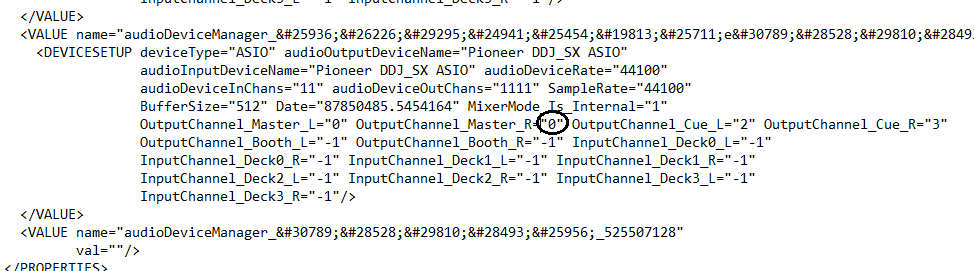
Instead of using these generic drivers, I tried also to keep on using the standard drivers and to modify the rekordbox3.settings file in order to obtain the same results:

This method works, but again the master cue in the headphones is only on the left.
Is there any way to solve this problem? For example, if with some particular syntax I could specify both "0" and "1" values together for the OutputChannel_Master_L and OutputChannel_Master_R (something like "0" AND "1"), everything would be ok.

As you said, it would be great if the software had a simple mono option to check into the settings, as both Serato and Traktor have.

Hentoneuf 0 votes
Comment actions Permalink
0
Avatar

Ah, yeah, I didn't think about the fact that cueing the master would result in a left-only signal, but I have two solutions for you on that...

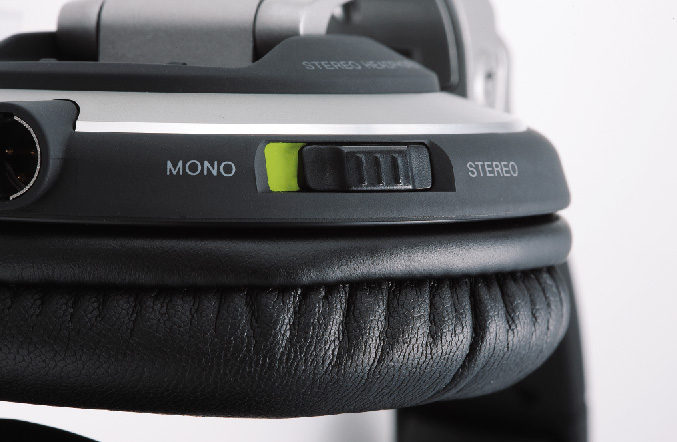
1) This switch:

2) The ghetto version of that switch: pull the headphone plug out of the jack just a bit so the contacts aren't in the right place, but instead you get signal to both ears.

Again, not ideal solutions, but we've put this suggestion forward to the product team and hopefully we'll see it included in a future update.

Pulse 0 votes
Comment actions Permalink
0
Avatar

What if instead I stayed with the default configuration and I connected both L and R outputs to my speaker? It's a JBL EON 515 and it has three separate inputs designed to be capable to be used all at the same time (each input has its own volume control knob).

Hentoneuf 0 votes
Comment actions Permalink
0
Avatar

Yeah, you could do that, but there's a risk of cancellation or summation of the waveforms depending on the input phase alignment. Give it a try.

Pulse 0 votes
Comment actions Permalink
0
Avatar

Thank you. I've quickly tried and connected both L and R outputs to my speaker and everything seems to be fine with no cancellation, even if I still need to check that more accurately.

Neither this solution is ideal thoug. Looking forward to seeing the Mono function implemented in one of the next releases, as it is in Serato!

Hentoneuf 0 votes
Comment actions Permalink
0
Avatar

I am currently checking to see if there is a mono option yet for Rekordbox Performance while using the DDJ-SZ, DDJ-SR and the DJM-S9. I recently switched to rekordbox using all 3 units but miss the Mono feature. Other software offer the feature which is great when doing a venue with stereo setup. It’s very noticeable on music with extreme sound separation. Please help!

Aaron Thomas 0 votes
Comment actions Permalink