
some tracks also start to disappear from my playlists never to appear again, also had this on the previous version which is why I upgraded
Comment actions
IN my playlist tracks start to self-replicate and then I have multiple versions of them and then I go to delete and they wont delete so I have about 6 versions of two different tracks in my playlist.
How Do I uninstall this and go back to the older version which also bugged but less so....
Post is closed for comments.
some tracks also start to disappear from my playlists never to appear again, also had this on the previous version which is why I upgraded

@Lynchun > Sorry, I don't quite understand the problem - are the playlists on your export device or within rekordbox? Do the tracks replicate after exporting? What is the step-by-step in reproducing this issue?

I am experiencing this issue too.
Within Rekordbox, playlist editing:
- Tracks will often self replicate within the playlist. It will be the same file (a name changes affects all iterations), but I am not instructing it to replicate.
- Certain tracks will not delete from the playlist. Furthermore when attempting to delete a track, it will *arbitrarily* delete a different track within the same playlist, from the playlist. The file remains in my collection.
This is game breaking. We cannot confidently edit playlists. Please address ASAP.
I should point out that I have been adding tracks to a playlist by dragging over from the finder. Adding tracks to playlists from my Rekordbox collection hasn't caused any dupes yet.
Restarting the program, and my computer, does not fix this issue.
I have uploaded a video of the 'wrong delete' bug in action:
https://www.dropbox.com/s/7cly5xyen1bup6g/File%20Jul%2001%2C%201%2041%2058%20PM.mov?dl=0

I have the same problem :(

Same problem here. It deletes track you dont want to. I agree w Paul.. this really is game breaking. Possibly the worst bug Ive ever seen in this software!
I'm having to create new playlists and importing all but the track I want deleted. This is a pain in the ass!
I've gone back to the previous version: https://forums.pioneerdj.com/hc/en-us/community/posts/207462346-rekordbox-4-2-0-Freez
yes I had to go back to the previous version too guys
PULSE> the duplication issue appears in the playlist on my mac (haven't tried the USB stick), there isnt a specific way to replicate, these are the steps I took: A. Upgraded to 4.2, B opened up my playlist, C. tried to move a tune in its sequence (as usual to rank them higher on my playlist.)...then it duplicated the track four times, then I tried to move another track and it also duplicated it four times too....then I started deleting them......... at first they didn't delete BUT when I looked at the number of tracks in the playlist there were LESS so it appeared something was being deleted but I couldn't see which track.....I kept going and maanged to delete two of each of the duplicated tracks but I couldn't eliminate the final duplicate of each track.....see image....at bottom.
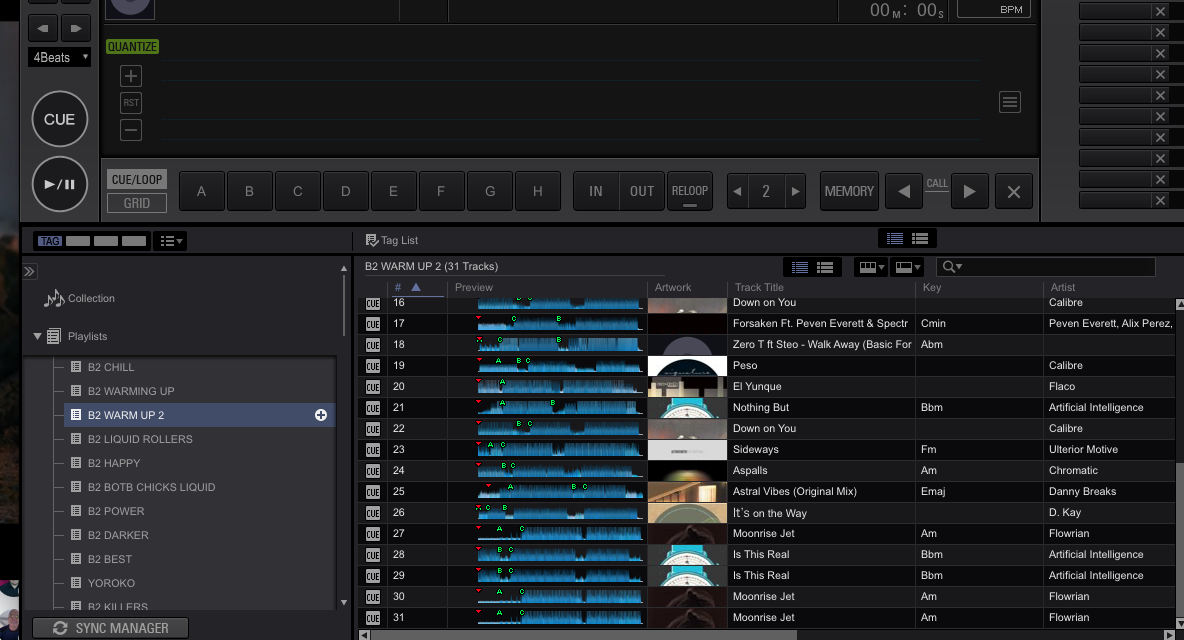
the duplicates
Sorry guys, it would seem there are a number of users experiencing this issue - our current recommendation is to downgrade to 4.1.2 until the rekordbox team can correct this bug. Additionally, you can revert to a previous version of your database through an automatically created backup in the rekordbox folder:
Win 7/8/10: C:\Users\yourusername\AppData\Roaming\Pioneer\rekordbox
OSX: /Users/yourusername/Library/Pioneer/rekordbox
Rename datafile.edb to datafile.edb.old
Rename datafile.backup.edb to datafile.edb (removing .backup)
rekordbox automatically creates a backup each time you launch the software; if you have opened / closed v4.2.0 more than 3 times you may not be able to recover your database in this manner. Please check the date / time of the backup files in order to choose the most appropriate version.

Where can I find the installer for 4.1.2 for Mac? This bug really screw me this past weekend.

