Have a feature request or suggestion? Post your idea here!

Post

2 followers Follow
0
Avatar

Rekordbox Video Clip Storage Location

Hi Guys. I've just picked up an RZX and wondered how Rekordbox on the Mac manages video files - does it merely stream them from wherever they are stored on the hard drive, or are they imported into a specific Rekordbox folder? I hold my Rekordbox Data on an external drive so I can use it with my desktop and laptop, and although I have video activated in Rekordbox, no Video folder appears on the external drive alongside my tunes and samples etc. Please explain. Many thanks 

Illumashroom

Official comment

Avatar

Wherever they live is where they come from - rekordbox doesn't manage the file locations, simply indexes them when you import them and builds a waveform overview and adds metadata to the database. You can have videos on multiple drives in multiple locations and they'll all be available within rekordbox.

Video and audio files can live along-side each-other in the collection, just look for the "film" icon on the far left column. In the current version, playlists may only contain one media type, but we hope a future update will resolve this issue.

Pulse
Comment actions Permalink

Post is closed for comments.

3 comments

0
Avatar

Thanks Pulse, that's completely clear for me now. Looks like I'll be storing my video alongside my audio on the external data drive so I can share between the Macs. Cheers

Illumashroom 0 votes
Comment actions Permalink
0
Avatar

Exactly, that's the best solution.

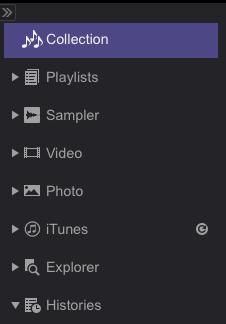
I should also mention, in Performance mode, you'll see separate filters in the tree on the left to show that content by type:

Pulse 0 votes
Comment actions Permalink