Have a feature request or suggestion? Post your idea here!

Post

6 followers Follow
0
Avatar

DDJ-RB cant Pre-Listen

I cant hear anything through my headphones when i press the cue button...

I know there are already some posts with this topic... but yeah...

Ty 4 helping me!

Lrn

Official comment

Avatar

Hello Lrn,

DDJ-RB cannot be updated because you have not updated Windows or you failed windows update. Windows will have the Pioneer DJ authentication if you update your Windows.

Will you please click on Windows Update from Start menu to update Windows?

This is the only solution to install the DDJ-RB driver.

After that, please follow Pulse's instructions for installing the driver.

If you have any questions or concerns, please let us know.

Best regards,
CRM, Pioneer DJ

Keiko
Comment actions Permalink

Post is closed for comments.

12 comments

0
Avatar

So a track is playing and going to the channel and out to the master right?  Also what computer os are you using?

Jay 0 votes
Comment actions Permalink
0
Avatar

The Problem is i know  

that i have to change this thing into DDJ-RB Asio.

But every time when i choose DDJ-RB asio it shows me this


 (there is written "failed opening "DDJ-RB ASIO")


Lrn 0 votes
Comment actions Permalink
0
Avatar

Try this-

Two things for you to try...

First:

  1. Unplug your RB
  2. Uninstall your RB driver
  3. Restart your PC
  4. Run any Windows updates you may not yet have installed
  5. SHUT DOWN (not restart) your PC
  6. Install the RB driver
  7. Restart your PC
  8. Open rekordbox
  9. Connect your RB
  10. Check the preferences

If that doesn't work...

Try putting Windows into Disable Driver Signing mode and tell me if that works:

  1. Click the Start menu and select Settings.
  2. Click Update and Security.
  3. Click on Recovery.
  4. Click Restart now under Advanced Startup.
  5. Click Troubleshoot.
  6. Click Advanced options.
  7. Click Startup Settings.
  8. Click on Restart.
  9. On the Startup Settings screen press 7 or F7 to disable driver signature enforcement.

FYI: After restarting again, driver signing will be re-enabled.

Jay 0 votes
Comment actions Permalink
0
Avatar

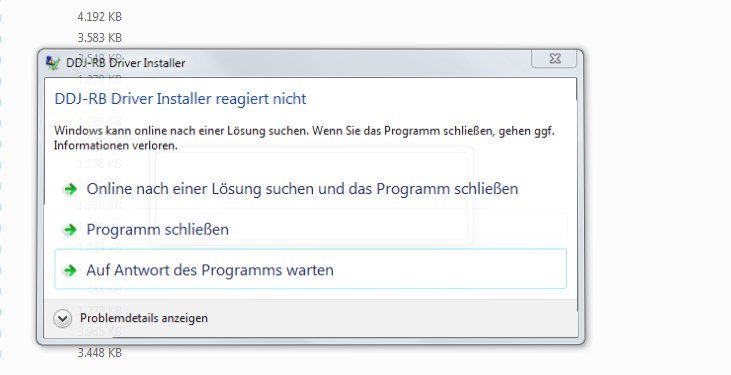
After the 1. it still doesnt work... The funny thing is every time i install the driver it happens this

im every time clicking on the last one wich says "wait for the programm". After that a window pops up where is written "install finished". And this window aswell 


Lrn 0 votes
Comment actions Permalink
0
Avatar

I don't know how to help man :/ sorry. My case was different.

Leonardo Barcellos 0 votes
Comment actions Permalink
0
Avatar

No, you don't need to install the 64bit driver unless you have specifically downloaded the 64bit version of rekordbox to use the video plus pack.

Follow these instructions please:

1. Disconnect the DDJ-RB from your computer.
2. Close rekordbox DJ.
3. Open the Control Panel and uninstall DDJ-RB driver from "Programs and Features".
4. Reboot Windows.
5. Install the DDJ-RB driver again. 
6. Connect the DDJ-RB to your PC.
7. Launch rekordbox DJ.

* Please note: Do not install the driver while rekordbox DJ is running. If you do so, you will have issues in driver update. 

Pulse 0 votes
Comment actions Permalink
0
Avatar

Bonjour,
Le père Noel m'a offert le contrôleur Pioneer DDJ RB.
J'ai pu déjà constater les nombreuses possibilités de cet appareil.
Cependant je n'arrive pas à configurer la pré écoute.
Le contrôleur est relié via usb à mon pc.
Ma micro chaine hifi est relié via usb à mon pc (nommé DAC par le logiciel Pioneer Rekordbox).
En mixage interne, le son passe uniquement par le casque (mais pas de pré écoute), lorsque je choisi mixage externe, le son passe par ma chaine mais mon casque ne fonctionne plus donc toujours pas de pré écoute.
J'ai usé des potentiomètres Trim, master, etc rien y fait.
Je pense qu'il s'agit d'un très mauvais réglage dans le logiciel Rekordbox.
Comment dois je donc configurer tout cela ?

Merci pour votre aide.

Desiigneur Panda 0 votes
Comment actions Permalink