Official comment

Uhm... I'm not even sure what you've done or how that came up! Can you please file a rekordbox inquiry here and our support team will be happy to assist you with that problem.
Comment actions

Starting today (before I updated to 4.2.3, was on 4.2.2), I keep getting this window pop up when starting 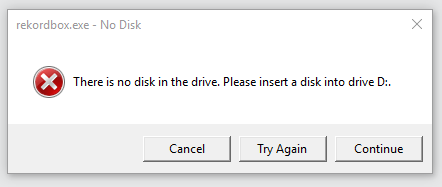
. I keep clicking cancel or continue an dit finally goes away, but its annoying, still happens with the new release. any ideas how to fix / get rid of it?
Appears to be an unused usb port?

Windows 10.
Uhm... I'm not even sure what you've done or how that came up! Can you please file a rekordbox inquiry here and our support team will be happy to assist you with that problem.
Post is closed for comments.
Me either! I think maybe it thought in its memory it had access to that drive when I export my playlist before. It appears to have stopped now, maybe because I inserted a sd card and exported. So never mind.
Thanks
Did that happen because you previously had an SD card in there and then removed it?
That's what I was thinking but its been weeks since I did a set, so I can't be 100% certain.

I have exactly the same problem after installing 4.2.4. I am not using any sd cards.I filed an rekordbox inquery.
The error does not occur in the 4.2.0 version that's still installed
If you have this issue, please see the official response and file an inquiry with our support team.