
OK I think there is a lot of problems. have a look
Comment actions

Hi
I have just got a new XDJ-RX and I love it, but I have noticed something that is very strange.
It came with the latest firmware 2.10 and i am using Rekordbox 4.2.4 via the Pro DJ Link.
Now every new track I get I set the grids up perfect on my computer first and add multiple memory cue points as I like to have them and everything was perfect when I was using Rekordbox DJ. On the XDJ-RX thought the grids are all slightly out which means that my cue points are all out and makes them all pretty much useless.
If I drag the same track up to the player in RB on the Mac/PC the grid is aligning perfect, exactly how I set them.
Obviously I don't need the grids to mix bit it does make quantize pointless and looping a bit tricky.
Any help would be greatly appreciated.
KB
Post is closed for comments.
OK I think there is a lot of problems. have a look
Wow that's on USB too, I had no issues with exported files on my USB stick when testing.
I logged a call with Pioneer support during the 4-5 days my troubleshooting was ignored on here and they came back to me today and basically said they can't support individual setups, go away look on the FAQ & Forums. Got a generic response, they didn't even bother taking a look.
KB.

@aurelien > Please don't cross-contaminate this post, I've answered you in your other post.
@KB > Yeah, they'll direct you here as they're not as up to speed with the software as we are. ;) Like I said, I've got a ticket open with the engineers, hopefully we'll find out what's going on. And don't worry about @aurelien's issue, that looks to be a bad audio file.
@Pulse
Its ok, I emailed them back and kindly pointed them in this direction ;)
KB.
Ok I have tried using sync again doing my show last night and even with 4.1.2 its all over the place. Now I've not changed how i'm setting my grids at all and had no issues through RBDJ. I bought an XDJ-RX to get away from software mixing but right now its looking like the better option.
Its annoying as I only use sync during my radio show so I can tweet artists and track names to get more exposure. If this doesn't work properly then I have less time to do these things.
I just don't understand how the grids can be so off on the hardware compared to the software.
KB.

anyone found a solution yet? this is extremley frustrating having to adjust with jog wheel 10 times a minute to keep two tracks in beat with the same bpm :/
The engineers are looking into it, I've asked if they have any information yet.

@Pulse
Just read your official comment and about the 4.2.5 Beta. Will test it later.
Thank you for your ongoing support and updates. Really.
Looking forward to get rekordbox rock stable.
Nope, no success. The XDJ-RX is not visible at all in rekordbox 2.3.5 Beta 5.
Works fine with 4.1.2....
Also, the Beta forgot every setting after 1st restart. Is it normal, that I have to go twice through the whole setup process incl. KUVO login etc.? I don't think so. Looks like another bug.
@Plangin > If you are running Windows, if, after updating to rekordbox 4.2.4 Beta 5, did you either disable your firewall or allow the 4 connections through the firewall?
@Pulse
I'm on Mac 10.12.1, but it is indeed a Firewall issue. After disabling it, the Link button appears again. Didn't appear at all during the 1st testing. Loading tracks works fine without firewall.
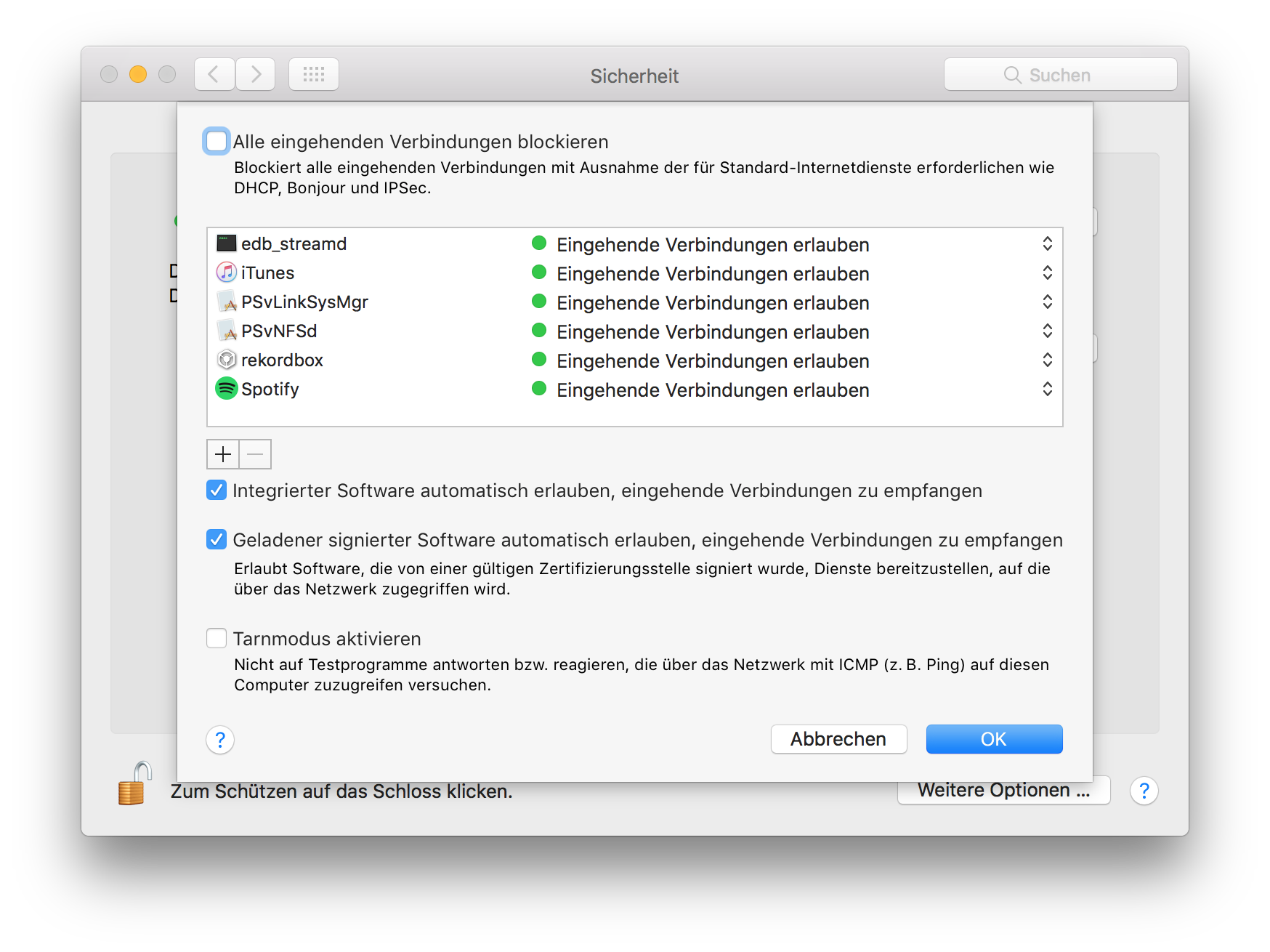
Now it looks like this: With firewall turned on, loading tracks via drag & drop is not possible. Nothing happens on the XDJ. Turning LINK on and off in rekordbox, keeps asking to allow "edb_streamd" every time. Everything is allowed here (check screenshot)
I'm sorry but this is not what this thread was originally about. I have never had an issue with tracks not loading in link mode.
This issue is with grids that sync properly in the software not syncing in export mode over the LAN connection. Also Quantize not working properly either.
Lets not get confused what the main issue of this thread is about.
@ (KB) Kieran Bowley
Sorry, I know this but I found no better place to give feedback about the latest beta (which should fix this exact issue). Keiko's announcement is closed and does not allow answers. (Why?) Where shall we post feedback about beta versions?
Back to topic: Did you try this version? Does it fix the issue for you?
@Pulse
Should Firmware 2.20 and RB 4.2.5 resolve these issues?
I have installed both and done a small amount of testing. Seems positive so far. Just couldn't see anything in the release notes about this issue?
KB
From https://rekordbox.com/en/support/releasenote.php:
"-Mac/Windows (64-bit): The enlarged waveform was not shown on the monitor screen on CDJs and XDJs and the waveform was shown at the beginning of a track where no sound exists and beat grid was shifted when using LINK EXPORT."
@Plangin
Thanks for that. I must have missed that skimming over the notes.
I'm glad, Pioneer fixed this.
Thanks, Pulse and Pio guys!

I have the same problem, I have already posted several videos where the bestgrid is not fixed even with SYNC on. Has anyone solved the problem yet? From what I see, thousands of people have the same problem even with firmware 2.20 and Rekordbox 4.2.5 (Windows). Therefore, it was not solved even with Firmware 2.20 and RB 4.2.5. Can someone help me? Thank you.

Experimenting same issue of Kieran Bowley on Mac with Rekordbox 4.2.5 and XDJ RX.
What about the solution?
Thank you very much.
I believe thay I am getting somewhere with support. I have provided some great video examples in this thread here:
Hopefully they can now get this sorted for us once and for all.
KB.
@Pulse can you change this from being Solved? As this issue is definitely not resolved as yet.
Thanks,
KB.
Hey guys - great news! Thanks to your videos, our engineers were finally able to fully understand and identify the issue at hand and are now working to resolve this in an upcoming firmware update. Thanks for your patience and we appreciate your feedback.
Hi @Pulse.
Thanks for the awesome news! Looking forward to the upcoming Firmware.
From a techie perspective could you provide any info as to what was causing this issue? Would be really interesting to find out what it was.
Well done to your engineers, its been a long wait for this fix!
KB!

