Have a feature request or suggestion? Post your idea here!

Post

3 followers Follow
0
Avatar

Rekordbox Issues


I've noticed that when I find a track halfway down a playlist then go to select the one next to it the software puts me right at the top of the list again meaning I have to scroll all the way down again which often makes me miss where I want to bring in the next track. I know you can select on the laptop but I don't feel like that should be required. Is there a fix for this?


Ricki Demmery Answered

Official comment

Avatar

@Ricki > The scrolling issue is being addressed in an upcoming release.

Regarding the output, simply disable the master output by clicking the icon at the top of the rekordbox window.
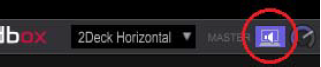
Pulse
Comment actions Permalink

Post is closed for comments.

5 comments

0
Avatar

Also regarding sound output, it now doesn't let me only output through the DDJ RX after the update, it automatically comes through my Macbook speakers as well. I've tried restarting and checking my audio settings in the app and system preferences but can't seem to fix it.

Ricki Demmery 0 votes
Comment actions Permalink
0
Avatar

I have an issue as well. Whenever I start up RB, it defaults to using the Rekordbox drivers. I'm using the Focusrite Scarlet 2i4 audio interface instead because that's where my monitors are routed. So each time I have to go into Preferences -> Audio -> [Change driver].

It's annoying.. Can it be fixed? 

Dennis Dyall Wallin 0 votes
Comment actions Permalink
0
Avatar

@Dennis > It will always default to the Pioneer DJ device. You can get around this by creating an aggregate or multi-output device.

Pulse 0 votes
Comment actions Permalink