Official comment

Sorry to say, rekordbox doesn't like the Scarlett family of products. A quick search will show many users having problems with them.
Comment actions

I just got my DDJ-RX in and I'm having some issues with getting playback in my speakers.
I'm using a Scarlett 2i2 audio interface, I have it configured as my default audio device, and I have it wired to my computer speakers using a Hosa CMP-159 3.5 mm TRS to Dual 1/4 inch TS Stereo Breakout Cable. All normal audio outputs are working fine (Spotify, Youtube, etc), but I haven't had any luck getting sound to correctly output from Rekordbox/controller.
I've activated PC MASTER OUT in Rekordbox so all sound should be routed through the USB rather than using the controller master outputs, and I've switched the master output in Preferences > Audio > Output Channels > Master Output to "MASTER + Focusrite USB (Focusrite USB Audio)", but still no luck.
At this point I've tried messing around with other output channels & settings to no avail, and I can't find anything online that's been any use to this point.
Any tips/recommendations?
EDIT: I also tried taking my Scarlett 2i2 out of the equation by just routing all system audio through my built in audio card and to my computer speakers, but that didn't help either.
Sorry to say, rekordbox doesn't like the Scarlett family of products. A quick search will show many users having problems with them.
Post is closed for comments.
At this point, I can't get any audio playback from Rekordbox with or without the controller. All tracks are playing fine, features work, etc. but it seems like there's something in the settings I'm missing. 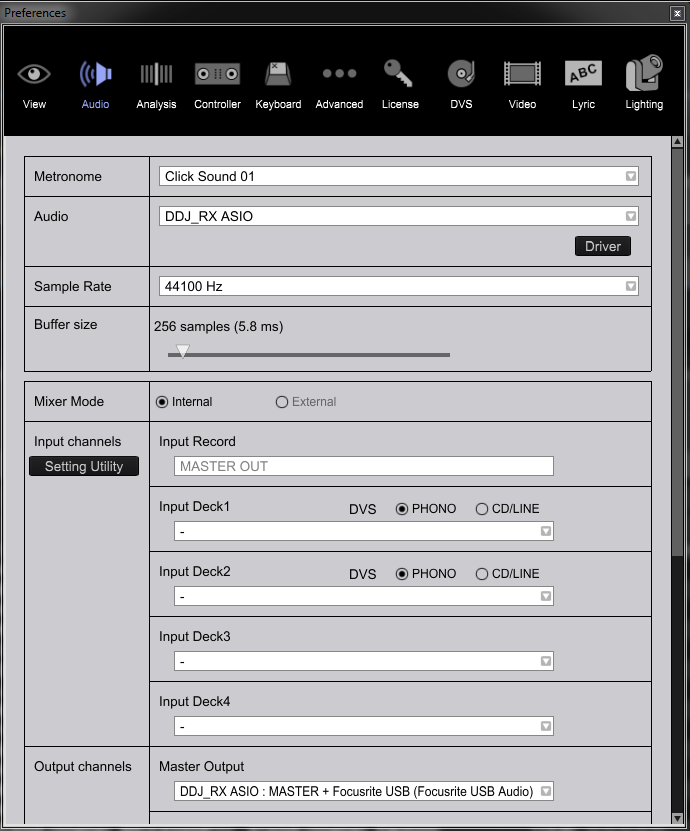
Understood, in that case I'll likely try using the breakout cable to wire the DDJ booth outputs directly to my computer speakers. Should I set my computer's playback to the DDJ built in sound card in this case and disable PC MASTER OUT?
Yep, that would be the best bet.
Sounds good, thanks Pulse. I'll try this tonight when I'm off work and we'll see if I have any other issues.
Please do!

