Have a feature request or suggestion? Post your idea here!

Post

3 followers Follow
0
Avatar

XDJ RX2 My Tag. Please explain

I am trying to search for tracks on my XDJ RX2 by using the My Tag feature.  I have added extra genres to the list of my tags in the RB software. (eg, uplifting psy, or psychill etc)

When I load my usb on my RX2 and press and hold the track filter edit button, from there I can select my tags and I can see the list of the sub genres I have added in the software. 

I can then highlight one or more of these genres, but I cannot figure out the next step. How do I see the list of tracks that have been tagged with the genres I have just highlighted?

For eg... I want to see all tracks that have been tagged as Psychill. 

How do I do this

Once I have highlighted the sub genre I want how do I see the list of tracks tagged as that?? 

Stephen Byrne Answered

Official comment

Avatar

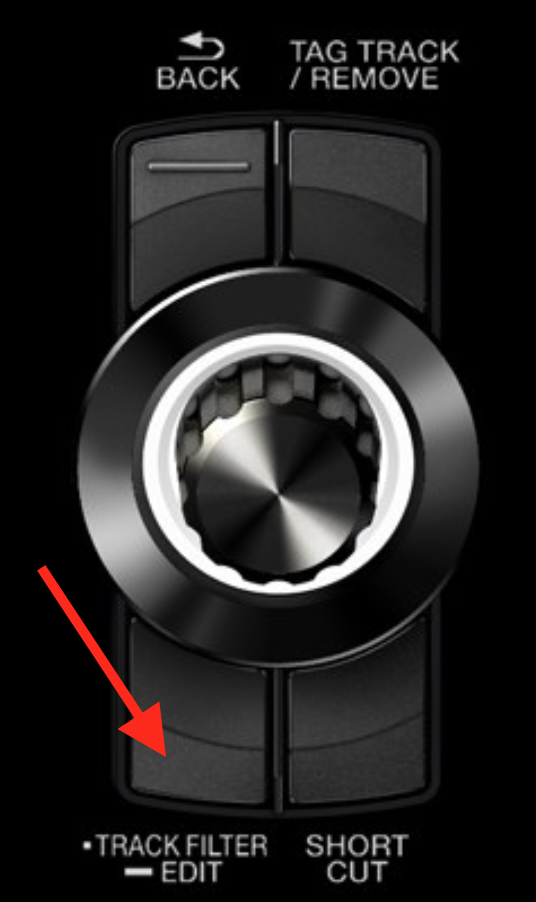
You long-press this button to enter the edit mode:

To engage or disengage the filter, just press the button. You'll see the number of tracks change in the count at the top right.

Pulse
Comment actions Permalink

Post is closed for comments.

3 comments

0
Avatar

@Stephen

Toggling the filter does influence the results in the current view (folder, playlist etc.).

So if you want to see all Psychill tracks at a glance, I'd suggest to go the [TRACK] view and use the filter there.

Take a look at this nice presentation:

https://youtu.be/qU6dHDmh3OY?t=11m10s

Cheers 

Plangin 0 votes
Comment actions Permalink
0
Avatar

@chtamina > Are you using the XDJ in stand-alone mode or connected to rekordbox in either performance or export (link) mode?

Pulse 0 votes
Comment actions Permalink