Official comment

The beauty of the XP1 is you are able to fully customize it to your liking, you don't have to use the preconfigured mappings. Use the Pad Editor (top right) to get started.
Comment actions

OK. The DDJ XP1 seem to have nice feature which are part of Rekordbox but we are missing two rather important quick activation features such as "Slicer", "Seq. Call", "Sensor enable and disable" and "Slicer Loop". At the present time there is like more than one way to get the same feature activated using the DDJ XP1. You should try adding the features I just mention using the shift key or something. Please listen to what I'm saying I already bought the DDJ XP1 and that was a Heartbreaking discovery that I can not active those feature using the DDJ XP1.
The beauty of the XP1 is you are able to fully customize it to your liking, you don't have to use the preconfigured mappings. Use the Pad Editor (top right) to get started.
Post is closed for comments.

Hi
Not totally true! When I connect my XP1 and open the MIDI-options it shows totally blank! No values at ALL! When I disconnect it, then the MIDI-options starts showing everything again.
I have raised this issue with a private help-ticket, but now several month later they have done NOTHING! I got some answers but nothing happens at all! I am really disappointed.
Also another matter also regarding "hang-up" inside RBDJ with my DDJ-RZ have not been solved! That is over half years trying ago!
I switched from Numark to Pioneer to get Premium products and premium support.
(I love your engagement here Pulse, so dont get me wrong, you are a tiger!)
But I dont feel I get what I have paid for fully. I love Pioneers equipment, and most of it works, but when my equpment hangs several times every time I use it and when I can not use MIDI at all for my XP1 I can not feel other than partly disappointed!
How are you going to help me and for how long should I wait??? My controller costs 2000€ here in Sweden! And the XP1 costed 250€. I have invested big money in your products! I mean half year and still problems for that price?? I want help! I want you to solve it!
It really feels now like you put some cases in private support just to "lay it on the shelf" and so no other should see it.
Thank you in advance
Well now, we're not going to let good gear just sit on the shelf, are we?
The XP1 is definitely mappable, here - check this out...
Buttons that can be MIDI Mapped (items with / + shift means both):
- 4 Beat Loop + SHIFT
- Quantize / + SHIFT
- Load / + SHIFT
- Loop In / + SHIFT
- Loop Out / + SHIFT
- Slip Reverse / + SHIFT
- MT / + SHIFT
- Beat Sync / + SHIFT
- Page < + SHIFT
- Page > + SHIFT
- Silent Cue + SHIFT
- Semitone - / + SHIFT
- Semitone + / + SHIFT
- Encoder turn / + SHIFT
- Encoder push / + SHIFT
- Hold
That's 23 mappable functions per side, plus the encoder x2 for both the turn and push. So while you may want to keep some for functionality, the rest certainly are mappable if you don't use those functions. For me, I never use key sync / semitone, so there's 4 mappable controls for each side right there.
In terms of the Pad Editor, you can customize what you use. As I said, I don't use the Key Shift function, so I've set that as my Lighting controls:
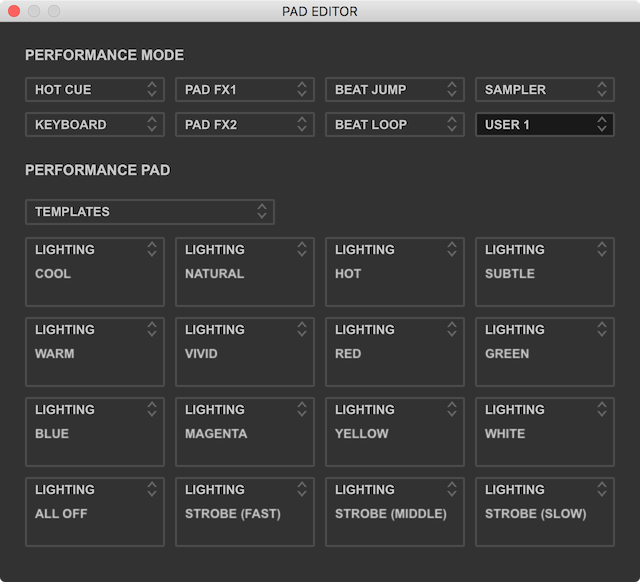
Thank you for your effort! I will try this.
BUT the problem is bigger than that. Because when XP1 is connected I can NOT change ANY MIDI-setting. Not on my DDJ-RZ eiter.
Off course I can disconnect it and then connect it again... but I mean when putting in 2250€ I do NOT WANT to be forced to take "the longer road"... =/
No -- when a device is not connected, you can't change the settings. Can I ask why you'd want to do that? Without the hardware connected, most users aren't going to look-up the CC for that control in order to change them.
Once you connect it, it remembers what you had previously used.
No you missunderstand me, or I am not clear enough!
WHEN I have BOTH DDJ-RZ AND DDJ-XP1 connected the MIDI-settings just shows an empty space - NOTHING can be changed, no MIDI for the XP! AND no MIDI for the DDJ-RZ!!
BUT when I disconnect the XP1 THEN I can change MIDI for the DDJ-RZ!
What I mean that the "problem is bigger than that" is that the XP1 "blocks" my ability to change MIDI for my DDJ-RZ too!!
That is annoying and frustrating that my EXPENSIVE gear not can make me relax in the gear! This togheter with that the RBDJ hangs with my DDJ-RZ even when upgraded my hardware to strong Intel 7 is very irritating when invested so much money and choosen ALL premium-products!
I have had open private tickets for this for many months now but nothing happens. Just get answer that your team not is able to "replicate the problem". I feel I should be able to get help. I even upgraded my hardware as I said with expensive gear and still same problem.
Can you tell me what your computer configuration is? Because on my Mac (10.12.6), I'm able to get both the XP1 and RZ showing in MIDI: https://youtu.be/semp3CtU0G4
Yes, sure Pulse, thank you so much for trying to help! =)
(YOUR VIDEO SOLVED IT! but please look further down for other question that is stuck in privat support, please give your opionon, you seems to solve the most things)
Acer Predator i7-4790, 3,6Ghz
RAM 16 gb
Graphics: Nvidia GTX 660 - 3gb
SSD-harddrive Samsung 1tb + Samsung SSD 446gb
DDJ-RZ and DDJ-XP1
Windows 10 Pro, latest version 1702 (16299.248)
OMG, now I try the Drop-down-menu!! That I did not see!! Very strange not being helpt with so easy thing with your "private support" month ago.
It solved!! My misstake, but also little hidden I must say. The drop-down did it!
Once again you prove easy solutions is the best solutions, thanks for you clear video!! =)
You are the best support, please can you look into my other problem that I have, the other support has had this over 6 months now, please:
The RBDJ-program just freeze, after a hight fast "glitching/squueeking sound" AND the CPU-meter goes up to full!!
The Task manager does not show anything wrong with the program. JUST some kind of crash inside the sound-signal...!?
I have latest drivers to DDJ-RZ:
Firmware: 1.10
Driver: 1.10
My RBDJ Froze as it does often now when playing songs as I described above!
But I just clicked the "ON/OFF button for PC MASTER OUT-button" and the CPU-meter went down immidietly from was FULL and frozed program! Then I clicked it again and Directly the program started to function again as NOTHING has happened!!
I did not have to restart program again!!
THIS MUST give you some answer WERE the problem lies!! It NOW MUST be something to do with the sound-signal!! What does this say to you??
And finally... WHAT can the solution now be??? I can still not have this freezing so often!
Thank you! Please help me sort this out now!! This must tell you a lot about the problem, otherwise please let me explain further if something was unclear!
When you engage the PC MASTER OUT, it has to disconnect the current (single) audio device, then create an aggregated device with the DDJ-RZ audio driver and the audio driver for your PC's currently-assigned main audio device, then reconnect that new aggregate device - hence a minor stoppage in audio output.
Depending on your PC's primary audio device and how its drivers are configured, it could be rekordbox is having trouble aggregating it, thus rekordbox crashes when trying to assign the aggregate.
Is there a reason you need to be using the PC MASTER OUT when you have an RZ which has multiple outs of its own?

thanks Pulse for this step by step demo!
bonus question: last time I checked the Pad Editor was only possible to DDJ-1000. not to the DDJ-SZ.
do you know if this useful feature was already opened to all controllers?
thanks...
Currently, no, but I hope to see them add every product with pads to that thing - so easy to use!
So, physically there is nothing that can be added to the XP1. I am happy with my unit, but I think we can add more features to it operation. Just as we have sequence call. Can Pioneer please at hot cue sequence call. And please add fade in and fade out memory call.
@LS > You could do that... with a remapping of existing controls. They can't add anything to the hardware, but because it's a controller, you can change what it does in the software quite easily.
There isn't a "fade in/out" command, as it's expected you're using a controller or mixer that performs that function with a hardware fader.

