
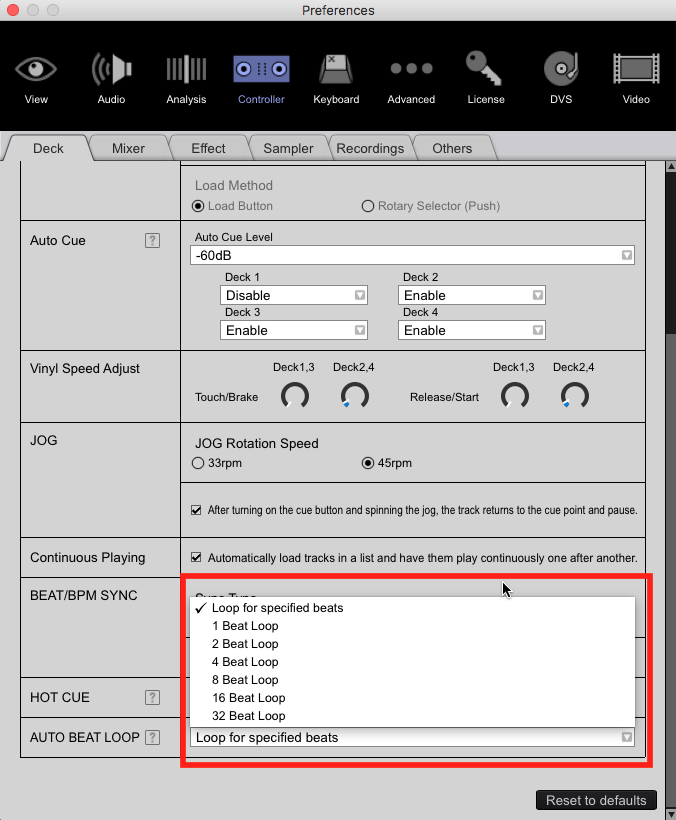
What is your setting here?


Comment actions

it seems that the initial Loop value that can be set in rb is ignored by the ddj-1000.
i have a initial value of 8 and the ddj remains at the Standard 4 beat autoloop value.
thx for Fixing this!
Post is closed for comments.
What is your setting here?
i have it set to 8beat but doesnt Change anything, always 4 beat Loop when pressing the button :-( on my rr this works.
btw what does Loop for specific beats mean? i've tested this too but won't Change the 4 beat Loop.
thx for Fixing this :-) ..or maybe i'm getting something wrong?
Is this the button you're pressing?
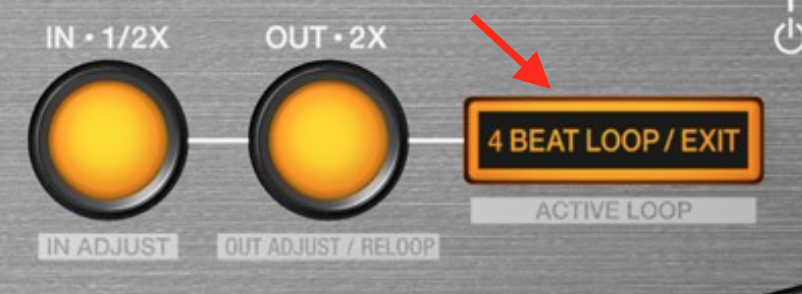
jep exactly :-)
The one that literally says "4 BEAT LOOP" on it...
jep i know this of Course, but since there is a tab for changing initial beat length it should be changeable to the desired value, otherwise this tab makes no sense? :-)
i've tried to remap it but it's not that easy i had to change the csv itself since there are midi adresses that are not officially used etc. so would be cool to get this beat length tab working :-)
any News when this will get fixed? :-)
it's really tricky to remap this manually, would be cool to use the official way.
thx for Fixing in advance!

i new this was going to be the case before i bought it, it was an obvious £$%K up, why not just call it a loop button definable by the user. How do things like this make it all the way through testing and on to the production unit, it just defies belief.
would be really cool to get a response if this will be fixed in next release :-/

Agreed. This seems like low hanging fruit to make behave as expected.
And the low-hanging fruit is typically left unpicked. :(

You can press 4 beat loop button...and then press "OUT x2" and it becomes a 8 beat loop...

Any ETA on fixing this? I wasted a solid 15-20 minutes also trying to figure out why the heck the menu there in the settings was having no effect! What does it change if NOT the default loop length value of the "4 beat loop" button? I would much rather have it default to a 4 BAR loop. Four beat/1 bar is more of an effect, I feel. If I just want to grab a loop for a safety net, I definitely want 16 beats/4 bars... not just 1 bar which will sound obvious.
No plans on changing the 4 beat loop default -- as noted earlier, that's exactly what it says on the button.
Pulse, I've enjoyed your many responses here and I know you are very active just from my past two or three weeks' of browsing. (this equipment is all new to me) So please don't take this as disrespect. However, I find your responses in this thread a bit snarky - sure, it "says" that on the button - just like the four buttons to set the 8 pads at the bottom "say" what their default setting is, right? Yet all of those can be changed, no matter what the factory silk-screened onto the chassis.
I am all for the default being 4 beats - all I ask is that the setting as mentioned earlier in this thread, "Auto Beat Loop - loop for specified beats", do what it appears to say it will on the tin, if you will. Does that setting NOT mean to set the DEFAULT number of beats for the Auto Beat Loop (AKA the "4 Beat Loop") button?
Like I said, my ideal default would be 8 or 16 beats. (and I SHOULD be able to select that from the dropdown as posted earlier in this thread, yes? but it has no effect)
Sorry, not trying to be curt, just answering dozens of inquiries daily, and while some have already been answered and haven't changed, I typically don't go into additional depth.
There are many functions that aren't user-configurable, including that button. Sorry!
Fair enough, no need to apologize. But can you at least explain this - what IS the purpose of that dropdown setting that you posted in the screenshot in your very first response on this thread? That setting seems to change what I want, but doesn't change that button as you've said... so what does that setting actually affect? (perhaps the functionality I am seeking lies in whatever it touches)
just take a look at the mapping XML for the ddj-1000 with a Little bit try & error you can Change the value to whatever value you want. note: always backup your XML before modifying.
you have to Play with this line:
4BeatLoop,4BeatLoop,Button,9014,0,1,2,3,9014,0,1,2,3,Fast,Auto Loop On/Off
Thanks very much for that pointer! I'm a technical person but didn't like the idea of playing with that file, but that seems straightforward enough. I am guessing basically the setting that Pulse originally pointed out in the settings should or could be updating that directly, which would then make it "work". (as far as I can tell, that dropdown setting doesn't do anything, unless some other controllers have an "Auto Loop" rather than a "4 bar loop" button, and it maps only to those) Thanks again!

hi you can change this button to your desired loop size.
top of my head go to the midi section (top right near cog settings)
select DECK and find "4 beat loop" (should be at top)
delete all 4 enteries(deck 1 2 3 4)
then select "ADD"
loop - find autoloop
select "LEARN" and press the button.
do this for all decks.
now select the autoloop size 4 8 16 32 etc in settings
you should find that pressing the default vutton is now set to to how you want it.
you can custom your controller in many ways.
if your having trouble i could send you a midi import file.
Wow, that's a good find! I hadn't looked in there much at all. So it's what I was thinking - maybe some controllers do have an "Autoloop" button already assigned. All we have to do is change "4 Bar Loop" assignment to that "Autoloop" function, then the menu will do what it looks like it should do! Thanks! Hopefully this will help everyone else -- I am sure it will help many.
@Pulse - see, I wasn't crazy after all! :)
There was a change to that as previously the MIDI mapping was not able to be changed. Glad to hear that works now.


