Official comment

Sorry to hear that, please file an inquiry ticket here and our rekordbox support team will be able to gather some additional information to assist you in resolving this issue.
Comment actions

Hello,
I can not hear the cue / monitor correctly in the headphones. If I set the parameters of the rekordbox 5.2 as an image I do not hear the monitor even if I turn the knob to the right but only the cue if I press the button.
I have tried many other combinations but they do not work. Win 10 installed and latest firmware for ddj 1000 installed.
Am I wrong?
Thank you

Sorry to hear that, please file an inquiry ticket here and our rekordbox support team will be able to gather some additional information to assist you in resolving this issue.
Post is closed for comments.
Sorry, "I do not hear the monitor even if I turn the knob to the right but only the cue if I press the button."
Were you not pressing the cue button for the source you wanted to hear?
Okay, but you understand you have to press the channel cue AND the master cue in order to hear both sources -- and then you're able to use the knob to mix between them.
Thanks for the reply, but the problem is not solved. If I press the channel cue and the master cue in order to hear both source
If in the Both Output section I select headphones, I hear the two sources together without the possibility of selecting one or the other.
in the Both Output section I hear the two sources together without the possibility of selecting one or the other.
Sorry, the previous post is badly written. If I press the cue channel and the master cue, the sound is distorted in both the speakers and the headphones. If I select headphones in the Booth Monitor section, I hear the two sources together without the possibility of selecting one or the other.
Start with all headphone CUE buttons un-lit (nothing selected), audio playing on channels 1 and 2, but only channel 1's fader should be open (with the crossfader to that side or disabled).
To hear the master in your headphones, you press the MASTER CUE button (the one below the booth monitor knob; that's not the booth cue, that's the master cue). Press it again to disable it.
To hear channel 1, press the CH1 CUE button.Press it again to disable it.
To hear channel 2, press the CH2 CUE button.Press it again to disable it.
To hear the master AND channel 2, press both the MASTER CUE and CH2 CUE. Because channel 2 is not "live" to the master, you can then use the cue-mix knob to blend between them.
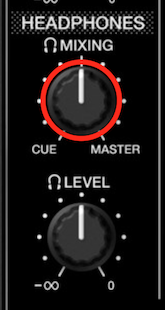
Turn it to the left to hear less of the master, turn it to the right to hear less of the channel. At any point you can press the CH2 CUE or MASTER CUE buttons to toggle that signal off or on, regardless of the mix amount.
At no point should you hear any of the headphone cueing selections through the master; that audio should only be going to the headphones when you press any CUE button provided the channel fader is down. Likewise, with no channel faders up, you will have no audio going to the master, so there will be nothing heard on the MASTER CUE.
Thanks for the detailed explanation. This is my sixth controller, so I think I have some experience;) The problem is unfortunately not solved. With the configuration of the photo I sent you I hear both sources (Cue and Master) if the knob is in the middle or on the left. If I move it to the left, the sound disappears. I tried all the possible combinations in addition to following your instructions to the letter But it does not work.

