Official comment

Hello all,
DDJ-1000 engineers are now working on this issue.
Thank you for your patience until any update is ready.
CRM, Pioneer DJ
Comment actions

I have channel 1 set to A and channel 2 set to B. You can still hear music from channel 1 when cross fader is moved all the way over to B. Does this for channel 3 as well. I have the most up to date firmware and driver installed. Is there something I'm missing or is this a hardware issue?! video showing the issue i'm currently having
Hello all,
DDJ-1000 engineers are now working on this issue.
Thank you for your patience until any update is ready.
CRM, Pioneer DJ
Post is closed for comments.

I have a similar issue, and also cannot position the crossfader in the middle:
https://forums.pioneerdj.com/hc/en-us/community/posts/360001607706-DDJ-1000-Magvel-fader-off-centre-position-FW1-04-bug-
they broke all kinds of stuff on fw 1.04
did you ever get it fixed?
no unfortunately not. I guess we will have to wait to the next update.

@Thao > If you assign it back from B to A, does it work then? Is it showing anything within the software mixer crossfader assignments?
@Cannonball > I've replied to your thread, please don't cross-post and confuse other topics.
no it does not work after switching from B back to A. it does show the correct deck when set to A and B. here is a video showing..Here's a video
@Thao > Which firmware / rekordbox version are you running?
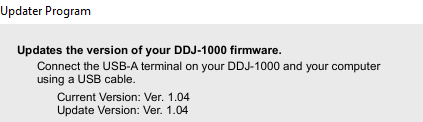
rekordbox 5.2.0 firmware 1.04
The headphone is also not working correctly, when turned all the way to the right to hear master there is not output to headphones, Only works when cue is turned on. Pretty disappointed waited 3 months to get this and it doesn't work on the first day i get it ): 
The headphone cue is working normally -- you have to press the master channel cue in order to hear it regardless of the position of the mix knob.
I'll see if I can get any information on the crossfader issue.
What about if you assign channel 2 to the A side, does it do the same thing?
Yes for all channels if placed on A it does not work correctly.
Okay, thanks for the confirmation!
Any suggestions? There no more in stock at any guitar center in the twin cities. so returning it and waiting another month isn't a option. I have a gig lined up...
In the meantime, don't use the crossfader, or just flip it over to the B side.
That's really not a great solution. one of the main reason's i bought this controller was because of the crossfader...
Sorry, that's the only solution I can offer at this time.
Hey @Thao > Could you please post a screenshot of your Preferences > Controller > Mixer page? Looks like this:
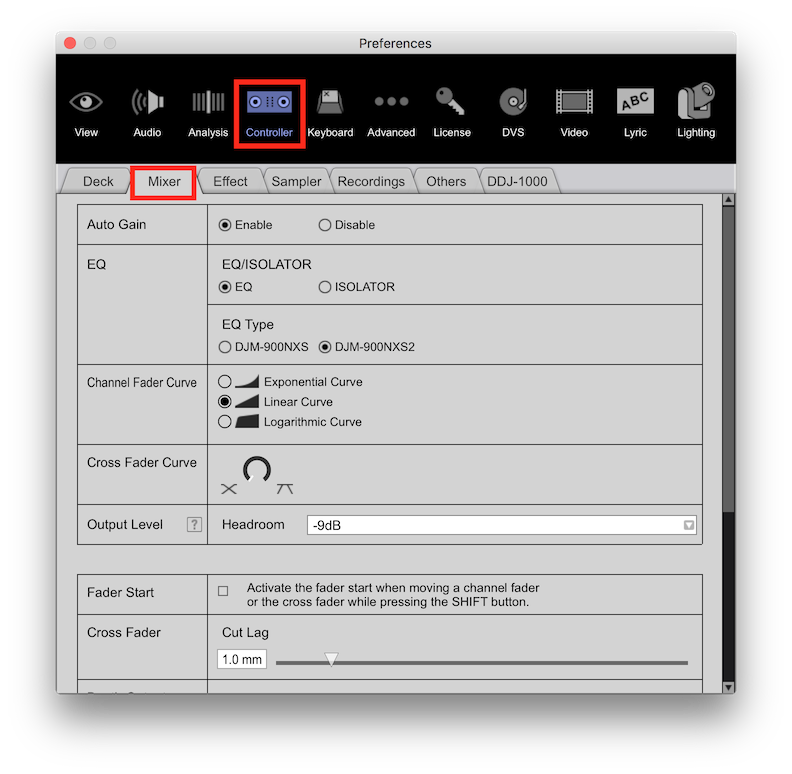 Post up what it's set to now (with the problem), and then check to see if your cut lag is set too low; try adjusting it up a bit. Thanks!

Did you ever get this fixed or did you get a new Unit? Also,did you use the Rekordbox that came in the box with the controller,or did you already have Rekordbox installed from a previous Controller? I am asking because I am having the same problem and somebody suggested to me that it might be because I am using the Rekordbox software I got with my XDJ-RX rather than the one from the DDJ1000.I myself don't think this would make any difference.

My fader still doesnt work. Is there ever going to be a fix for this issue? Running 5.8.4 with 1.07 firmware. Tried all the reccomend settings and a to b variables with zero success. It's almost as if tjebfader isn't connected or registering for some reason. It makes mixing more difficult and scratching almost impossible.
@Jake > What do you mean by "doesn't work" - like at all? Doesn't fade? Doesn't cut? What is the EXACT problem?
Actually, after months of research and frustration I just resolved it a minute ago after watching a video on YouTube.
I fixed it by putting the 1000 in "Utility Mode" with a power off, holding down the shift and play buttons, and powering on. After that I recycled the power, it re-loaded 1.07 firmware and she works now!
Since day 1 regardless of settings, curve, a to b switch variables the fader never actually worked for me. Meaning side to side fading never muted the opposing track playing. It's working now though! Awesome!
Glad that worked ... although it's a bit surprising as simply entering the utility mode doesn't do anything itself. I'm guessing the firmware update was more of the fix than anything.
Either way, hurray! Enjoy.
Yeah right? I thought so too, but the strange thing is I've been on 1.07 for a while now. Meaning the flash upgrade didn't resolve it. Bit for some strange reason after going into Utility Mode then power cycling and upon reboot seeing the 1.07 firmware re-install itself in the small display window the fader works now. Maybe it's a cache issue depending on specific environmental circumstances at the time of original firmware installation or maybe just a strange perfect storm of oddities at the time of upgrading. Not sure. Just glad it works now.
All that being said I'm guessing re-installing 1.07 over itself is the fix. Not sure if the software allows you do that manually though. Never tried it.

Increible.. te animas a compartir el link del video en youtube? Gracias


