Have a feature request or suggestion? Post your idea here!

Post

3 followers Follow
0
Avatar

Exporting Rekordbox Tracks to USB for XDJ-RX2 - E:306 NO FILE

Hi, 

I bought an XDJ-RX2 last week, and ever since have been trying to transfer MP3 playlists via Rekordbox to an external MS DOS (Fat 32 / 64GB) DataTraveller USB Drive. 

All of the tracks I have transferred from the USB drive into the collection work perfectly when played through Rekordbox on my laptop, in Traktor, and open and play in iTunes. 

However after I transfer these to my USB using Sync Manager, when played through the RX2 I am prompted with E:306 NO FILE. 

Oddly this does not seem to be an individual track issue, but a matter of which playlist the tracks were in originally when I first uploaded them. (The first half of the alphabetically appearing playlists all appear to be working fine). 

Depending on the sync approach I have used, I sometime can also access and play these files within their original folder in the USB drive on my RX2 but without any Rekordbox data or playlist organisation. 

This makes me think it is a Rekordbox issue, not one with file corruption. I was going to try to use MP3Val to analyse the tracks but it appears to not be a Mac-compatible application. 

Could the erroneous tagging generated by the first attempt to upload these playlists have corrupted their rekordbox files or something? 

Are there any Mac equivalent programs to MP3Val?

Things I have tried to far: 

-Reorganising the playlists to ensure no folder has more than 1000 songs in it.

-Wiping & Reformatting the USB drive & re-adding these tracks to the USB and then to Rekordbox. 

-Bypassing Sync Manager and exporting straight from playlists in my collection to USB. 

-Clearing & re-analyzing all my track collection in Rekordbox (about 5 times) 

-Changing the origin locations of the files and re-uploading them.

-Reinstalled the most recent software & firmware. 

-Deleting AIFF files from the playlist so it is purely MP3. 

Is there an internal memory on the RX2 that I need to clear or anything? 

Any tips at all would be greatly appreciated. 

Thanks. 


RJMeaney

Post is closed for comments.

2 comments

0
Avatar

Hi, I'm also on Mac and XDJ-RX2. Both work great together here.

For me this sounds like an USB drive issue. Did you have the chance to try another USB device so far?

Two ideas:


1. Check your USB drive with F3X:

https://github.com/insidegui/F3X

Basically, this software checks if your device is pretending to store more data than it actually can (fraud) and checks integrity of its storage. Random data is written and verified afterwards, so you can get a reliable test result if your XDJ-RX2 will get the same data your Mac wrote initially.


2. Reset whole drive with MBR and FAT32

Apple's disk utility is OK in most cases, but to get a 100% compatible partition layout I'd suggest to reformat and recreate the partition in macOS' Terminal.

Reason: Apple's graphical disk utility creates another hidden partition when resetting the whole USB drive. Also, the GUID partition scheme is selected by default. The MBR (Master Boot Record) scheme is still the most compatible partition electronic devices out there.

How to do this:

+++ CAUTION: Save your data from your USB stick +++
+++ I'm not responsible for any data loss. +++

a) Connect USB device with Mac
b) Launch Terminal (you can look it up quickly using Spotlight)
c) Enter diskutil list
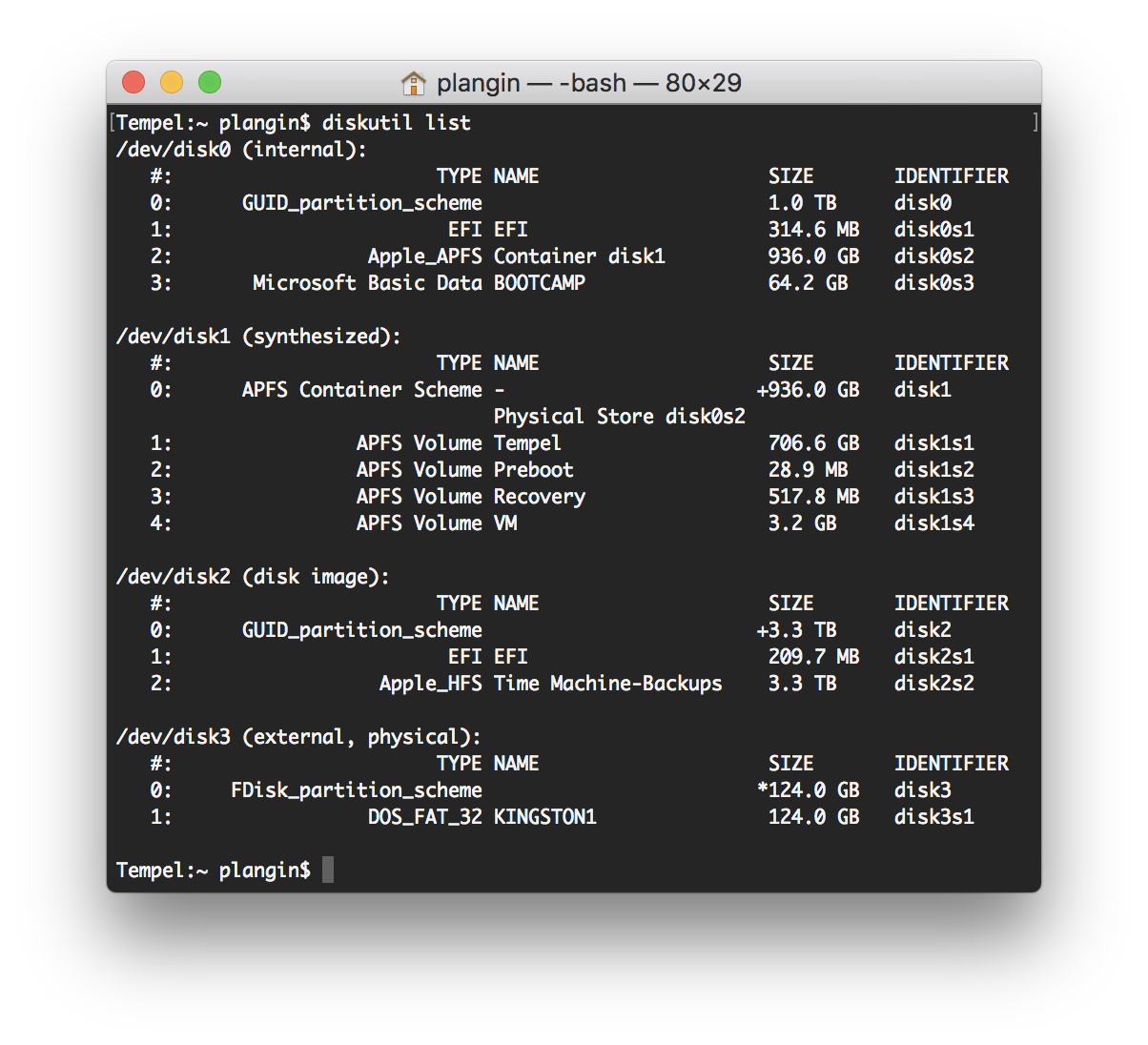
d) Look up your drive. In my case, it is disk3
e) Enter diskutil unmountDisk /dev/disk3 (change the number, if needed to your drive no.)
f) Enter diskutil eraseDisk FAT32 DESIRED_NAME MBRFormat /dev/disk3 (change to your desired name)

Let me know, if it worked!

Plangin 0 votes
Comment actions Permalink