Have a feature request or suggestion? Post your idea here!

Post

4 followers Follow
0
Avatar

Issues with recording in Rekordbox Performance mode

 Hi there I hope you can help me. 

I am having issues recording in the performance mode in rekordbox. 

I am using the latest software with x2 CDJ 900s and a DJM 700 mixer. The CDJs are connected to my Mac via two usb cables using the midi control mode (hid advanced) option on each deck. 

I have downloaded the aggregator for the CDJs so that when I select the audio in preferences is reads as 'pioneer cdj/xdj' 

The problem I have is that I can record via the internal mixer mode but the master output for both decks is then only played out on a single channel, meaning that I only have a single channel to create a mix with and not two or more. 

When I change the mixer mode to external (which does enable me to mix with two or more channels / outputs each deck on separate channels) the option to record a mix is then taken away on the main screen. 

Am I doing something wrong here or is there a way that I can use the internal mixer mode but with the option to use two channels instead of one?

Any helps would be very much appreciated. 

Danny

Danny Fowler Answered

Official comment

Avatar

@Danny > Here's the problem...

With your setup, you don't have any way of getting the mix back into rekordbox for recording. So unless you have another sound card, or the capacity to use a built-in connector as an input, you'd have to mix in INTERNAL mode... which would also require a bit of monkeying around to map the mixer, and then routing audio to a channel you don't use on the mixer in order to hear it.

Really, the short answer is: you need a device to input the audio back to your computer for recording.

Pulse
Comment actions Permalink

Post is closed for comments.

3 comments

0
Avatar

Hi Danny,

exactly the same problem here with my XDJ-R1 and rekordbox 5.2.3. on HighSierra. Did you solve that problem?

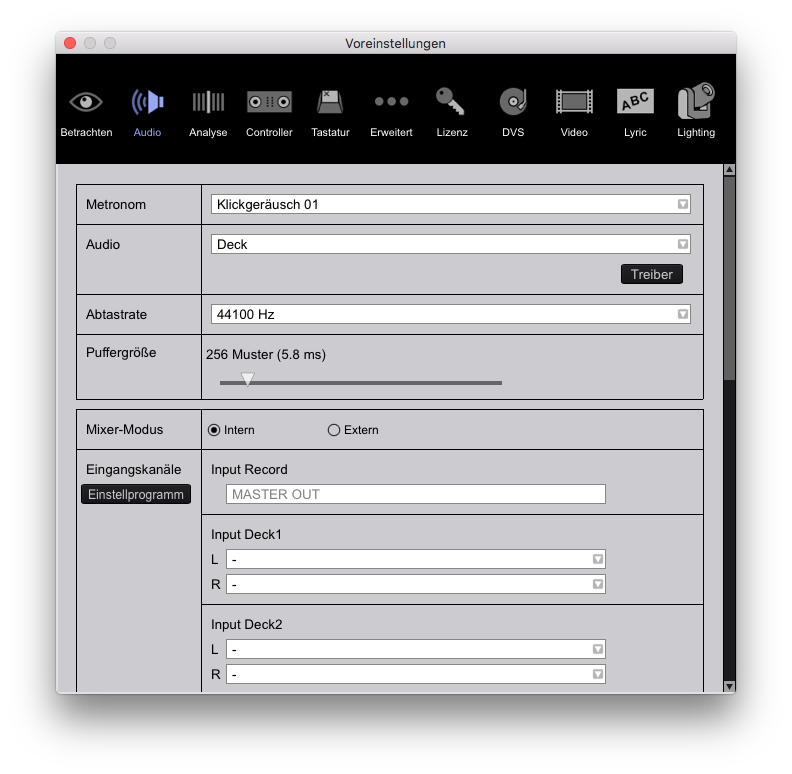
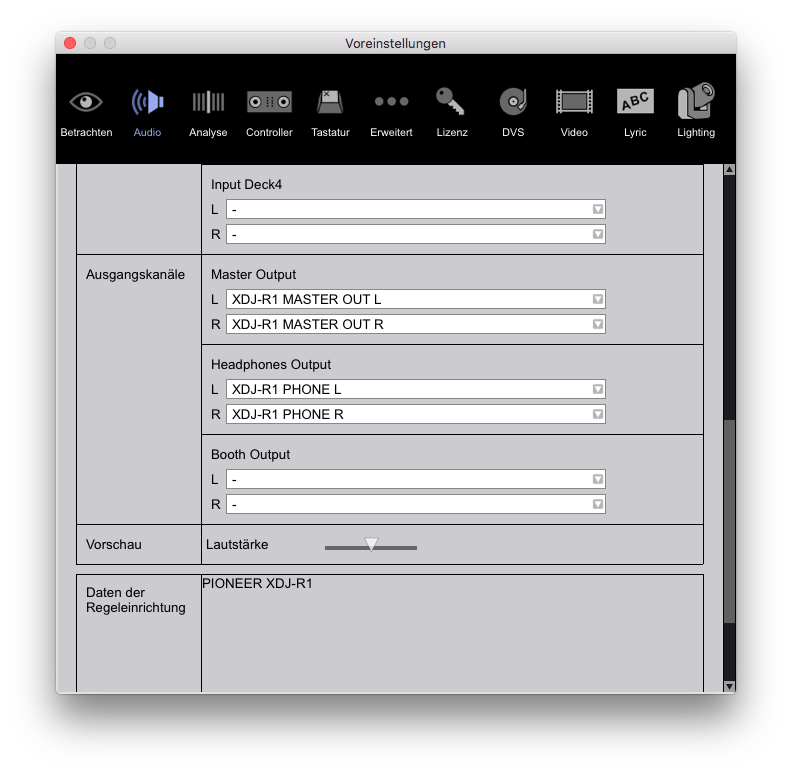
Here are my settings from macOS and rekkordbox itself. With this settings I cannot fade every Channel seperately. Just when I change mixer-mode to external this works, but then I cannot record, because there is not Record Input Mode to select (it is empty).


Regards, Dominik

Dominik Hils 0 votes
Comment actions Permalink
0
Avatar

I managed to find a software workaround, until to the developer team implement this missing feature in Rekordbox. 

I use CDJ/DJM 2000 Set in performance mode with Rekordbox. With the mixer mode set to external in Rekordbox (DJM2000) 

This disable the record option. As mentioned by Danny.

Workaround: I managed to use a secondary application, in this case "Audacity" on my Mac. In Audacity i can select DJM2000, and record just fine. Without further cabling or devices connected. Only one USB HUB with 1 USB connected to each Player and the mixer to the MAC. 

Conclusions: Application limit in Rekordbox.

So i guess this is possible to implement a secondary "record channel" in audio options in Rekordbox, and link this to the Record function, so we are able to select a device in the "Empty Recording Device list". I think this enable the recording feature in performance mode with external mixer mode.

Best Regards

Svenny K


Svenny Karlsen 0 votes
Comment actions Permalink