Have a feature request or suggestion? Post your idea here!

Post

5 followers Follow
1
Avatar

Recordbox Collection Hack ! ;)

Hi,


I recently discovered something cool. It's an " undocumented  feature" at best .

Normal Situation
In a normal situation you have your original music files on your drives or in your system somewhere, you drag or import these to recordbox and then have Recordbox export them to your USB stick or drive. This results in a messed up group of files that are all over the drive which make it hard to find and replace or re-use that stick or drive for anything else.

Solution
I have tested this and in my version this works like a charm.

First, before you ever start to create playlists in Recordbox ( or if you start to use a new stick/drive ) , you prepare all the files you want to use on the USB stick/drive.

  1. Create a folder on your SUB stick/drive called " Music"
    ( stay away from the " content" folder, Recordbox needs it )
  2. Copy all your music you want to use into the " Music" folder
  3. You may copy them from wherever they are onto the stick/drive and place them in your favorite usage. This is often  <Genre> < Album> < Songs>, but place them in the " Music" folder.


Do this to all the tracks you want to use.

Now with the Stick/Drive still connected to your computer.

  1. Start Rekordbox.
  2. Open the File Explorer Section and navigate to the USB Stick/Drive
  3. Open the folder " Music" where you have added the albums & tracks
  4. Add the contents to your playlists / Create the playlists you want.
  5. Sync with the device and notice that no files will be copied !!!

Now you have put your files into playlists ON the USB stick/drive and have the actual playable files in a separate folder on the same drive in a listing you prefer. This makes creating playlists a lot faster and easier and may save hours and hours of copying.

Let me know how you are getting along with this.

Cheers

Peter

Peter Broerse

Official comment

Avatar

Or just use an external drive as your source and export drive and your export time is zero, without having to keep a "copy" or spend time manually doing anything crazy like above! :D

Pulse
Comment actions Permalink

Post is closed for comments.

14 comments

0
Avatar

One of the really good features of Rekordbox is that what you bring to the club is not your "master" library. It's huge step forward from playing vinyl, CD's or using a laptop, that if you loose your gear, it's not a catastrophe. The USB can easily be replaced and you're good to go again as soon as you have access to your computer and a fresh USB. I would NOT recommend anyone following your advice and bring your master files with you, an USB stick is easily lost and can be damaged resulting in you losing all your music. If you do have a backup of your music you will have many hours of work re-locating the flies.

Organise your files properly on your hard drive. No need for hack / work around.

The Henrik Maneuver 0 votes
Comment actions Permalink
0
Avatar

@Henrik

Please reread what I wrote....

It says : "Copy all your music you want to use into the " Music" folder"

So in any case your " masters" will remain where they are, on your system at home or wherever. You just copy them over, just like Recordbox would do, but ....and there's the difference...you copy them over BEFORE recordbox does it, which allows you to put the files in the sorting order that YOU want instead of having all the files dropped in a large container where nothing can be found anymore (. i.e. the " contents folder" )

So yes please keep your masters safe and copy the files you want according to the system as I described above.

For those that don't get it....this would work best with a NEW drive. This is NOT what you want to do with a drive you already have used before.

#NotForTheFaintHearthed ;)


@henrik:  You also wrote " Organise your files properly on your hard drive. No need for hack / work around." ..

That's exactly what I am doing here, but now also on the USB drive. Don't you see ?

Oh and...it's not really a " hack or a workaround". it's merely taking the actual copying done by Recordbox out of the equation and doing it yourself in a smarter way, which as an added bonus let's you update your USB drive in a matter of minutes in stead of hours.

Backup Plan:
Yes it is ALWAYS advisable to make a backup copy of drives you take along with you, if not only for losing the drive it may also be for a simple failure of the drive. This does happen !


Cheers

Peter


Peter Broerse 0 votes
Comment actions Permalink
0
Avatar

Agree to organize this your hard drive.

however Peter raises a good point: what he really wants is folder organization instead of playlist organization. for example, Traktor supports both models.

A large part of this complex setup is that RB doesn't have a search box on the explorer nodes.

more detailed comments in: https://forums.pioneerdj.com/hc/en-us/community/posts/115018095303/comments/360000392646)


pedro estrela 0 votes
Comment actions Permalink
0
Avatar

@Pedro:

Well, I gathered that Recordbox itself is sloppy with files. It merely dumps them in the " Contents" folder under each artists name. Like so :

/Contents / Artistname / Album name / Track.mp3

For the program itself it doesn't matter as the database it creates, points to the right file anyway, but for humans, especially those that want to keep their files sane, it's a mess.

By creating a second folder you can solve this issue.

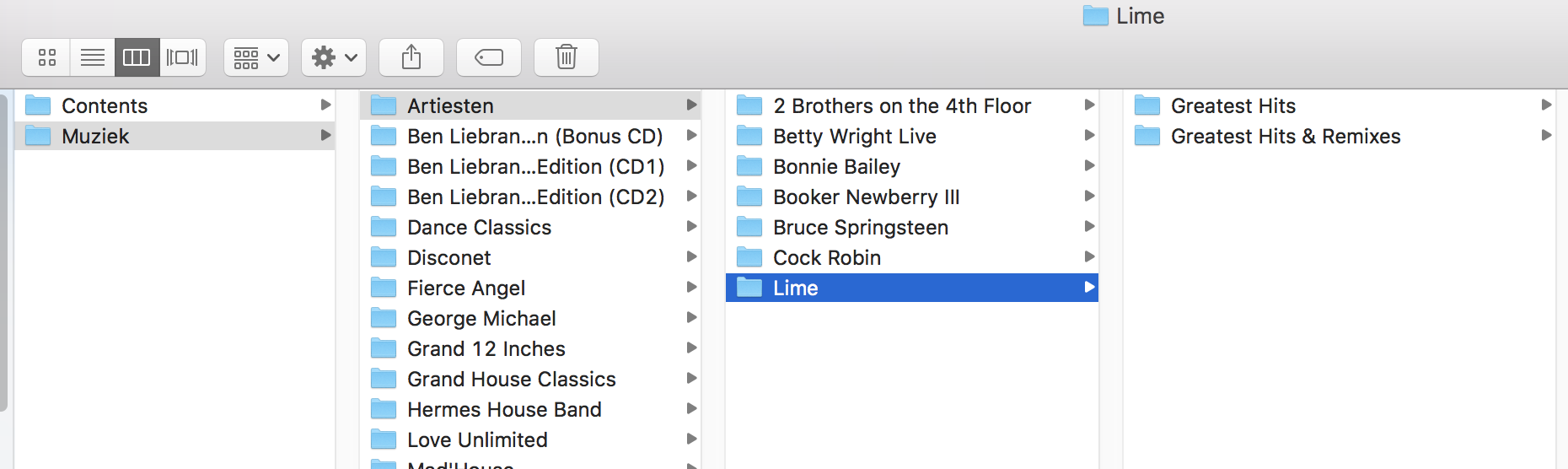
Look at the screen dump, it will become clear to you.

I have NOTHING in the contents folder. Oh and yes, this is what my USB drive looks like when I hook it up to my XDJ-700's and it works like a charm.


Peter Broerse 0 votes
Comment actions Permalink
0
Avatar

Ah, now I understand.

My files have always been neatly organised on my USB-sticks under Contents -> Artist -> Album -> Song

Looking over your workflow again you might point your RB database to your USB stick and that would cause you a lot of problems if you loose it.

The Henrik Maneuver 0 votes
Comment actions Permalink
0
Avatar

@Henrik:  ;)

The Whole Artist -> Album -> Song thing is Recordbox doing it that way.

It's what recordbox creates when you let IT decide on the export.


Main database
As long as you keep your masters in their place and the master database on your main system, all is fine.

It's to each-his-own I guess but this at least saves me hours and hours of copying.

Back up

As for a contingency plan, it is always prudent to make a backup copy of any stick or drive you use. Drives can fail, however modern SSD drives can take a fairly big whooping before they go down.

But yes....backup is a must, but that would also be the case when you use the standard approach. 

;)

Just try this on a new USB drive and see if you like it.

Cheers,

Peter


Peter Broerse 0 votes
Comment actions Permalink
0
Avatar

What I don't get with this workflow is where are your Cues, Hot cues and Beatgrids? Have you analysed the Music Files on the USB drive? How does your Collection look like? You got only the files imported from the USB?

So in case you are losing the USB, before you will be ready again you will have to create a new USB with the same structure, plug it into rekordbox and relocate the files to not lose your cues?

I am trying to get my head around... 

Frank Richter 0 votes
Comment actions Permalink
0
Avatar

@Frank,

Let me try to answer your queries.


What Changed?
The simpelest answer is that I haven't changed anything.
The ONLY thing I took out of the workflow is the part where RB copies over all your files from Master-Location to USB. The Syncing of the actual MP3's. That's all.


To further explain:  If you want to use this method, you  start with copying all the files you want to use in your playlists onto the USB drive in the separate folder. Call the folder anything you want, "GrandMas_Hits"  for all I care.

Then you open Recordbox,  navigate to the new folder you created on the USB drive where you've added the music.

Then create the  Playlists as you normally would, but now you create them from the USB drive ( not from the masters on your system ) .

Because you did the copying ahead of this and you read in the playlist from the USB drive, there is no more copying needed. Hope this clears things up.

Just grab any 8, 16 or 32 GB empty USB stick and give it a try.
You'll see.

Edit:  Come to think of it, you may even do this on a used USB drive, as long as you keep away from the Contents Folder, that's off limits and just create a new folder in the root where you store the files in BEFROE you create the new playlists. 

Cue's
As for Cue's and all that, I don't know where RB stores this info, my guess is in the hidden database files, where it's always stored. They just work like a charm ;)


Good luck !


Peter Broerse 0 votes
Comment actions Permalink
0
Avatar

Peter wrote:

Then you open Recordbox,  navigate to the new folder you created on the USB drive where you've added the music.

Then create the  Playlists as you normally would, but now you create them from the USB drive ( not from the masters on your system ) .

********************

This is what I don't get. When creating a Playlist from the files in the USB, wouldn't rekordbox not take them as new and will have to analyse them new? No cue etc?
I think I need to try it out...


Frank Richter 0 votes
Comment actions Permalink
0
Avatar

@Pulse :

You wrote:

Official comment

Avatar

Or just use an external drive as your source and export drive and your export time is zero, without having to keep a "copy" or spend time manually doing anything crazy like above! :D

My reply: 

In what way is keeping the source and export drive the same unit better then this way ? If you loose your drive/ stick/card whatever...you loose everything.

Besides, using the source as export drive means that you yourself are also not happy with the copy sequence in the program and thus point your program to use the source drive as the export drive.

The way I am proposing this is a safer one because you don't need to take your precious masters on the road with you, they stay safe, where they should be.

You only use the files that you need in my version and ...as an added bonus...get to set-up your files in a way that you deem appropriate by creating the folder structure as you'd like it.

Afterwards, yes, you could say that indeed you are using the source drive as the copy drive and thus no copying is needed. I still feel mine is safer :P


Peter Broerse 0 votes
Comment actions Permalink
0
Avatar

@Peter:

Go to one of the files in your "master" collection, not on the USB, and check one of the files you use on your USB. If "Location" in the summary pane is pointing to your USB you will have serious issues with duplicates, missing files, relocating etc. as soon as you change anything on your USB, remove a file, create a new USB or loose it.

The Henrik Maneuver 0 votes
Comment actions Permalink
0
Avatar

@Peter.

I tried it but it doesn't make any sense. When moving files to the USB and add it to a new Playlist rekordbox will do the analysis for these files when drgging them into the playlist. And this is logig as for rekordbox these are new files. So cues, beatgrids etc. you got for those files already on your harddrive are unknown for these copies.

So you have to do all your work again.

When starting with an new collection, this might be something to consider but not when having a collection where you spent a lot of time already doing cues, beatgrids etc.

So in principle a nice finding but not practicable for me.
Anyway I got a fast USB drive - copying files during sync is not a problem for me. :-)

Frank Richter 0 votes
Comment actions Permalink
0
Avatar

Do you honestly think I only have one copy of my master music collection? Nope. I mirror my primary drive (I carry 2 to events). I also have it backed up on a local desktop drive at home. And on Dropbox. And in Backblaze. That's FIVE copies of the same data.

And it's not a matter of not being happy with the copy process, I just happen to know what works and what doesn't.

Pulse 0 votes
Comment actions Permalink