Official comment
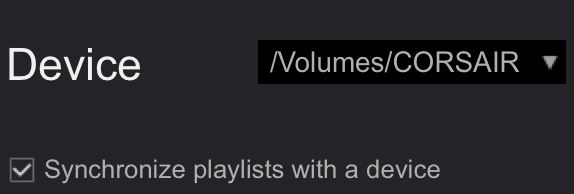
This is because you have the checkbox in the SYNC MANAGER enabled:

Uncheck the synchronize and manage them manually if you don't want it to automatically sync and export when you connect / use the device.
Hello,
I'm using the feature SYNC MANAGER in Rekordbox to keep all of the tracks and playlists on my USB/SD devices up-to-date. Great feature!
But: What happens now is that when, after inserting the device in my PC, I left or right click on the device(name) in Rekordbox, it starts to export automatically,
I want to keep using SYNC MANAGER, but I want it to start at my command. Sometimes I only want to 'Update collection', which needs a right-click. But that click activates the auto sync/export.
I can't find any setting to change this. Did I miss something?
This is because you have the checkbox in the SYNC MANAGER enabled:

Uncheck the synchronize and manage them manually if you don't want it to automatically sync and export when you connect / use the device.
Post is closed for comments.
Export mode > Preferences > Advanced > Database tab

Hello Mark,
Thank you for your response. Unfortunately, it does not solve my problem. I already have this setting on 'OFF'. Besides, it is only used when your source tracks are on an external drive. I have the issue with a normal export situation: Source tracks on a PC, destination is a USB stick.
Of course I know it's always wise to first do a sync from PC to USB before updating the collection from USB to PC, unless you're 100% sure what you're doing. But it's just strange that Sync Manager starts working as soon as you (left or right) click on the device.
I'm working out of my office right now, so I can't confirm this 100% without a device to test it, but I believe there is a checkbox in the SYNC MANAGER to disable that functionality.
Thank you, Pulse, but no. The only option is to turn off sync. That is not what I want.
Hi,
I am experiencing the same issue. I have the sync automatically turned OFF in the settings, but whenever I click my device it starts syncing automatically.
Please rekordbox team fix this ASAP, this is super annoying. Sometimes I don't have time to sync my device, but I do need to check my playlists.
Couldnt solve this problem too. I have an old usb with my old playlists from another macbook. Just putted the usb , started the rekorbox and all my playlists are gone(but the files are still on usb, only playlists were deleted) . Earlier i could import my old playlists to the new macbook from usb
@Pulse i CAN NOT to uncheck it! I just put on the usb and it starts to delete all the playlists without asking me, and when i put another usb, then uncheck the sync, then put the one with old playlists it continues to delete them!
Okay... so sync them first (so they're up to date within rekordbox), then un-sync, then re-export them manually.
This is not a solution, but a time-consuming workaround. Can't I just check the contents of a device without it being synced first?
@Leon > If you had previously set the device to be used with the sync manager, you would need to disable it first.
Hi! Auto export is switched off but It's automatically sync. I don't want to sync. Can you help me?
The easy unofficial fix for this
And now you can safely stick your USB in someone else's Rekordbox without sync starting (always chose not to sync "my tags"! when using your USB on another Rekordbox collection)

Hi MixMaster G. This is a very nice workaround. Thanks!
This "feature" is among the most ridiculous in the history of programming. A simple prompt with "Do you want to synch your USB device - Yes or No" wold solve all our problems. I just f**cked up a stick - again - because I "accidentally" wanted to check out the playlists on the device. It is super annoing and can potentially ruin a gig.
This reminds me of when a lot of your users, including myself, tried to make you understand that it is cruical to be prompted before deleting a playlist. Now you can, but it took years before such an obvious security measure was implemented.
Please fix this!
+1
I experienced same issue today. Spent whole night syncing my library to usb and as soon as I connected the usb to other laptop >> it ended up syncing with that laptop and deleted all my playlists from overnight sync. and YES I made sure the auto sync option was off. Unbelievable, Pioneer cant solve a simple bug. I feel stuck in a $15 monthly cycle wasting more time with something as basic as transferring music. SMH.
Before you guys come to me, let me say my rekord box version is latest in both laptops and I used USB 3.0.